Dr.Web Live Disk logo

Dr.Web Live Disk 9.0.1

  • User Rating:
    ★★★★★
    ★★★★★
    0.0 0Votes
  • Requirements:
    Windows
  • Version: 9.0.1
  • Latest updated: 1 day ago
  • License: Freeware  
  • Publisher: Doctor Web
  • Size: 844 MB
×

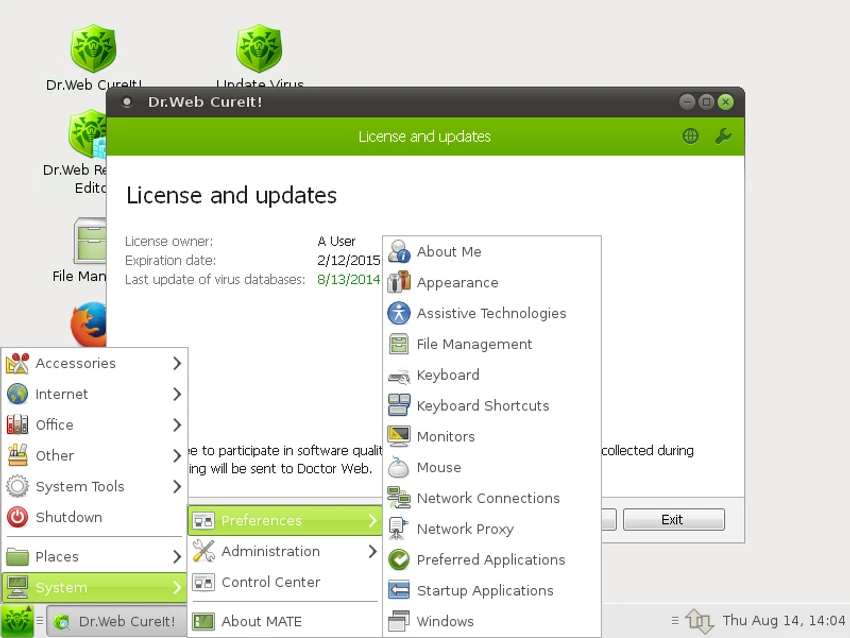
Dr.Web LiveDisk is a free bootable rescue environment designed to help users remove viruses and other dangerous files from computers that can no longer boot normally due to malware infections. Available as a bootable ISO image for DVD or USB drives, the software allows you to start a simplified operating environment, access the internet, update virus definitions, and scan infected systems without loading Windows or Linux.

For users dealing with severe malware infections that prevent their operating system from starting, Dr.Web LiveDisk provides a practical recovery solution and an opportunity to rescue important files before attempting system repairs.

Features of Dr.Web LiveDisk

  • Bootable rescue disk for malware-infected systems
  • Available as an ISO image for DVD or USB drives
  • Removes viruses and suspicious files outside the installed operating system
  • Supports updating virus definition databases before scanning
  • Provides internet access within the recovery environment
  • Includes a control center for managing scans
  • Allows full-drive scans or targeted scans of selected folders and files
  • Helps users copy important files to removable storage devices or another computer
  • Attempts to disinfect infected files when possible
  • Compatible with systems that cannot boot normally due to malware attacks

User Experience

I found Dr.Web LiveDisk particularly useful for situations where malware has compromised the operating system to the point that normal startup is impossible. Since the software runs from a bootable USB drive or DVD, it bypasses many of the obstacles that malware can create within Windows or Linux. The interface is intentionally simplified, making it relatively easy to navigate even during a stressful recovery situation. After booting into the environment, I was able to access the built-in scanner and configure scans for either the entire drive or specific locations that appeared suspicious.

One of the most valuable aspects is the ability to update virus definitions before running a scan. This ensures the scanner uses the latest malware signatures, which is important when dealing with modern threats. The included internet connectivity makes this update process straightforward. Another practical benefit is the option to copy important documents and files to external storage before making significant repair attempts. This can be especially useful when dealing with heavily infected systems where data preservation is a priority.

Because Dr.Web LiveDisk is designed as an emergency recovery tool rather than a full-time antivirus solution, it works best as a rescue utility when traditional security software can no longer operate effectively.

Conclusion

Dr.Web LiveDisk is a practical and dependable emergency recovery tool for dealing with severe malware infections. Its ability to boot independently, update virus definitions, scan infected drives, and help recover important data makes it particularly valuable when a computer becomes unbootable.

Pros & Cons

Pros

    • Free to use as a rescue and recovery tool
    • Boots independently from the infected operating system
    • Supports both DVD and USB-based recovery media
    • Allows virus definition updates before scanning
    • Can scan entire drives or selected files and folders
    • Helps recover and copy important files from compromised systems
    • Includes internet access within the recovery environment

Cons

    • Requires creating bootable media before use
    • Primarily intended for emergency recovery rather than ongoing protection
    • Large ISO download size
    • Users unfamiliar with bootable media may face a learning curve

Frequently Asked Questions

What is Dr.Web LiveDisk used for?

Dr.Web LiveDisk is a bootable recovery tool that helps remove viruses and dangerous files from computers that cannot boot normally because of malware infections.

Is Dr.Web LiveDisk free?

Yes. Dr.Web LiveDisk is available as a free rescue solution for recovering infected systems and removing malware.

Can I create a bootable USB with Dr.Web LiveDisk?

Yes. The ISO image can be used to create a bootable USB drive or burned to a DVD for system recovery purposes.

Does Dr.Web LiveDisk require an installed operating system to work?

No. It runs independently from the installed operating system, making it useful when Windows or Linux cannot start.

Can Dr.Web LiveDisk update virus definitions?

Yes. The software includes an updater that can download and install the latest virus definition databases before scanning.

Can I recover files using Dr.Web LiveDisk?

Yes. The recovery environment allows users to access storage devices and copy important files to removable media or another computer.

Recommended apps [Freeware]:
  • Simple IP Config 2.9.7 Simple IP Config logo a lightweight, portable tool for quickly changing Windows IP, DNS, and network settings
  • EarthTime 6.33.4 EarthTime logo displays world clocks, weather, and local times for 120,000+ cities with customizable alarms and maps.
  • DirPrintOK 7.61 DirPrintOK logo fast and portable tool to print or export directory contents in XLS, HTML, CSV, or TXT formats.
  • Stretchly 1.21.0 Stretchly logo reminds you to take breaks while working on your computer, promoting better health and productivity.
  • Android Studio 2026.1.1.9 Android Studio logo Google’s official IDE for Android, offering intelligent coding, fast emulators, and cloud integration.
  • Audacity 3.7.8 Audacity logo Free open-source audio editor and recorder with multi-track editing, effects, audio analysis, and format conversion
Recommended apps [Shareware]:
  • iPubsoft Android Desktop Manager 3.7.22 iPubsoft Android Desktop Manager logo transfer files, manage Android data, back up and restore devices, and organize contacts and SMS from your PC
  • iBackup Viewer 4.3.14.2 iBackup Viewer logo extract contacts, messages, photos, and app data from iPhone backups
  • Internet Download Manager (IDM) 6.42 Build 64 Internet Download Manager (IDM) logo boosts download speeds up to 5x, schedules downloads, and supports all major browsers and protocols
  • VMware InstallBuilder Enterprise 26.5.1 VMware InstallBuilder Enterprise logo It helps developers quickly create professional installers, RPM packages, and software bundles for multiple platforms.
  • DBConvert Studio 4.3.1 DBConvert Studio logo simplifies database migration and synchronization across multiple database platforms.
  • HyperSnap 10.0.3 HyperSnap logo captures screenshots, scrolling windows, OCR text and video with advanced editing tools on Windows.