Bandizip logo

Bandizip 7.44

  • User Rating:
    ★★★★★
    ★★★★★
    0.0 0Votes
  • Requirements:
    Windows
  • Version: 7.44
  • Latest updated: 1 day ago
  • License: Freemium  
  • Publisher: Bandisoft
  • Size: 17 MB
×

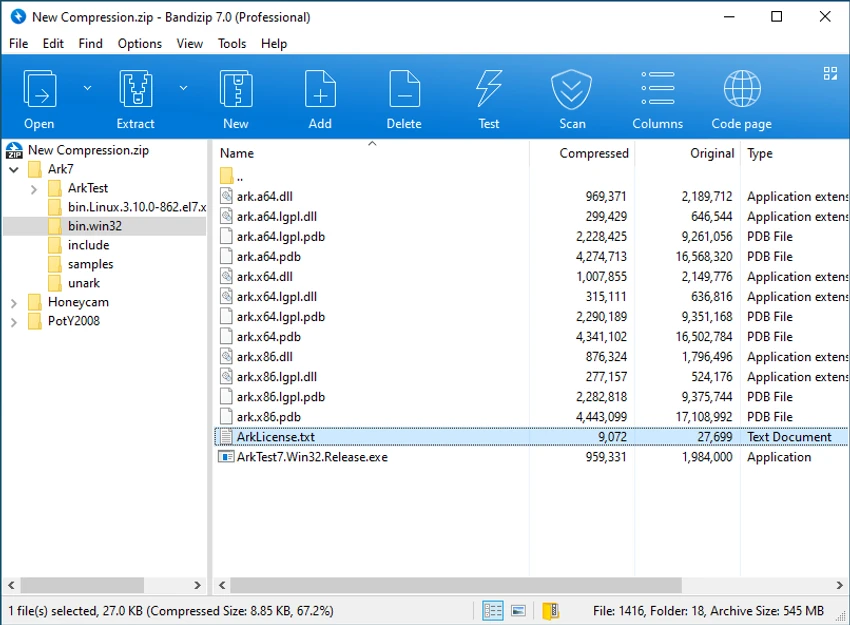
Bandizip is a lightweight and easy-to-use file compression tool for Windows that supports a wide range of archive formats. Designed for both casual and advanced users, it offers fast compression and extraction speeds while maintaining compatibility with popular formats such as ZIP, RAR, and 7Z. What immediately stood out during my experience with Bandizip was its focus on speed. The software introduces specialized features such as Fast Drag & Drop and High Speed Archiving, helping reduce the time required to extract and compress files. Its broad format support also makes it a practical alternative to traditional archiving tools.

Features of Bandizip

  • Supports numerous archive formats, including ZIP, 7Z, RAR, ALZ, EGG, TAR, BH, LZH, GZ, BZ2, ISO, CAB, WIM, XZ, ARJ, and Z.
  • Creates self-extracting archive files (.EXE).
  • Supports multi-volume (split) archives.
  • High Speed Archiving feature for faster compression performance.
  • Fast Drag & Drop extraction directly to the destination folder.
  • Unicode support for handling international filenames and characters.
  • Code Page functionality for selecting archive language encoding.
  • Compatible with Windows 7, Windows 8, Windows 8.1, Windows 10, and Windows 11.

User Experience

After using Bandizip, I found the interface straightforward and approachable. The software focuses on core archiving tasks without overwhelming users with unnecessary complexity. The extraction process feels particularly efficient thanks to the Fast Drag & Drop feature. Unlike some archive utilities that extract files into temporary folders before moving them to the final destination, Bandizip extracts directly to the target folder. This approach helps improve extraction speed and simplifies the workflow.

Another practical advantage is the High Speed Archiving function. When working with multimedia files such as AVI, WMV, or MP3 files, as well as already compressed archives, Bandizip can bypass unnecessary compression attempts. Since these file types typically do not compress well, this feature helps reduce processing time and improve overall archiving performance. Users who frequently work with international filenames will also appreciate the software’s Unicode support and Code Page options, which help preserve character encoding across different languages.

Who Should Use Bandizip?

Bandizip is ideal for:

  • Home users who frequently extract ZIP or RAR files.
  • Professionals who manage large archives regularly.
  • Users looking for a fast alternative to traditional archiving software.
  • Anyone working with multilingual filenames and international character sets.
  • Windows users who need support for multiple archive formats in a single application.

Conclusion

Bandizip is a reliable and efficient compression tool that combines broad archive compatibility with impressive speed optimizations. Features like Fast Drag & Drop, High Speed Archiving, and Unicode support help streamline everyday file management tasks without adding unnecessary complexity.

Pros & Cons

Pros

    • Wide support for popular and niche archive formats
    • Fast compression and extraction performance
    • Creates self-extracting executable archives
    • Supports split archive creation
    • Excellent Unicode and international character support
    • Simple and intuitive interface

Cons

    • Advanced feature set is primarily focused on archiving tasks only
    • Compression gains may be limited when working with multimedia or already compressed files

Frequently Asked Questions

What archive formats does Bandizip support?

Bandizip supports a wide range of formats including ZIP, 7Z, RAR, ALZ, EGG, TAR, ISO, CAB, WIM, XZ, ARJ, Z, and many others.

Can Bandizip create self-extracting archives?

Yes. The software can create self-extracting archive files in the EXE format.

Does Bandizip support split archives?

Yes. Users can create multi-volume archives that are divided into smaller parts.

What is High Speed Archiving?

High Speed Archiving is a feature that improves compression performance by intelligently handling file types that typically do not benefit from additional compression.

Which Windows versions are supported?

Bandizip supports Windows 7, Windows 8, Windows 8.1, Windows 10, and Windows 11.

Recommended apps [Freeware]:
  • All in One Runtimes 2.5.0 All in One Runtimes logo Package essential Windows runtime environment packages to improve software compatibility and system stability.
  • HWMonitor 1.64 HWMonitor logo a free system tool that monitors CPU, GPU, voltages, temperatures, and fan speeds in real time.
  • FastCopy 5.11.3 FastCopy logo a lightweight Windows tool for ultra-fast file copying, syncing, and error-resilient data transfer
  • Glow 26.9 Glow logo advanced Windows system analysis tool offering deep hardware insights, diagnostics, benchmarks, and system optimization utilities
  • OCCT 16.1.11.99 OCCT logo hardware monitoring and stress testing tool for CPU, GPU, memory, and power supply performance analysis.
  • BitTorrent 7.11.0.47255 BitTorrent logo peer-to-peer file sharing client for fast, decentralized downloads with bandwidth control and resume support
Recommended apps [Shareware]:
  • Amazing Laptop Cooling Wizard 1.1.5.8 Amazing Laptop Cooling Wizard logo Reduce laptop overheating by optimizing CPU and fan cooling performance on Windows.
  • DSLR Remote Pro 3.31.5 DSLR Remote Pro logo Windows software for Canon DSLR control, photo booth creation, live view, HDR capture via USB connection
  • Adobe After Effects 2026 Adobe After Effects logo advanced motion graphics, visual effects, compositing, and animation tools for creators.
  • DBConvert Studio 4.3.1 DBConvert Studio logo simplifies database migration and synchronization across multiple database platforms.
  • HWMonitor Pro 1.58 HWMonitor Pro logo extends HWMonitor with remote monitoring, logging graphs, and improved sensor interface tools.
  • HyperSnap 10.0.3 HyperSnap logo captures screenshots, scrolling windows, OCR text and video with advanced editing tools on Windows.