FileLegit Windows Utilities Disk Tools Coolmuster Android Eraser
Coolmuster Android Eraser logo

Coolmuster Android Eraser 4.0.25

  • User Rating:
    ★★★★★
    ★★★★★
    0.0 0Votes
  • Requirements:
    Windows
  • Version: 4.0.25
  • Latest updated: 3 weeks ago
  • License: Free Trial  
  • Publisher: Coolmuster
  • Size: 21 MB
× app stores

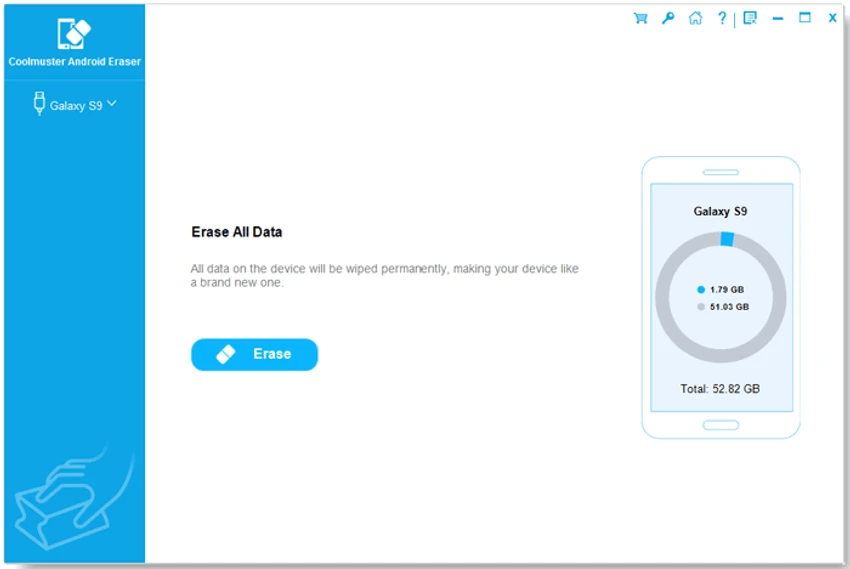
Coolmuster Android Eraser is a Windows-based utility designed to permanently erase all data from Android devices. It focuses on privacy protection by ensuring that deleted files cannot be recovered, making it especially useful when preparing a phone for resale, donation, or recycling. Coolmuster Android Eraser is built for users who want a complete and irreversible data wipe from Android smartphones and tablets. Unlike standard factory resets or basic deletion, it goes deeper by overwriting data to prevent recovery through specialized tools.

The software supports erasing a wide range of personal data, including contacts, messages, call logs, photos, videos, app data, browsing history, and even saved credentials. It also provides multiple erasure levels, allowing users to choose between speed and security depending on their needs. By integrating a simple interface with strong data destruction capabilities, it aims to make secure device wiping accessible to non-technical users.

Key Features of Coolmuster Android Eraser

  • One-click Android data erasure for full device cleanup
  • Permanent deletion of existing and deleted files
  • Supports contacts, messages, photos, videos, call logs, apps, and more
  • Removes browsing history and app usage data
  • Three erasure levels: Low, Medium, and High security
  • High-level mode follows U.S. DoD 5220.22-M standard overwriting
  • Prevents data recovery using professional recovery tools
  • Works as a full device “clean slate” reset tool
  • Supports a wide range of Android brands (Samsung, Huawei, Xiaomi, etc.)
  • Simple interface designed for non-technical users
  • Requires Windows system for operation

User Experience

Coolmuster Android Eraser is designed with simplicity in mind. The workflow is straightforward: connect the Android device, choose an erasure level, and start the wiping process. The tool emphasizes ease of use rather than technical configuration. The three-level erasure system gives users flexibility. Casual users may prefer faster wiping, while those handling sensitive data can choose stronger overwrite options for maximum security.

However, since the process is irreversible, users must be careful before starting. The tool strongly depends on proper device connection and preparation, and there is no recovery option once the wipe begins.

Who Should Use Coolmuster Android Eraser?

  • Users selling or donating Android phones
  • People handling sensitive personal or financial data
  • IT technicians managing device recycling or cleanup
  • Users who want guaranteed irreversible data deletion
  • Anyone preparing a device for factory-like reset with added security

Conclusion

Coolmuster Android Eraser is a focused privacy protection tool that goes beyond standard factory resets. By offering multi-level secure wiping and deep data removal, it helps ensure that no personal information can be recovered from Android devices.

Pros & Cons

Pros

  • Permanent and irreversible data deletion
  • Multiple security levels for different needs
  • Easy one-click operation
  • Supports wide range of Android devices
  • Removes both visible and deleted data

Cons

  • No data recovery option after erasure
  • Requires Windows computer
  • Not useful for everyday phone maintenance
  • Must be used carefully to avoid accidental data loss

Frequently Asked Questions

What is Coolmuster Android Eraser used for?

It is used to permanently erase all data from Android devices so that it cannot be recovered.

Can deleted files be recovered after using this tool?

No, the software is designed to make data permanently unrecoverable.

Does it support all Android devices?

It supports most major Android brands including Samsung, Huawei, Xiaomi, and others.

Is Coolmuster Android Eraser safe to use?

Yes, but users must ensure they back up data first because the process is irreversible.

Why use it instead of factory reset?

Unlike factory reset, it overwrites data to prevent recovery using advanced tools.

Recommended apps [Freeware]:
  • Stellarium 26.2 Stellarium logo 3D planetarium software showing stars, constellations, planets, and deep-sky objects in real time.
  • UniGetUI 2026.2.3 UniGetUI logo graphical interface for Winget, Scoop, and Chocolatey, making software installation, updates, and removal easy on Windows
  • KMPlayer 2026.6.26.11 KMPlayer logo high-performance 4K/8K media player with ad-free UI, codec support, and YouTube playback tools
  • WinDirStat 2.7.0 WinDirStat logo Analyze disk space visually with WinDirStat, a free Windows tool that helps identify and clean large files quickly
  • Nuclear Music Player 1.42.2 Nuclear Music Player logo Stream and discover music with a free open-source player offering ad-free playback, playlists, downloads, and cross-platform support.
  • cPicture LE 4.14 cPicture LE logo Manage, browse, crop, search, and process digital photos with a lightweight image workflow application supporting plugins and JPEG tools.
Recommended apps [Shareware]:
  • TweakNow Gallery 1.3.5 TweakNow Gallery logo a fast Windows photo viewer and organizer with slideshow and built-in image conversion tools
  • Adlice Protect 16.7.0.0 Adlice Protect logo Detect and remove stubborn malware with Adlice Protect, an advanced anti-malware tool using signature and heuristic analysis
  • Abelssoft YouTube Song Downloader 2026 v26.13 Abelssoft YouTube Song Downloader logo Download YouTube music and videos in multiple formats with Abelssoft YouTube Song Downloader for Windows
  • Wondershare UniConverter 17.4.4.617 Wondershare UniConverter logo converts, edits, compresses, downloads, and manages videos across multiple formats with ease
  • HTMLPad 2025 v18.7.0.277 HTMLPad logo Fast HTML editor with CSS and JavaScript tools, code completion, FTP support, validation, and browser preview for Windows.
  • Muziza YouTube Downloader Converter 9.5.7 Muziza YouTube Downloader Converter logo Download online videos, convert media files, extract audio, manage playlists, and optimize videos for multiple devices.