FileLegit Windows Utilities Backup & Recovery QILING Disk Master Professional
QILING Disk Master Professional logo

QILING Disk Master Professional 8.8

  • User Rating:
    ★★★★★
    ★★★★★
    0.0 ★ 0Votes
  • Requirements:
    Windows
  • Version: 8.8
  • Latest updated: 3 weeks ago
  • License: Free Trial  
  • Publisher: QILING Tech
  • Size: 31 MB
× app stores

QILING Disk Master Professional is a comprehensive backup, recovery, and disk management solution designed for Windows desktops and laptops. It focuses on protecting systems from data loss while also providing tools to restore entire operating systems in case of failure.

During evaluation of its feature set, the software positions itself as an all-in-one disaster recovery and backup utility. It supports system imaging, file-level backups, and scheduled backups, making it suitable for both personal and business use. The software also includes additional disk utilities such as system migration to SSD, disk management tools, and performance-enhancing features like RAMDisk creation.

Features of QILING Disk Master Professional

  • System backup and disk imaging for full OS protection.
  • File and folder backup and recovery.
  • Supports full, differential, and incremental backups.
  • One-click system backup creation.
  • Scheduled backups (daily, weekly, monthly).
  • File compression and AES 256-bit encryption.
  • File synchronization with server support.
  • Disk and partition management tools.
  • System migration to SSD or larger hard drives.
  • GPT and UEFI boot support.
  • Email notification for backup tasks.
  • Virtual disk utility for safe testing environments.
  • RAMDisk feature to improve system performance.
  • Intelligent backup strategy management and quota control.
  • Built-in defragmentation and system optimization tools.

Interface and Usability

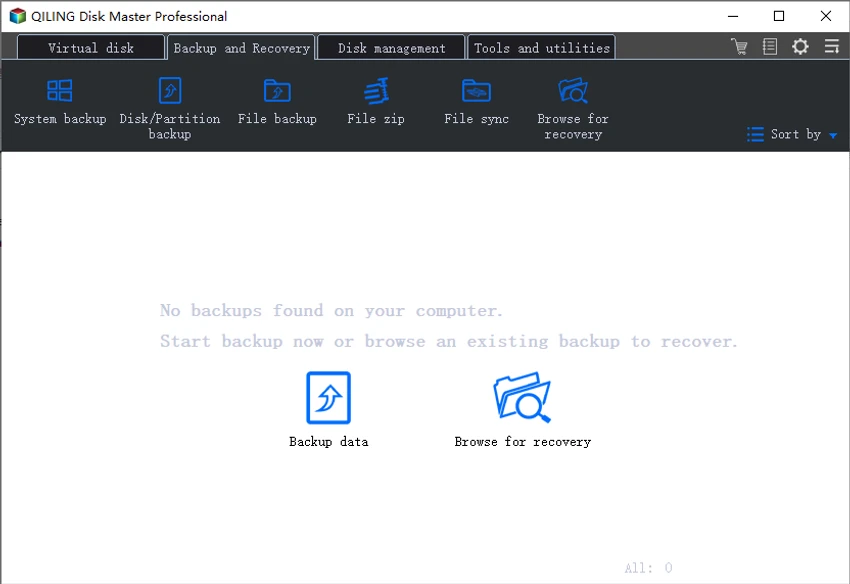
QILING Disk Master Professional uses a structured interface centered around backup tasks and system recovery options. From my perspective, the layout is designed to guide users through backup creation, scheduling, and recovery without requiring advanced technical knowledge.

The one-click backup feature simplifies system protection, while advanced users can access detailed options such as incremental backups, encryption settings, and disk migration tools. Although the tool offers a wide range of features, the interface remains organized around core workflows like backup, restore, and disk management, helping reduce complexity.

Who Should Use QILING Disk Master Professional?

  • Users who want full system backup and recovery options.
  • IT administrators managing multiple systems.
  • Businesses requiring data protection and disaster recovery plans.
  • Users upgrading from HDD to SSD.
  • Anyone needing scheduled and automated backup solutions.
  • Users who want encrypted and secure backup storage.

Conclusion & Recommendation

QILING Disk Master Professional is a powerful and flexible backup and recovery solution designed to protect Windows systems from data loss and hardware failure. Its combination of system imaging, scheduling, encryption, and disk migration tools makes it suitable for both home users and IT professionals.

Pros & Cons

✓

Pros

  • Comprehensive backup and system imaging tools
  • Supports incremental and differential backups
  • Strong AES 256-bit encryption
  • One-click system backup and restore
  • Disk migration to SSD supported
  • Includes RAMDisk and virtual disk features
  • Flexible scheduling options
✕

Cons

  • Feature-rich interface may feel complex for beginners
  • Some advanced disk tools may not be needed for casual users
  • Limited modern UI polish compared to newer backup tools

Frequently Asked Questions

What is QILING Disk Master Professional used for?

It is used for system backup, disk imaging, file recovery, and restoring Windows systems after failure.

Does it support scheduled backups?

Yes. It supports daily, weekly, and monthly automated backup scheduling.

Can it migrate Windows to an SSD?

Yes. It includes a system migration feature for transferring Windows to SSD or larger drives.

Does it support encrypted backups?

Yes. It supports AES 256-bit encryption for secure backup storage.

Can it recover a failed Windows system?

Yes. It can restore full system images to recover a corrupted or failed operating system.

Does it include disk management tools?

Yes. It includes partition management, synchronization, and optimization features.

Recommended apps [Freeware]:
  • Android Studio 2026.1.2.10 Android Studio logo Google’s official IDE for Android, offering intelligent coding, fast emulators, and cloud integration.
  • FluentTweaker 26.06.02 FluentTweaker logo a Windows utility for safe, reversible system tweaks focused on UI, privacy, and performance control.
  • Winstep Nexus 26.6 Winstep Nexus logo customizable desktop dock for Windows with app launch shortcuts, widgets, and multi-monitor support
  • Jailer 17.2 Jailer logo database subsetting and data browsing tool for exporting consistent relational datasets and navigating database relationships
  • VLC Media Player 3.0.23 VLC Media Player logo a free, open-source multimedia player supporting nearly all video formats, streaming, and playback features across platforms.
  • cPicture LE 4.14 cPicture LE logo Manage, browse, crop, search, and process digital photos with a lightweight image workflow application supporting plugins and JPEG tools.
Recommended apps [Shareware]:
  • NTFS Permissions Auditor 26.6.27 NTFS Permissions Auditor logo analyze Windows folder permissions, audit NTFS access rights, and export detailed security reports
  • MathType 7.11.1.462 MathType logo a powerful equation editor for creating mathematical formulas in Word, LaTeX, and more
  • GlassWire 3.9.1102 GlassWire logo monitors network activity, alerts you to suspicious internet behavior, tracks bandwidth usage, and helps protect your privacy and security
  • PanoramaStudio 4.2.0 PanoramaStudio logo Create seamless panoramic images with automatic photo stitching, editing tools, and export options for web, print, and presentations.
  • Easy Duplicate Finder 8.1.0.1 Easy Duplicate Finder logo Find and remove duplicate files quickly with advanced scanning, file management tools, and safe deletion options.
  • Batch It Ultra 6.77 Batch It Ultra logo Process thousands of images with batch resizing, conversion, effects, watermarking, captions, and advanced automation tools.