InstallerClean logo

InstallerClean 1.9.2

  • User Rating:
    ★★★★★
    ★★★★★
    0.0 0Votes
  • Requirements:
    Windows
  • Version: 1.9.2
  • Latest updated: 1 week ago
  • License: Freeware  
  • Publisher: no-faff
  • Size: 91 MB
× app stores

InstallerClean is a lightweight Windows system tool designed to remove hidden leftover files created after installing or updating programs. The application focuses on cleaning unnecessary Windows Installer files while keeping the process simple and controlled. Unlike general-purpose cleanup utilities, InstallerClean focuses specifically on installer-related leftovers, helping users identify files that may no longer be needed and recover storage space.

Features of InstallerClean

  • Scans Windows installer files automatically when the application starts.
  • Displays a clear list of installer files with details such as file size and removal availability.
  • Identifies leftover files that can potentially be removed.
  • Checks with Windows’ built-in installer system before deleting files.
  • Helps clean two types of unnecessary files:
    • Orphaned installer files.
    • Superseded patches replaced by newer updates.
  • Shows the total number of files and amount of space that can be freed before cleanup.
  • Requires confirmation before using Delete or Move actions.
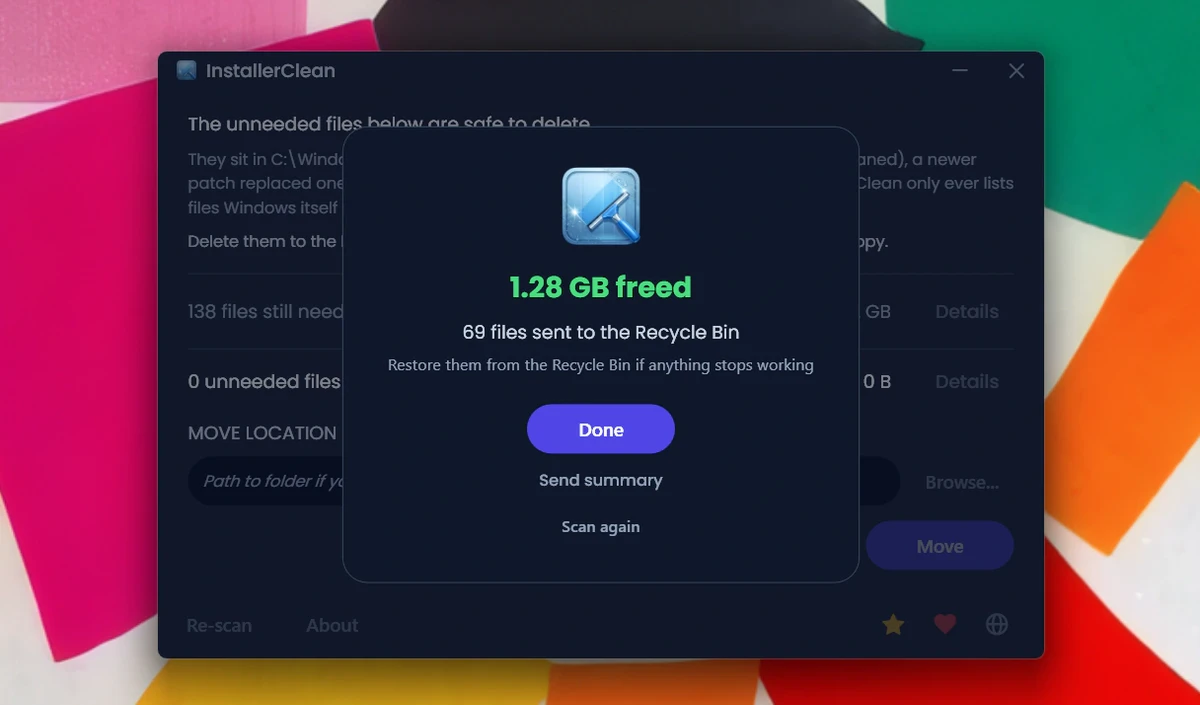
  • Provides a completion screen showing what was found and removed.

User Experience

InstallerClean delivers a straightforward experience focused on one specific task: cleaning leftover Windows installer files. The interface avoids unnecessary complexity, presenting users with a simple list and important information such as file sizes and cleanup results. The automatic scan at startup makes it easy to check for unnecessary installer data without manually searching system folders. Before any changes are made, the software asks for confirmation, giving users control over the cleanup process.

A notable part of the experience is the way InstallerClean verifies files before removal. Instead of blindly deleting items from the Windows Installer folder, the application checks with the operating system’s installer records to determine what can safely be removed. The tool is best suited for occasional maintenance rather than constant use. Installer leftovers do not accumulate frequently for most users, but InstallerClean can be helpful after installing many applications or when trying to recover additional storage space.

InstallerClean supports Windows 11, Windows 10, Windows 8, and Windows 7.

Who Should Use InstallerClean?

  • Windows users who want to remove unnecessary installer leftovers.
  • People looking to recover additional disk space.
  • Users who prefer focused system maintenance tools instead of large cleanup suites.
  • Anyone who frequently installs or updates many programs.

Conclusion

InstallerClean is a practical Windows utility for users who want a simple way to manage leftover installer files. Its focused approach, confirmation steps, and Windows-based verification make the cleanup process easy to understand and control.

Pros & Cons

Pros

  • Simple and focused cleanup purpose.
  • Checks Windows installer records before removing files.
  • Shows available space savings before cleanup.
  • Requires user confirmation before making changes.
  • Provides a clear cleanup summary after completion.

Cons

  • Designed only for installer-related leftovers, not general system cleaning.
  • Cleanup may not be needed frequently for most users.

Frequently Asked Questions

What is InstallerClean?

InstallerClean is a Windows cleanup utility that removes leftover installer files created after installing or updating programs.

Is InstallerClean safe to use?

InstallerClean checks with the Windows installer system before removing files, helping identify items that are safe to clean based on Windows records.

What types of files does InstallerClean remove?

The tool focuses on orphaned installer files and superseded patches that have been replaced by newer updates.

Does InstallerClean delete files automatically?

No. The application requires confirmation before deleting or moving files.

When should I use InstallerClean?

InstallerClean can be used occasionally, especially after installing many programs or when you want to recover extra storage space.

Which versions of Windows support InstallerClean?

InstallerClean supports Windows 11, Windows 10, Windows 8, and Windows 7.

Recommended apps [Freeware]:
  • BitTorrent 7.11.0.47255 BitTorrent logo peer-to-peer file sharing client for fast, decentralized downloads with bandwidth control and resume support
  • Tixati 3.43 Tixati logo a fast, ad-free BitTorrent client offering advanced peer control, bandwidth management, and detailed swarm analysis
  • Prevent Restore 2026 v122 Prevent Restore logo securely wipes deleted files, blocks data recovery, and protects sensitive information on Windows
  • KMPlayer 2026.6.26.11 KMPlayer logo high-performance 4K/8K media player with ad-free UI, codec support, and YouTube playback tools
  • Hasleo Backup Suite 5.8.2.2 Hasleo Backup Suite logo Windows backup software for system restore, disk imaging, and cloning with emergency recovery support
  • BitDefender Antivirus Free Edition 27.0.60.339 BitDefender Antivirus Free Edition logo real-time protection against malware, phishing, and viruses for Windows users
Recommended apps [Shareware]:
  • Charles 5.2.0 Charles logo HTTP proxy tool for web debugging, allowing developers to inspect, modify, and analyze network traffic in real time
  • EF CheckSum Manager 26.05 EF CheckSum Manager logo creates and verifies MD5, SHA, and SFV checksums to ensure file integrity and detect corruption.
  • EF Duplicate Files Manager 26.05 EF Duplicate Files Manager logo finds and removes duplicate files by name, size, or content to reclaim storage space.
  • Duplicate Finder 2026 v418 Duplicate Finder logo remove duplicate photos and videos by scanning files using MD5 hashing for accurate results.
  • CloudMounter 3.7.2137 CloudMounter logo mounts cloud storage and remote servers like local drives for easy file access and management on Windows
  • Movavi Video Editor 26.18.0 Movavi Video Editor logo easy video editing tool with AI subtitles, effects, transitions, and color correction for creators