Allavsoft logo

Allavsoft 3.29.3.9669

  • User Rating:
    ★★★★★
    ★★★★★
    0.0 0Votes
  • Requirements:
    Windows
  • Version: 3.29.3.9669
  • Latest updated: 6 days ago
  • License: Free Trial  
  • Publisher: Allavsoft
  • Size: 70.4 MB
× app stores

Allavsoft is a Windows-based video downloading and conversion tool designed for users who frequently save online videos and audio content. It supports downloading from a wide range of video-sharing websites and includes built-in conversion options, making it a practical all-in-one solution for media acquisition and format conversion.

Overview

Allavsoft functions primarily as a video download manager and media converter, allowing users to download videos from popular platforms and convert them into various formats in a single workflow. It supports both video and audio extraction, making it useful for users who want offline access to multimedia content in flexible formats. The software is designed for convenience, offering batch processing, multiple quality options, and resume functionality for interrupted downloads. It also includes a simple built-in player for previewing downloaded files.

Features of Allavsoft

  • Download videos from more than 100 video-sharing websites
  • Supports platforms like Facebook, Dailymotion, and educational video sites
  • One-click download and automatic conversion workflow
  • Video format conversion (MP4, AVI, WMV, MOV, MPEG, FLV, WebM, and more)
  • Audio extraction from videos with support for MP3, WAV, AAC, FLAC, and other formats
  • Supports HD, Full HD, 2K, 4K, and lower resolutions (240p–1080p+)
  • Batch download and batch conversion of multiple URLs
  • Built-in video player for previewing downloaded content
  • Pause, resume, and breakpoint download support
  • Automatic shutdown option after completing downloads
  • Download history tracking

User Experience

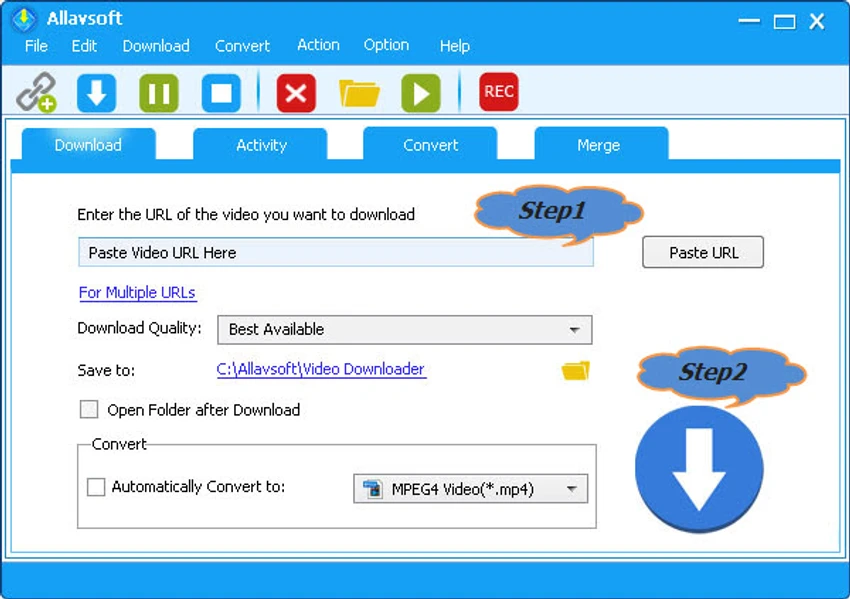
From a usability standpoint, Allavsoft focuses on simplicity and efficiency. The process of adding URLs and starting downloads is straightforward, especially for users handling multiple files at once. Batch processing works smoothly, reducing repetitive tasks when downloading playlists or multiple videos. The conversion feature is integrated directly into the download workflow, which eliminates the need for separate software. The built-in player is basic but useful for quick previews without opening external media players. Overall, the interface is functional and designed for utility rather than visual appeal, which suits its target audience of productivity-focused users.

Who Should Use Allavsoft?

  • Users who frequently download online videos for offline viewing
  • Students or professionals saving lectures and educational content
  • Content collectors managing large video playlists
  • Users who need both downloading and format conversion in one tool
  • Anyone who wants batch downloading capabilities on Windows

Conclusion

Allavsoft is a practical solution for users who need a reliable video downloader combined with format conversion tools. Its batch processing, wide format support, and resume capabilities make it especially useful for managing large volumes of online media.

Pros & Cons

Pros

  • Supports a wide range of video-sharing websites
  • Built-in video-to-audio and video format conversion
  • Batch downloading and batch conversion support
  • High-resolution video support up to 4K
  • Resume and pause functionality improves download reliability
  • Simple workflow for beginners

Cons

  • Windows-only software (no Mac/Linux version mentioned)
  • Interface is functional but not modern or visually polished
  • No official performance benchmarks or rating data provided
  • Limited advanced editing features beyond conversion

Frequently Asked Questions

What is Allavsoft used for?

Allavsoft is used for downloading videos from online platforms and converting them into different video or audio formats.

Does Allavsoft support HD and 4K video downloads?

Yes, it supports multiple resolutions including HD, Full HD, 2K, and up to 4K depending on source availability.

Can Allavsoft extract audio from videos?

Yes, it can extract audio and convert it into formats like MP3, WAV, AAC, FLAC, and more.

Does Allavsoft support batch downloads?

Yes, users can download and convert multiple video URLs at the same time.

Is Allavsoft beginner-friendly?

Yes, its one-click download and simple interface make it easy for most users, even beginners.

Recommended apps [Freeware]:
  • Simple IP Config 2.9.7 Simple IP Config logo a lightweight, portable tool for quickly changing Windows IP, DNS, and network settings
  • EarthTime 6.33.6 EarthTime logo displays world clocks, weather, and local times for 120,000+ cities with customizable alarms and maps.
  • WSCC - Windows System Control Center 10.0.3.8 WSCC - Windows System Control Center logo Windows utility manager that installs, organizes, and runs Sysinternals and system tools from one central interface
  • Tixati 3.43 Tixati logo a fast, ad-free BitTorrent client offering advanced peer control, bandwidth management, and detailed swarm analysis
  • Blank And Secure 8.41 Blank And Secure logo a portable Windows tool that securely deletes files by overwriting data to prevent recovery.
  • PilotEdit 21.0.0 PilotEdit logo a powerful text and hex editor for large files with FTP support, scripting, encryption, and search tools
Recommended apps [Shareware]:
  • DBF Converter 7.85 DBF Converter logo convert DBF files to CSV, Excel, SQL and text with fast batch processing and filtering
  • VX Search 18.2.34 VX Search logo a powerful rule-based file search tool with advanced filtering, reporting, and network search capabilities.
  • FileCenter 12.5.36 FileCenter logo organize documents, scan files, manage PDFs, and build an efficient digital filing system
  • TweakNow Gallery 1.3.1 TweakNow Gallery logo a fast Windows photo viewer and organizer with slideshow and built-in image conversion tools
  • Pazu StreamGet 3.1.5 Pazu StreamGet logo Download movies and TV shows from major streaming platforms to MP4 or MKV
  • SysTools SQL Backup Recovery 12.0.0 SysTools SQL Backup Recovery logo Repair and recover corrupt SQL Server BAK files, restore database objects, and export recovered data with ease.