BeerSmith logo

BeerSmith 4.0.22

  • User Rating:
    ★★★★★
    ★★★★★
    0.0 0Votes
  • Requirements:
    Windows
  • Version: 4.0.22
  • Latest updated: 11 hours ago
  • License: Free Trial  
  • Publisher: BeerSmith
  • Size: 21 MB
× app stores

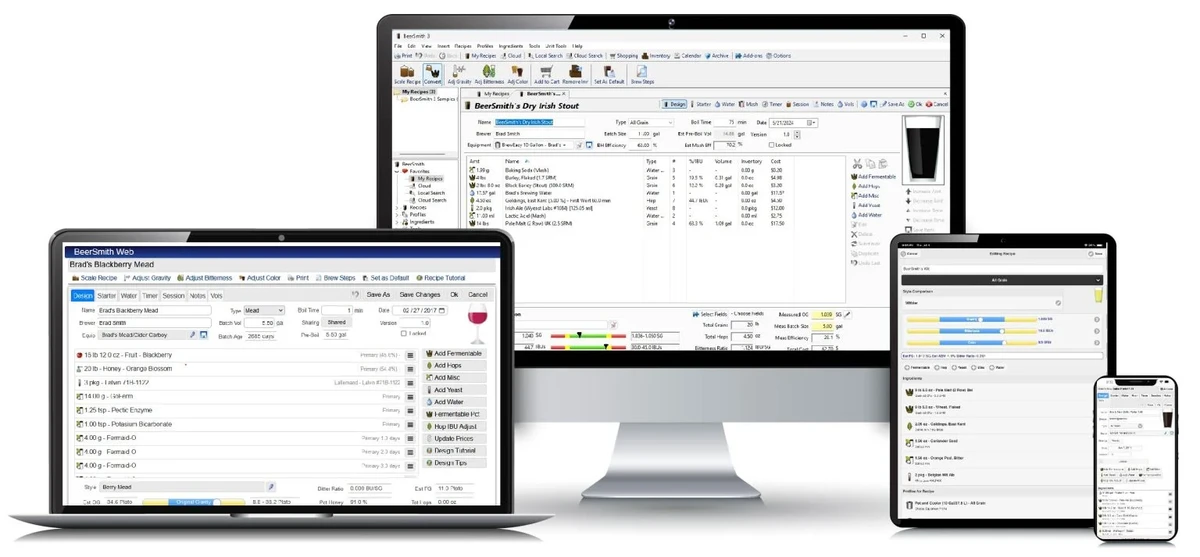
BeerSmith is a powerful recipe design and brewing management application built for home brewers and small-scale brewing enthusiasts. It allows users to create, refine, and manage recipes for beer, mead, wine, and cider with precision. The software is widely used in both home and professional brewing communities due to its ability to calculate key brewing parameters such as gravity, bitterness, color, mash pH, and water chemistry adjustments automatically.

Features of BeerSmith

  • Beer recipe design and formulation tools
  • Support for beer, mead, wine, and cider recipes
  • Style matching for classic beer profiles
  • Access to thousands of online recipes via BeerSmithRecipes.com
  • Ingredient database (grains, hops, yeast, additives, water)
  • Automatic calculations for:
    • Gravity
    • Bitterness (IBU)
    • Color (SRM)
  • Integrated water profile builder
  • Mash pH estimation and adjustment tools
  • Recipe scaling and customization
  • Brewing step tracking and planning
  • Modern tabbed interface with themes and ribbon UI
  • Recipe builder with real-time updates
  • Support for fruit, honey, and juice ingredients

User Experience

BeerSmith provides a structured and highly detailed workflow that guides users through the entire brewing process—from recipe creation to final brewing calculations. Adding ingredients is straightforward, with real-time updates to key brewing metrics such as alcohol potential, bitterness, and color. One of the strongest aspects of BeerSmith is its automation of complex brewing calculations. Instead of manually estimating mash chemistry or adjusting water profiles using spreadsheets, the software integrates these calculations directly into the recipe builder.

The interface is modern and organized, using tabs and categorized panels to manage ingredients and brewing steps. While beginners may initially feel overwhelmed by the number of options, the structured layout helps users gradually understand the brewing process. As users gain experience, BeerSmith scales well with their needs, supporting more advanced brewing techniques and precise recipe adjustments.

Who Should Use BeerSmith?

  • Home brewers
  • Craft beer enthusiasts
  • Mead, cider, and wine makers
  • Small-scale brewing professionals
  • Users interested in brewing science and recipe development

Conclusion

BeerSmith is a highly capable brewing design tool that simplifies the complexity of crafting beer and other fermented beverages. With its advanced calculation engine, ingredient database, and recipe management tools, it provides everything needed to design consistent, high-quality brews.

Pros & Cons

Pros

  • Extremely detailed brewing calculations
  • Supports beer, mead, wine, and cider
  • Built-in water chemistry and mash pH tools
  • Large online recipe database
  • Real-time recipe adjustment feedback
  • Suitable for beginners and advanced brewers
  • Strong community and recipe support

Cons

  • Learning curve for new users
  • Interface can feel complex at first
  • Focused only on brewing-related tasks
  • Requires time to fully master advanced features

Frequently Asked Questions

What is BeerSmith used for?

BeerSmith is used to design and calculate brewing recipes for beer, mead, wine, and cider.

Does BeerSmith support different beer styles?

Yes. It includes style guidelines to help match classic beer profiles from around the world.

Can BeerSmith calculate mash pH?

Yes. It includes built-in mash pH estimation and water chemistry adjustment tools.

Is BeerSmith suitable for beginners?

Yes, but it has a learning curve due to its advanced brewing features.

Does BeerSmith include recipes?

Yes. It provides access to thousands of online recipes through BeerSmithRecipes.com.

Recommended apps [Freeware]:
  • TreeSize 9.8.1.2302 TreeSize logo Windows disk space analyzer to scan, visualize, and clean storage efficiently with reports.
  • Sandboxie-Plus 1.17.9 Sandboxie-Plus logo a Windows sandboxing tool that isolates programs to prevent system changes and improve security.
  • WifiInfoView 3.00 WifiInfoView logo scans nearby Wi-Fi networks and displays detailed technical information in real time
  • SoftPerfect RAM Disk 26.6 SoftPerfect RAM Disk logo creates high-speed virtual drives in memory to boost performance and reduce disk wear
  • MSI Center 2.0.71.0 MSI Center logo a system utility for MSI devices that manages performance, gaming modes, monitoring, RGB, and hardware optimization tools
  • Winstep Nexus 26.6 Winstep Nexus logo customizable desktop dock for Windows with app launch shortcuts, widgets, and multi-monitor support
Recommended apps [Shareware]:
  • Teorex FolderIco 9.3.0 Teorex FolderIco logo Change folder colors or icons in one click and organize your files visually, so you can find everything instantly
  • FastStone Image Viewer 8.5 FastStone Image Viewer logo a fast and user-friendly tool for viewing, editing, converting, and managing images on Windows
  • UVK Ultra Virus Killer 11.10.26.0 UVK Ultra Virus Killer logo removes malware, manages system processes, repairs Windows issues, and provides advanced system cleanup tools
  • MobiKin Backup Manager for Android 2.0.30 MobiKin Backup Manager for Android logo Back up and restore Android data with one click using MobiKin Backup Manager for Android for Windows PCs
  • Cubase Pro 15.0.30 Cubase Pro logo a professional DAW for recording, composing, editing, mixing, and music production
  • Glary Malware Hunter 1.218.0.860 Glary Malware Hunter logo Windows security tool that scans, detects, and removes malware while offering system cleanup and performance optimization features