VovSoft Tree Notes logo

VovSoft Tree Notes 3.0

  • User Rating:
    ★★★★★
    ★★★★★
    0.0 0Votes
  • Requirements:
    Windows
  • Version: 3.0
  • Latest updated: 1 day ago
  • License: Freemium  
  • Publisher: VovSoft
  • Size: 7 MB
× app stores

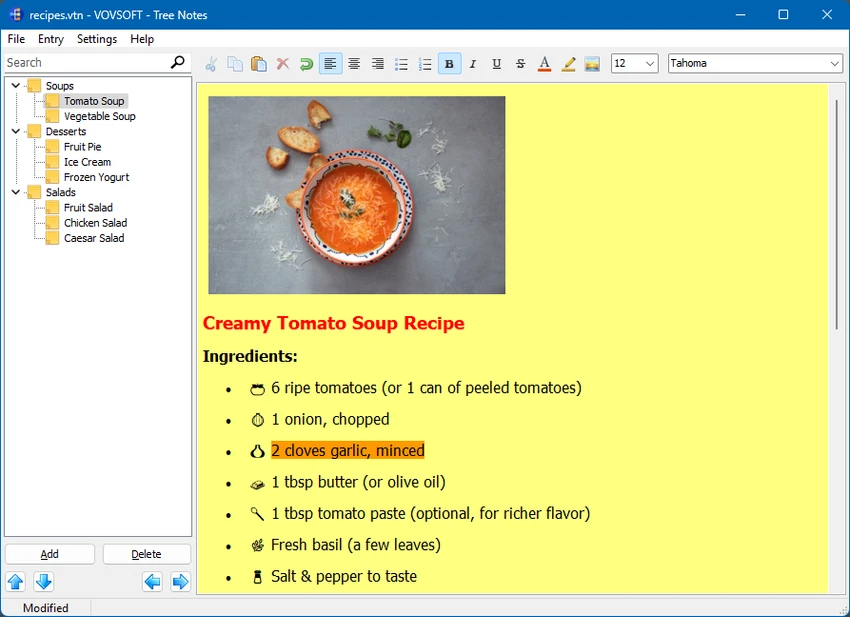
VovSoft Tree Notes is a note-taking application designed for users who need a structured way to organize information. Built around a hierarchical tree system, the software allows users to arrange notes into categories and subcategories, making it easier to manage large collections of information. With rich text editing capabilities and single-file storage, VovSoft Tree Notes offers a straightforward solution for organizing ideas, research, personal notes, and work-related information in one centralized location.

Features of VovSoft Tree Notes

  • Hierarchical tree structure for organizing notes
  • Create categories and subcategories for better information management
  • Rich text editing support
  • Text formatting options including bold, italic, underline, and bullet points
  • Font and style customization
  • Store all notes in a single file
  • Simplified backup and portability
  • User-friendly interface focused on organization and productivity

User Experience

After using VovSoft Tree Notes, I found its hierarchical organization system to be the standout feature. Instead of managing notes in a flat list, the software allows users to create a tree-like structure that keeps related information grouped together and easy to navigate. The rich text editor provides enough formatting tools for everyday note-taking. Basic styling options such as bold text, bullet lists, and font customization help make notes more readable without introducing unnecessary complexity.

Conclusion

VovSoft Tree Notes is a solid choice for users who value organization and simplicity. Its hierarchical structure makes it easy to keep information organized, while rich text editing and single-file storage provide the essential tools needed for everyday note management.

Pros & Cons

Pros

  • Easy-to-use hierarchical note organization
  • Clear tree structure for managing large collections of notes
  • Rich text editing and formatting tools
  • Single-file storage simplifies backup and portability
  • Lightweight and straightforward interface
  • Suitable for personal, academic, and professional use

Cons

  • Limited feature set compared to comprehensive productivity suites
  • Focused primarily on desktop note management

Frequently Asked Questions

What is VovSoft Tree Notes used for?

VovSoft Tree Notes is a note-taking application that helps users organize information using a hierarchical tree structure.

Does VovSoft Tree Notes support text formatting?

Yes. The software includes rich text editing features such as bold, italic, underline, bullet points, and font customization.

How are notes stored in VovSoft Tree Notes?

All notes are stored in a single file, making backups and file transfers easier to manage.

Is VovSoft Tree Notes suitable for students?

Yes. The hierarchical structure is useful for organizing research, study materials, and class notes.

Can I create categories and subcategories?

Yes. The software allows users to create a tree-like arrangement of notes with multiple levels of organization.

Which Windows versions are supported?

VovSoft Tree Notes supports Windows XP, Windows Vista, Windows 7, Windows 8/8.1, Windows 10, and Windows 11 in both 32-bit and 64-bit environments where applicable.

Recommended apps [Freeware]:
  • SSD Booster .NET 19.7 SSD Booster .NET logo a Windows tool designed to tweak system settings and optimize SSD performance with simple on/off controls
  • Adobe Camera Raw 18.4 Adobe Camera Raw logo Edit, process, and convert RAW photos in Photoshop with Adobe Camera Raw's powerful image workflow tools
  • SoftPerfect RAM Disk 26.6 SoftPerfect RAM Disk logo creates high-speed virtual drives in memory to boost performance and reduce disk wear
  • Prevent Restore 2026 v122 Prevent Restore logo securely wipes deleted files, blocks data recovery, and protects sensitive information on Windows
  • MSI Center 2.0.71.0 MSI Center logo a system utility for MSI devices that manages performance, gaming modes, monitoring, RGB, and hardware optimization tools
  • TeamViewer 15.79.4 TeamViewer logo a secure remote desktop tool for PC control, file transfer, and remote support worldwide
Recommended apps [Shareware]: