Clipboard Remote logo

Clipboard Remote 2.0.1

  • User Rating:
    ★★★★★
    ★★★★★
    0.0 ★ 0Votes
  • Requirements:
    Windows
  • Version: 2.0.1
  • Latest updated: 2 weeks ago
  • License: Freeware  
  • Publisher: NTWIND LLC.
  • Size: 13 MB
× app stores

Clipboard Remote is a cross-platform clipboard sharing utility designed to simplify copying and pasting between computers, smartphones, and tablets. Instead of relying on cloud synchronization, the application transfers clipboard content securely over your local network or Wi-Fi, giving users greater control over where their data is shared.

The software supports Windows, macOS, Android, and iOS, making it a practical solution for users who regularly switch between multiple operating systems. After pairing devices, you can quickly retrieve clipboard content from another device or send your current clipboard with a single click. Clipboard Remote also preserves text formatting during transfers, helping maintain consistency when moving content between applications.

Beyond plain text, the software allows users to transfer URLs and photos, making it convenient for sending website links from a phone to a desktop or moving mobile photos directly into a computer's clipboard. Built-in clipboard history provides quick access to recently copied items, while basic image editing tools let you crop, rotate, or edit images before or after transfer.

One important limitation is that image transfers are currently one-way—from Android or iOS devices to desktop computers. Despite this restriction, Clipboard Remote offers a secure and efficient alternative to cloud-based clipboard synchronization for users who prefer keeping data within their local network.

Features of Clipboard Remote

  • Cross-platform support for Windows, macOS, Android, and iOS
  • Secure clipboard transfers over LAN or Wi-Fi
  • Manual device pairing for controlled sharing
  • One-click Copy and Paste between paired devices
  • Automatic handling of clipboard format differences across platforms
  • Preserves text formatting during transfers
  • Transfer text, URLs, images, and photos
  • Clickable URLs and email addresses directly from the clipboard
  • Basic image editing, cropping, and rotation
  • Clipboard History for accessing recent clipboard items
  • Encrypted local network communication without cloud storage
  • Supports using multiple connected devices as transfer bridges

Interface and Usability

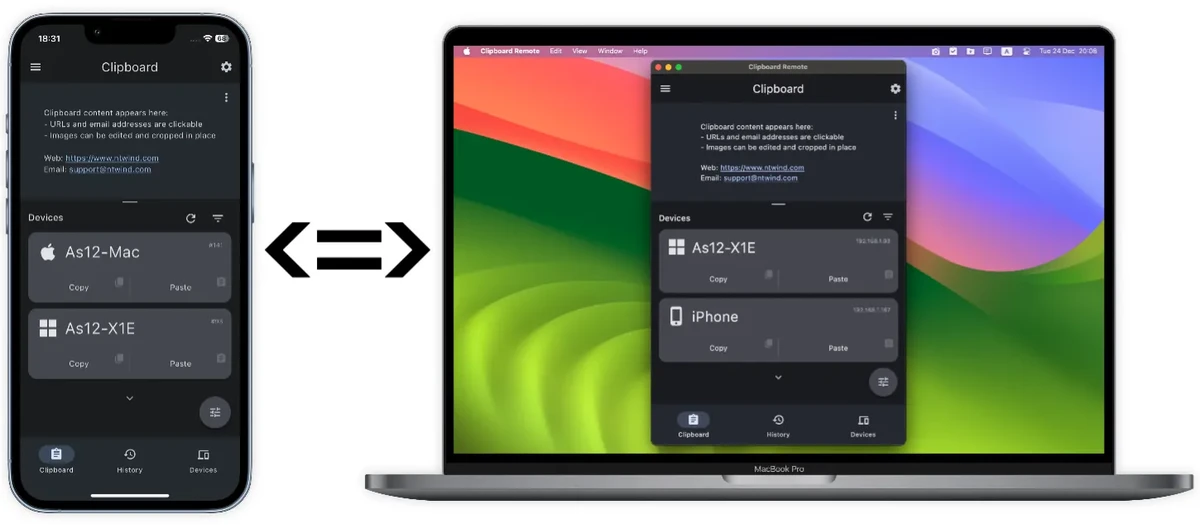
Clipboard Remote keeps its interface straightforward and easy to navigate. Once installed on at least two devices, it automatically scans the local network and displays available devices in a clean, organized list. Pairing devices requires only a couple of clicks, making the initial setup quick even for less experienced users.

During everyday use, the workflow feels simple. After copying content normally with standard system shortcuts, Clipboard Remote makes that clipboard available to paired devices through its Copy and Paste controls. The History tab helps retrieve previously copied items without repeatedly switching between applications.

The software also integrates image editing tools directly into the clipboard workflow, allowing quick adjustments before sharing. Overall, the interface prioritizes efficiency without overwhelming users with unnecessary options.

Who Should Use Clipboard Remote?

  • Professionals working across multiple computers and mobile devices
  • Students who frequently transfer notes and links between phone and PC
  • Remote workers using Windows and macOS together
  • Users who prefer local network transfers over cloud synchronization
  • Anyone who regularly copies URLs, text snippets, or mobile photos to a desktop

Conclusion

Clipboard Remote provides a practical solution for users who frequently move information between multiple devices without relying on cloud services. Its secure LAN-based communication, cross-platform compatibility, clipboard history, and support for URLs and images make everyday workflows faster and more convenient.

Pros & Cons

✓

Pros

  • Secure local network transfers without cloud services
  • Works across Windows, macOS, Android, and iOS
  • Easy device pairing process
  • Preserves text formatting
  • Clipboard history improves productivity
  • Built-in image editing before or after transfer
  • Supports URLs, text, and photos
✕

Cons

  • Requires installation on at least two devices
  • Devices must be paired before sharing
  • Image transfers only work from mobile devices to desktop computers
  • Requires devices to be connected through the same LAN or Wi-Fi network

Frequently Asked Questions

What devices are compatible with Clipboard Remote?

Clipboard Remote works on Windows, macOS, Android, and iOS. To transfer clipboard content, the application must be installed on at least two devices connected to the same local network.

Does Clipboard Remote require an internet connection?

No. Clipboard Remote operates over your local LAN or Wi-Fi network and does not depend on internet-based cloud services to transfer clipboard data between devices.

Can I transfer both text and images between devices?

Yes, but with some limitations. Text, URLs, and other clipboard content can be shared between supported devices. Images and photos can only be transferred from Android or iOS devices to a desktop computer, not from a desktop to a mobile device.

Is Clipboard Remote secure?

Yes. Clipboard Remote transfers data over your local network using encrypted connections instead of cloud storage, helping keep clipboard content private and under your control.

Do I need to pair my devices before using Clipboard Remote?

Yes. Before you can share clipboard content, the devices must be paired manually. The pairing process is simple and typically takes only a couple of clicks.

Does Clipboard Remote save my clipboard history?

Yes. Clipboard Remote includes a Clipboard History feature that stores your recent copy and paste operations, making it easy to reuse previously copied text, URLs, or images without copying them again.

Recommended apps [Freeware]:
  • EarthView 7.17.0 EarthView logo dynamic wallpapers and screensavers with day, night, and weather effects
  • ManicTime 2026.2.0.3 ManicTime logo Automatically track work hours, monitor productivity, and generate accurate reports with ManicTime
  • AIMP 5.40.2722 AIMP logo a lightweight audio player with high-quality sound, playlist tools, equalizer, and audio conversion features
  • DISMTools 0.8 DISMTools logo open-source GUI for Windows DISM that simplifies image management, system repair, and maintenance
  • PHP 8.5.8 PHP logo Develop dynamic websites with PHP, the free open-source scripting language for modern server-side web development
  • Microsoft Edge WebView2 Runtime 150.0.4078.83 Microsoft Edge WebView2 Runtime logo Enable modern Windows apps to display web content with Chromium-based rendering, HTML, CSS, JavaScript support, and native integration.
Recommended apps [Shareware]:
  • Charles 5.2.0 Charles logo HTTP proxy tool for web debugging, allowing developers to inspect, modify, and analyze network traffic in real time
  • Total PDF Converter 6.5.0.183 Total PDF Converter logo converts PDF to DOC, XLS, images, TXT, PDF/A and more with batch processing and advanced tools.
  • VovSoft Batch Audio Converter 2.1 VovSoft Batch Audio Converter logo a Windows tool for fast bulk audio conversion with drag-and-drop simplicity and format flexibility
  • DroidKit 2.3.9.20260625 DroidKit logo Recover data, unlock Android devices, repair system issues, and manage phone content with DroidKit for Windows
  • Advanced ETL Processor Professional 6.5.1.5 Advanced ETL Processor Professional logo a powerful ETL tool for database automation and data integration
  • VovSoft Desktop Diary 3.2 VovSoft Desktop Diary logo a secure offline journal app for Windows with password protection, backups, and calendar notes