


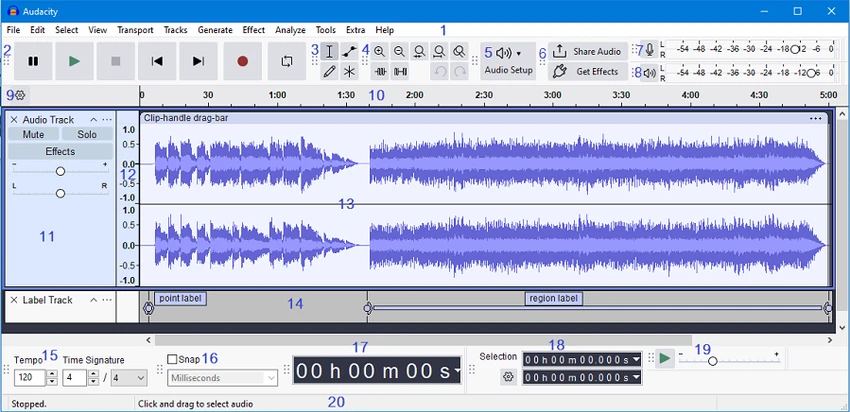

Audacity is a free, open-source audio editor and recorder designed for users who need powerful audio editing tools without the cost of professional software. Supporting a wide range of audio formats and offering multi-track recording capabilities, Audacity is suitable for podcast creators, musicians, audio enthusiasts, and anyone working with digital audio.
Features of Audacity
- Record live audio from microphones, USB devices, and FireWire devices.
- Import and export WAV, FLAC, AIFF, AU, and OGG Vorbis files.
- Edit audio using cut, copy, paste, and delete functions.
- Mix multiple audio clips and tracks.
- Modify individual sample points with the Draw tool.
- Convert tapes and vinyl records into digital recordings.
- Change audio speed and pitch.
- Built-in effects including:
- Noise processing
- Equalization
- Bass adjustment
- High-pass and low-pass filters
- Amplify
- Fade in and fade out
- Normalize
- Reverse
- Echo
- Phaser
- Plugin support for additional effects.
- Multi-channel recording at high sample rates.
- Spectrogram visualization and frequency analysis tools.
- Fourier transform-based audio analysis.
- Portable version available.
- Compatible with Windows 7, Windows 8, Windows 10, and Windows 11.
You can use Audacity to
- Record live audio.
- Convert tapes and records into digital recordings or CDs.
- Edit Ogg Vorbis, MP3, WAV or AIFF sound files.
- Cut, copy, splice or mix sounds together.
- Change the speed or pitch of a recording.
- And more! See the complete list of features.
User Experience
Installing Audacity is quick and straightforward. The application launches into a clean interface that provides easy access to recording, playback, and editing tools. While new users may need some time to familiarize themselves with the workflow, the built-in help resources make the learning process manageable. The waveform-based editing environment offers precise control over audio projects. Basic editing tasks such as trimming unwanted sections, combining clips, and adjusting volume levels are easy to perform. More advanced users can take advantage of multi-track editing and audio analysis tools for deeper sound manipulation.
One area where Audacity stands out is its flexibility. The software handles everything from simple voice recordings to more complex audio projects involving multiple tracks and effects. Plugin support further expands its capabilities, allowing users to customize their workflow according to specific needs. Performance is generally smooth, even when working with larger audio files. During use, audio processing remains responsive, and the resulting output maintains high audio quality.
Conclusion
Audacity delivers an impressive set of audio recording and editing tools in a completely free package. From basic trimming and mixing to advanced audio analysis and effects processing, the software provides everything most users need for audio production.


