Transmission logo

Transmission 4.1.3

  • User Rating:
    ★★★★★
    ★★★★★
    0.0 ★ 0Votes
  • Requirements:
    Windows
  • Version: 4.1.3
  • Latest updated: 3 weeks ago
  • License: Freeware  
  • Publisher: Transmission Project
  • Size: 22 MB
× app stores

Transmission is a free, open-source BitTorrent client designed for downloading and managing large files over peer-to-peer networks. Known for its simplicity and lightweight design, it is widely used by users who want a fast and efficient torrenting experience without unnecessary complexity. It supports multiple platforms, including Windows, macOS, and Linux, and provides essential torrent management tools such as download control, speed limits, encryption, and remote access.

Features of Transmission

  • Simple and clean user interface for easy torrent management.
  • Lightweight design with low system resource usage.
  • Cross-platform support (Windows, macOS, Linux).
  • Built-in support for encrypted connections.
  • Ability to control upload and download speeds.
  • Web-based remote management interface.
  • Scheduling options for downloads and uploads.
  • Automatic bandwidth management.
  • Supports magnet links and torrent files.
  • Open-source software with active community development.

User Experience

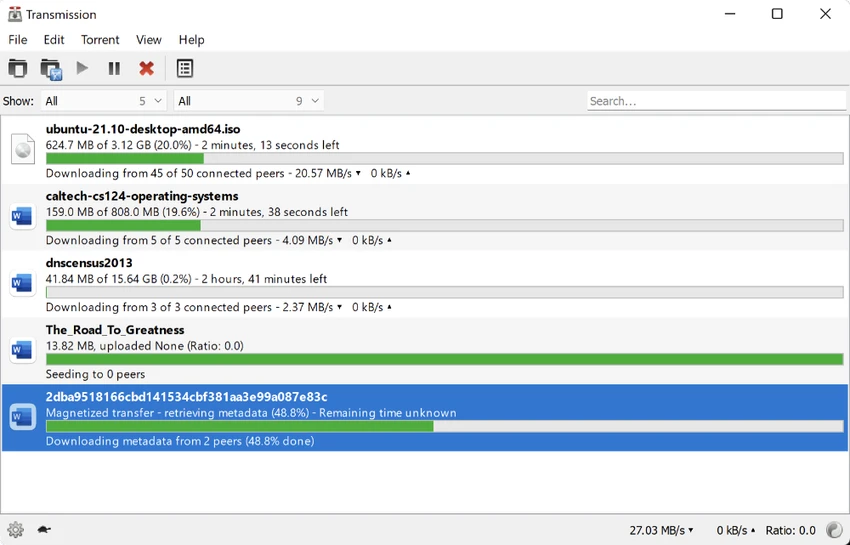
Transmission offers a minimal and distraction-free experience, focusing on core torrenting functionality rather than advanced or complex features. The interface is straightforward, making it easy for beginners to add torrents, monitor progress, and manage downloads.

Performance is one of its strongest advantages. Transmission runs efficiently in the background with very low CPU and memory usage, making it ideal for older systems or users who need a lightweight application. The software includes useful controls for adjusting download and upload speeds, helping users manage bandwidth effectively. This is especially useful when multitasking or sharing internet connections.

Remote management via a web interface adds flexibility, allowing users to control downloads from other devices such as smartphones or tablets. Scheduling features also allow users to automate torrent activity based on preferred time windows. While it does not include many advanced features found in heavier torrent clients, its simplicity is part of its appeal.

Who Should Use Transmission?

  • Users looking for a simple torrent downloader.
  • People with low-spec or older computers.
  • Users who prefer open-source software.
  • Those who need remote torrent management.
  • Beginners who want an easy introduction to torrenting.

Conclusion

Transmission stands out as a clean, lightweight, and highly efficient BitTorrent client that focuses on doing one job well—downloading and managing torrents. It avoids unnecessary complexity while delivering stable performance across multiple platforms.

Pros & Cons

✓

Pros

  • Extremely lightweight and fast.
  • Simple, easy-to-use interface.
  • Open-source and free.
  • Cross-platform support.
  • Low system resource usage.
  • Remote web access for managing downloads.
  • Supports encryption for privacy.
  • Stable and reliable performance.
✕

Cons

  • Lacks advanced features found in more complex torrent clients.
  • Minimal customization options.
  • Not ideal for power users needing extensive plugin support.

Frequently Asked Questions

What is Transmission used for?

Transmission is a BitTorrent client used to download and manage large files through peer-to-peer file sharing.

Is Transmission free?

Yes. Transmission is free and open-source software available for multiple operating systems.

Does Transmission support Windows and Mac?

Yes. Transmission is available for Windows, macOS, and Linux.

Is Transmission safe to use?

Yes. It supports encrypted connections and is widely used as a trusted open-source torrent client.

Can I control Transmission remotely?

Yes. Transmission includes a web interface that allows remote management from other devices.

Does Transmission use a lot of system resources?

No. Transmission is designed to be lightweight and uses very little CPU and memory.

Recommended apps [Freeware]:
  • Prevent Restore 2026 v123 Prevent Restore logo securely wipes deleted files, blocks data recovery, and protects sensitive information on Windows
  • Recuva 1.55.133 Recuva logo recover deleted files from PCs, USB drives, memory cards, and damaged or formatted disks
  • GLview 7.4.6 GLview logo displays detailed OpenGL, Vulkan, DirectX, and GPU information, helping users analyze graphics hardware and driver capabilities
  • QuickImageComment 5.02 QuickImageComment logo Edit IPTC, EXIF, and XMP metadata quickly, a lightweight tool for image comments and photo tagging on Windows
  • DipTrace 5.3.0.1 DipTrace logo Design schematics, create multilayer PCB layouts, verify circuits, and generate manufacturing files with integrated design tools.
  • VidMasta 30.7 VidMasta logo Search, preview, and manage movie downloads with advanced filtering, subtitles, trailers, and detailed title information.
Recommended apps [Shareware]:
  • VovSoft Batch Audio Converter 2.1 VovSoft Batch Audio Converter logo a Windows tool for fast bulk audio conversion with drag-and-drop simplicity and format flexibility
  • TweakNow Gallery 1.3.5 TweakNow Gallery logo a fast Windows photo viewer and organizer with slideshow and built-in image conversion tools
  • Diffchecker 7.1.5 Diffchecker logo offline tool for comparing text, images, PDFs, spreadsheets, and folders securely on Windows
  • FastKeys 6.07 FastKeys logo Windows automation tool for shortcuts, text expansion, mouse gestures, macros, and workflow automation
  • Driver Easy 7.1.3.5200 Driver Easy logo Windows utility for scanning, updating, and managing hardware drivers with offline support
  • Ultimate Power Assistant 1.1.28.0 Ultimate Power Assistant logo manage Windows power settings, schedules tasks, and automates shutdown options