


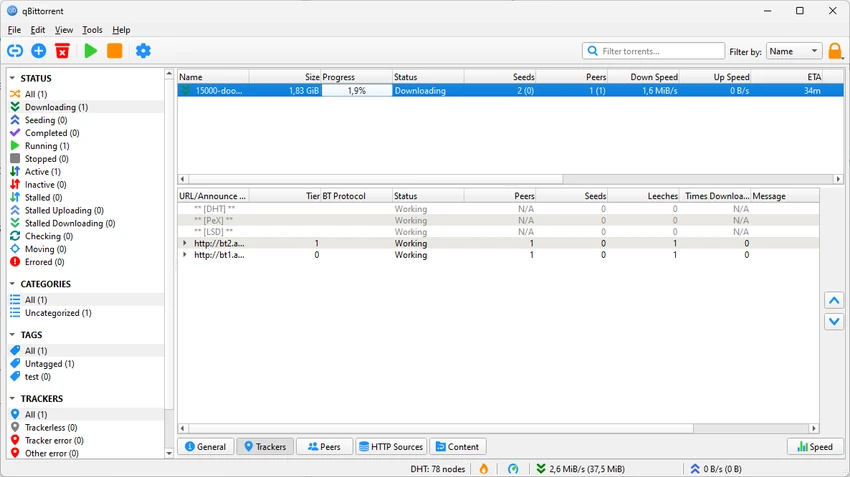

qBittorrent is a free and open-source torrent client designed to provide a fast, lightweight, and feature-rich alternative to commercial torrent applications. Built with simplicity in mind, it offers an ad-free experience while still providing advanced tools for users who want more control over their downloads. The software supports torrent management, built-in searching, RSS feeds, remote control, bandwidth scheduling, and detailed customization options. qBittorrent allows users to manage downloads efficiently while avoiding unnecessary advertisements and bundled features commonly found in other torrent clients. Whether managing occasional downloads or handling larger collections, qBittorrent provides a flexible environment for users who need a reliable BitTorrent application.
Features of qBittorrent
- Free and open-source torrent client.
- Lightweight design with no advertisements.
- Built-in torrent search engine for finding content from within the application.
- RSS feed support for automated torrent downloads.
- Remote control through a web browser.
- Bandwidth scheduling to manage download and upload speeds.
- Sequential downloading support for starting media playback before completion.
- File prioritization for controlling download order.
- Peer and tracker management tools.
- IP filtering options.
- Encryption settings for additional connection privacy.
- Extensive customization options for advanced users.
Interface and Usability
qBittorrent focuses on providing a clean and efficient torrent management experience. The interface avoids unnecessary extras and keeps the main functions easy to access, making it suitable for users who want a straightforward torrent client without advertisements or upgrade prompts. The built-in search feature is a convenient addition because users can look for torrents without manually visiting multiple websites. Advanced users can also take advantage of detailed controls such as bandwidth scheduling, file priorities, tracker management, and connection settings.
The software offers a good balance between simplicity and customization. Beginners can start downloading with minimal setup, while experienced users have access to deeper configuration options for optimizing their workflow.
Who Should Use qBittorrent?
- Users looking for a free alternative to µTorrent.
- People who prefer open-source software.
- Users downloading legal torrents such as open-source software, public domain media, or other permitted files.
- Advanced users who want detailed torrent customization.
- Users who need remote torrent management and automation features.
Conclusion
qBittorrent remains one of the most capable free torrent clients available, offering a strong combination of simplicity, performance, and advanced management features. Its lightweight design, lack of advertisements, and open-source approach make it an appealing alternative to heavier torrent applications.


