VovSoft Domain Checker logo

VovSoft Domain Checker 10.4

  • User Rating:
    ★★★★★
    ★★★★★
    0.0 0Votes
  • Requirements:
    Windows
  • Version: 10.4
  • Latest updated: 6 days ago
  • License: Free Trial  
  • Publisher: VovSoft
  • Size: 8 MB
× app stores

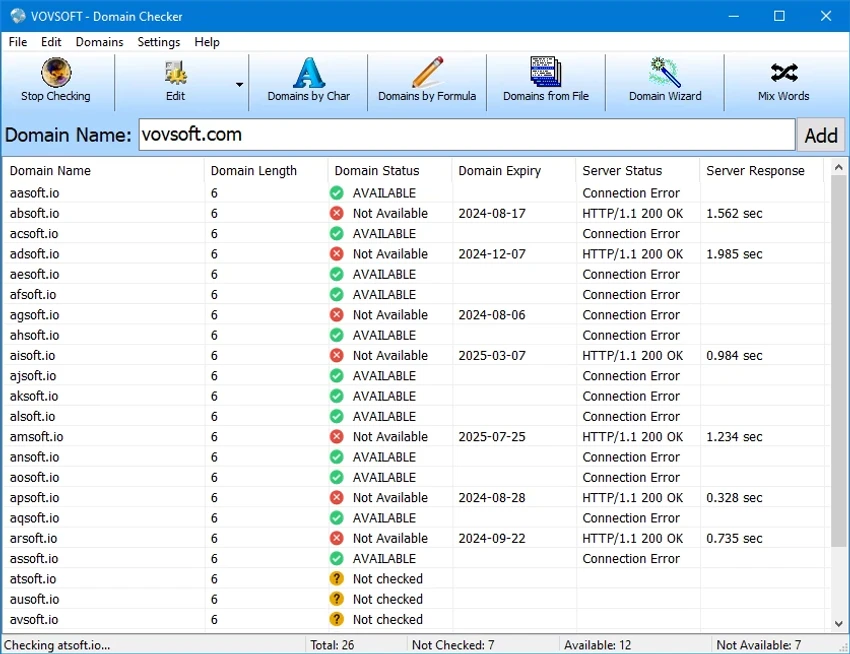
VovSoft Domain Checker is a lightweight utility designed for checking domain name availability and performing WHOIS lookups across multiple domain extensions. It is particularly useful for web developers, marketers, and entrepreneurs who need to quickly evaluate potential website names before registering a domain.

Overview

Domain Checker focuses on simplifying the process of finding available domain names. Instead of manually searching through registrar websites, users can input multiple domain options and instantly check their availability status. The software supports a wide range of common top-level domains (TLDs), with the option to add custom extensions. Its batch processing capability allows users to evaluate multiple domain names at once, making it especially efficient for brainstorming and comparing website name ideas. The interface is designed to be straightforward, with minimal navigation complexity and quick access to both simple and advanced scanning modes.

Features of VovSoft Domain Checker

  • WHOIS lookup functionality for domain names
  • Domain availability checking across multiple TLDs
  • Supports most common domain extensions
  • Option to add custom TLDs manually
  • Batch processing for multiple domain entries
  • Import domain lists from files
  • Manual domain input support
  • Simple and efficient user interface
  • Quick scanning for availability results
  • Advanced scanning options for detailed checks
  • Lightweight utility design
  • Accessible controls via menu or top-panel buttons

User Experience

Using VovSoft Domain Checker feels straightforward and efficient. The application is designed for speed rather than complexity, allowing users to quickly enter domain names and retrieve availability results without unnecessary steps. The batch processing feature is one of its most practical strengths. Instead of checking domains one by one, users can evaluate multiple naming options simultaneously, which is particularly useful during brainstorming sessions for new websites or projects.

Importing domain lists from files further improves productivity, especially for users working with large sets of potential domain names. The interface remains uncluttered, with primary functions accessible through simple menus and clearly labeled controls. While the tool does not include advanced branding or SEO analysis features, it performs its core function—domain checking—efficiently and reliably.

Who Should Use VovSoft Domain Checker?

  • Web developers
  • Domain investors
  • Digital marketers
  • Startup founders
  • Bloggers and content creators
  • SEO professionals researching domain names
  • Anyone brainstorming website name ideas

System Requirements

  • Windows XP (32-bit & 64-bit)
  • Windows Vista
  • Windows 7
  • Windows 8 / 8.1
  • Windows 10
  • Windows 11

Conclusion

VovSoft Domain Checker is a straightforward and efficient utility for anyone involved in website creation or domain research. Its ability to process multiple domain names at once makes it a time-saving tool during the planning phase of new projects.

Pros & Cons

Pros

  • Fast domain availability checking
  • Supports batch processing for multiple domains
  • Simple and lightweight interface
  • Supports a wide range of TLDs
  • Allows custom TLD configuration
  • File import support for domain lists
  • Easy to use for beginners

Cons

  • Limited to domain checking functionality only
  • No advanced SEO or branding analysis tools
  • Basic interface design without modern UI enhancements

Frequently Asked Questions

What is VovSoft Domain Checker used for?

VovSoft Domain Checker is used to check domain name availability and perform WHOIS lookups across different domain extensions.

Does it support batch domain checking?

Yes. The software allows users to check multiple domain names at once using batch processing or file import.

Can I add custom domain extensions?

Yes. Users can add new TLDs manually to expand the list of supported domain extensions.

Is Domain Checker suitable for beginners?

Yes. The software has a simple interface designed for quick and easy domain availability checks.

Does it provide SEO analysis?

No. The tool focuses only on domain availability and WHOIS lookup functionality.

Recommended apps [Freeware]:
  • Sandboxie-Plus 1.17.9 Sandboxie-Plus logo a Windows sandboxing tool that isolates programs to prevent system changes and improve security.
  • Microsoft PowerToys 0.100.2 Microsoft PowerToys logo adds powerful productivity tools and customization features to Windows 10 and 11
  • LAV Filters 0.82 LAV Filters logo a free DirectShow codec package that enables broad audio and video format support on Windows
  • SoftPerfect RAM Disk 26.6 SoftPerfect RAM Disk logo creates high-speed virtual drives in memory to boost performance and reduce disk wear
  • CCleaner 7.08.1355 CCleaner logo removes junk files, clears browsing traces, and helps optimize Windows for better performance
  • OcenAudio 3.19.5 OcenAudio logo a fast and easy-to-use audio editor with real-time effects, spectrogram analysis, and VST plugin support
Recommended apps [Shareware]:
  • Photo Supreme 2026.3.0.9285 Photo Supreme logo Organize, search, and manage thousands of photos with Photo Supreme's powerful cataloging features
  • Mountain Duck 5.3.0.29446 Mountain Duck logo mounts cloud storage and servers as local drives with smart sync, offline access, and seamless file integration
  • Ant Download Manager 2.17.4.96212 Ant Download Manager logo a Windows tool that speeds up downloads, captures streaming media, supports torrents, and integrates with browsers
  • Copy Protect 3.0.2 Copy Protect logo converts media files into secured executables to prevent copying, duplication, and unauthorized distribution on Windows.
  • Classroom Spy Pro 5.6.6 Classroom Spy Pro logo Monitor, control, and manage student computers remotely with Classroom Spy Pro for Windows classrooms
  • KeyShot 2026.2 KeyShot logo real-time 3D rendering and animation software for photorealistic visuals, materials, and product design