PRTG - Free Network Monitor logo

PRTG - Free Network Monitor 26.2.120.1477

  • User Rating:
    ★★★★★
    ★★★★★
    0.0 ★ 0Votes
  • Requirements:
    Windows
  • Version: 26.2.120.1477
  • Latest updated: 2 weeks ago
  • License: Free Trial  
  • Publisher: Paessler AG
  • Size: 733 MB
× app stores

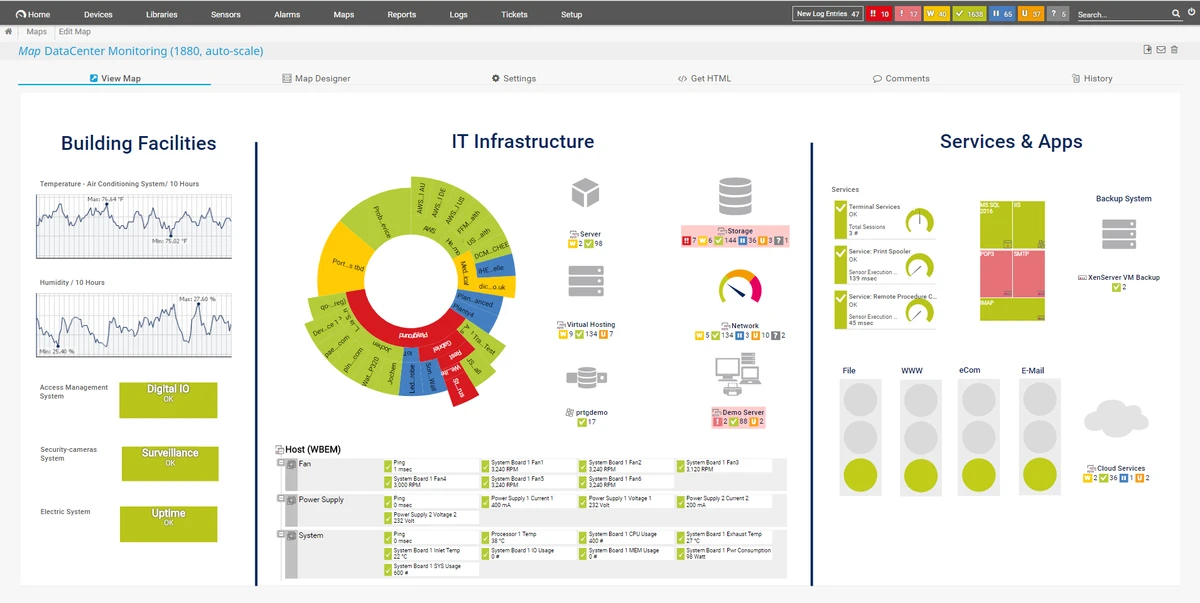
PRTG Free Network Monitor is a network monitoring solution designed to help businesses track the availability, performance, and usage of their network components. The software continuously monitors network activity, helping IT teams identify performance problems, bandwidth limitations, and system issues before they affect daily operations.

Modern businesses depend heavily on reliable networks for communication, data transfer, and essential services. PRTG Free Network Monitor helps administrators maintain network stability by providing visibility into traffic patterns and system performance. By monitoring key components, organizations can detect potential bottlenecks and take action before they develop into serious problems. The software focuses on proactive network management by helping users understand how bandwidth and hardware resources are being used. This information can support better decisions when planning infrastructure upgrades or adjusting network capacity based on actual usage.

PRTG Free Network Monitor is designed to provide alerts when issues occur, allowing administrators to respond quickly to unexpected problems. Notifications can help users stay informed about network conditions and reduce the risk of downtime caused by undetected failures.

The free edition provides access to a limited number of sensors after the initial trial period. This makes it suitable for smaller monitoring needs or users who want to evaluate network monitoring capabilities before considering expanded options.

Features of PRTG Free Network Monitor

  • Monitor network component availability
  • Measure network traffic and usage
  • Track server and network performance
  • Help identify bandwidth bottlenecks
  • Detect potential system failures
  • Support proactive network management
  • Provide alerts through email, SMS, pager, and other methods
  • Help optimize hardware and bandwidth planning
  • Reduce downtime caused by undetected issues
  • Free edition available with sensor limitations

Interface and Usability

PRTG Free Network Monitor is designed around continuous monitoring rather than manual network checks. The software provides administrators with information about network performance, traffic levels, and system availability, helping them identify potential issues before they impact users.

The monitoring approach allows IT teams to focus on important tasks while receiving notifications when attention is required. By tracking actual network usage, administrators can better understand resource demands and make informed decisions about infrastructure improvements. The software is mainly aimed at IT professionals and organizations that need visibility into their network environment. Users with network monitoring experience will benefit most from its management-focused features.

Who Should Use PRTG Free Network Monitor?

  • IT administrators managing business networks
  • Small organizations monitoring network performance
  • Teams tracking bandwidth and server usage
  • Businesses wanting proactive issue detection
  • Professionals evaluating network monitoring solutions

Conclusion

PRTG Free Network Monitor provides businesses with a practical way to monitor network health, measure usage, and identify potential performance problems. Its proactive monitoring approach helps administrators respond to issues before they become major disruptions.

While the free version has sensor limitations after the initial period, it remains a useful option for smaller monitoring requirements and for users who want to explore professional network monitoring features. For organizations that depend on reliable network performance, PRTG Free Network Monitor is worth considering.

Pros & Cons

✓

Pros

  • Helps monitor network availability and performance
  • Provides traffic and usage insights
  • Supports proactive problem detection
  • Offers multiple notification methods
  • Helps reduce downtime risks
  • Free edition available
✕

Cons

  • Free edition is limited to 100 sensors after 30 days
  • Primarily designed for professional network environments
  • Advanced monitoring needs may require a paid license

Frequently Asked Questions

What is PRTG Free Network Monitor used for?

PRTG Free Network Monitor is used to monitor network components, track traffic usage, measure performance, and detect potential network issues.

Can PRTG Free Network Monitor help prevent downtime?

Yes. By continuously monitoring network and server performance, the software helps administrators identify problems before they become serious failures.

Does PRTG Free Network Monitor monitor bandwidth usage?

Yes. The software can measure traffic and usage, helping users identify bandwidth bottlenecks and understand network resource demands.

Is PRTG Free Network Monitor completely free?

The software includes a free edition. After 30 days, it reverts to a freeware version limited to a maximum of 100 sensors.

Who is PRTG Free Network Monitor designed for?

It is mainly designed for businesses, IT administrators, and network professionals who need to monitor infrastructure performance and availability.

How does PRTG Free Network Monitor notify users about problems?

The software can send notifications through methods such as email, SMS, pager, and other supported alert channels when monitored systems require attention.

Recommended apps [Freeware]:
  • Tails 7.9.1 Tails logo a privacy-focused live operating system that enables anonymous browsing and secure communication
  • F-Secure Uninstallation Tool 19.3.15 F-Secure Uninstallation Tool logo completely removes F-Secure security products, including files, services, and registry entries from Windows
  • Media Player Classic Black Edition 1.9.0 Media Player Classic Black Edition logo a free media player with a modern dark interface and YouTube playback
  • Transmission 4.1.3 Transmission logo a lightweight, open-source BitTorrent client for fast and simple file sharing
  • Notepad++ 8.9.7 Notepad++ logo Edit code and plain text with a fast, lightweight editor featuring syntax highlighting, multiple tabs, plugins, and support for many programming languages.
  • Eusing MultiClip 2.2 Eusing MultiClip logo Store frequently used text snippets, assign custom hotkeys, and speed up repetitive typing with a lightweight clipboard management utility.
Recommended apps [Shareware]:
  • Remote Desktop Manager 2026.2.13.0 Remote Desktop Manager logo manage RDP, SSH, VNC, and virtual machines from one secure centralized platform
  • NTFS Permissions Auditor 26.6.27 NTFS Permissions Auditor logo analyze Windows folder permissions, audit NTFS access rights, and export detailed security reports
  • Coolutils PDF Splitter Pro 6.1.0.86/58 Coolutils PDF Splitter Pro logo Split large PDF files by keywords, page breaks, or document patterns with Coolutils PDF Splitter Pro for Windows.
  • Adlice Protect 16.7.0.0 Adlice Protect logo Detect and remove stubborn malware with Adlice Protect, an advanced anti-malware tool using signature and heuristic analysis
  • PopChar 10.1 Build 3360 PopChar logo insert special Unicode characters easily into documents without memorizing keyboard shortcuts
  • Chris-PC CPU Booster 3.26.0706 Chris-PC CPU Booster logo optimizes CPU usage, prioritizes applications, and helps improve performance for demanding software