GnuCash logo

GnuCash 5.16

  • User Rating:
    ★★★★★
    ★★★★★
    0.0 0Votes
  • Requirements:
    Windows
  • Version: 5.16
  • Latest updated: 1 day ago
  • License: Freeware  
  • Publisher: The GnuCash Project
  • Size: 176 MB
× app stores

GnuCash is a free and open-source financial accounting application designed for both personal users and small businesses. Built on professional double-entry accounting principles, it provides a structured and reliable way to manage income, expenses, bank accounts, investments, and business transactions. Despite its powerful accounting engine, GnuCash remains accessible enough for users familiar with basic financial tracking, such as a checkbook register. It is available across multiple platforms and also offers a portable version for flexible use.

Features of GnuCash

  • Free and open-source financial accounting software
  • Double-entry bookkeeping system
  • Track bank, asset, liability, income, and expense accounts
  • Manage stocks, bonds, and mutual fund accounts
  • Small business accounting support:
    • Customers
    • Vendors
    • Jobs
    • Invoices
    • Accounts payable and receivable
  • Import financial data (QIF, OFX, HBCI formats)
  • Transaction matching for imported records
  • Built-in financial reports and graphs
  • Scheduled and recurring transactions
  • Financial calculations and budgeting tools
  • Online banking support (requires admin privileges for certain institutions)
  • Portable version available

User Experience

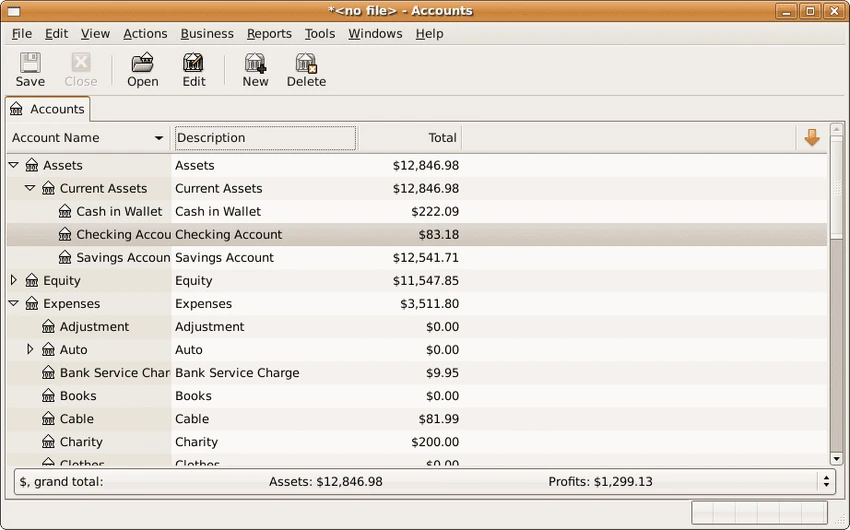
GnuCash offers a structured and detail-oriented user experience centered around accuracy and financial organization. The interface resembles a traditional ledger system, which helps users understand their financial position in a clear and systematic way. Setting up accounts requires some initial learning, especially for users unfamiliar with double-entry accounting. However, once configured, the system becomes highly reliable for tracking financial activity across multiple categories, including personal budgets and business operations.

One of its strongest aspects is financial accuracy. Because it uses double-entry bookkeeping, every transaction is recorded in a balanced way, reducing the risk of accounting errors. This makes it particularly useful for small business owners who need dependable financial records.

Importing bank transactions is also supported through formats like OFX and QIF, allowing users to integrate external financial data and reconcile accounts more efficiently. Scheduled transactions further reduce manual effort for recurring payments or income tracking. While the interface may feel less modern compared to commercial finance apps, its stability, transparency, and depth of features make it a strong long-term financial management solution.

Who Should Use GnuCash?

  • Individuals managing personal finances
  • Small business owners
  • Freelancers tracking income and expenses
  • Users needing double-entry accounting
  • Anyone wanting a free alternative to commercial accounting software

Conclusion

GnuCash stands out as a powerful open-source accounting solution that delivers professional-level financial tracking without subscription costs. Its double-entry system ensures accuracy and accountability, making it especially valuable for users who need structured financial reporting.

Pros & Cons

Pros

  • Free and open source
  • Professional double-entry accounting system
  • Suitable for personal and small business use
  • Supports investments and banking accounts
  • Import and reconcile bank transactions
  • Scheduled transactions for automation
  • Detailed financial reports and graphs
  • Portable version available

Cons

  • Learning curve for beginners unfamiliar with accounting
  • Interface is functional but not modern
  • Requires setup time to configure properly
  • Some banking features require administrative privileges

Frequently Asked Questions

What is GnuCash used for?

GnuCash is used for managing personal and small business finances using double-entry accounting principles.

Is GnuCash free?

Yes. GnuCash is completely free and open-source.

Can GnuCash track investments?

Yes. It supports stocks, bonds, and mutual fund accounts.

Does GnuCash support small business accounting?

Yes. It includes features for customers, vendors, invoices, and accounts payable/receivable.

Is GnuCash difficult to learn?

It has a moderate learning curve due to its accounting structure, especially for users unfamiliar with double-entry bookkeeping.

Recommended apps [Freeware]:
  • O&O ShutUp10++ 3.1.1104 O&O ShutUp10++ logo control Windows privacy, telemetry, updates, and system settings with a simple portable interface
  • ExplorerPatcher 26100.8457.70.3 ExplorerPatcher logo restores Windows 10-style taskbar, menus, and Explorer behavior on Windows 11.
  • Password Safe 3.72.0 Password Safe logo encrypted password manager for Windows to store, organize, and generate secure passwords
  • WinScript 2.20.1 WinScript logo customize Windows with debloat, privacy, performance tweaks, and one-click app installation scripts
  • Hasleo Disk Clone 5.8.2.1 Hasleo Disk Clone logo clone disks, migrate Windows systems, and transfer partitions with fast and reliable tools.
  • Viber for Windows 28.2.0 Viber for Windows logo make free calls, send messages, and sync chats across devices via WiFi or 3G
Recommended apps [Shareware]:
  • Digimizer 6.5.4 Digimizer logo image analysis tool for precise measurements, object detection, and scientific image processing
  • Smart MindMap 11.6.3 Smart MindMap logo AI-powered Windows tool for mind maps, UML, flowcharts, and professional diagram creation
  • eM Client 10.4.5600.0 eM Client logo a modern Windows email client with support for Gmail, Exchange, calendars, tasks, contacts, and chat in one app
  • Centurion Setup 51.0 Centurion Setup logo Windows installer builder that creates compressed, self-contained executables with multilingual support
  • EaseUS Data Recovery Wizard 20.5.0 EaseUS Data Recovery Wizard logo Recover deleted or lost files with EaseUS Data Recovery Wizard using quick and deep scans for hard drives
  • iToolab WatsGo 9.0.0 iToolab WatsGo logo transfer, back up, and restore WhatsApp data between Android and iPhone devices easily