Red Burner logo

Red Burner 19.7

  • User Rating:
    ★★★★★
    ★★★★★
    0.0 0Votes
  • Requirements:
    Windows
  • Version: 19.7
  • Latest updated: 1 week ago
  • License: Freeware  
  • Publisher: OMID SOFT
  • Size: 6.7 MB
× app stores

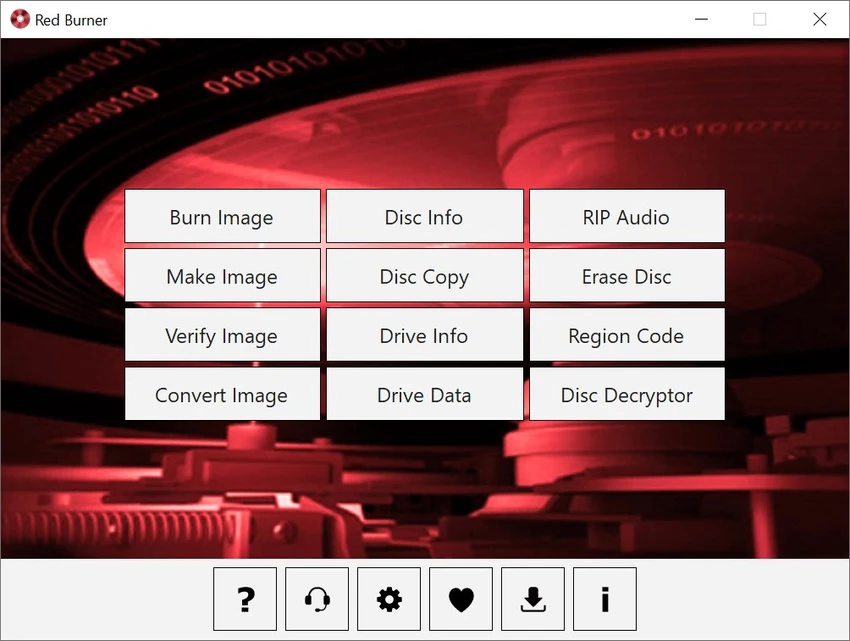
Red Burner is a lightweight disc burning utility designed to write data to CD, DVD, and Blu-ray discs quickly and efficiently. It also supports working with ISO and CUE image files, making it a simple but functional solution for users who need basic optical media burning tools without unnecessary complexity.

Overview

Red Burner is developed as a streamlined alternative to heavier disc authoring software. It focuses on speed, portability, and ease of use while maintaining support for common optical media formats. The software is designed to handle both physical disc burning and image-based workflows, allowing users to create or write ISO and CUE files. It is positioned as a lightweight standalone tool that avoids installation overhead and system footprint, making it suitable for quick, on-demand use.

Features of Red Burner

  • Fast burning engine for CD, DVD, and Blu-ray discs
  • Supports ISO and CUE image file handling
  • Lightweight and portable design
  • No installation required (runs directly)
  • Minimal system and disk footprint
  • Simple user interface for quick operations
  • Optimized burning algorithm for speed-focused performance

User Experience

Red Burner prioritizes simplicity over advanced configuration. The interface is minimal, allowing users to quickly select a disc, choose a file or image, and start the burning process without navigating complex menus. The lightweight nature of the tool makes it responsive, and it is well-suited for users who only need basic disc burning functionality. However, it does not appear to include advanced authoring features such as disc menus, detailed session control, or multimedia editing options. As a result, it feels more like a fast utility tool rather than a full-featured disc authoring suite.

Who Should Use Red Burner?

Red Burner is best suited for users who need a quick and simple way to burn data to optical discs or write ISO/CUE images. It is particularly useful for users who prefer portable tools without installation requirements. It is less suitable for users who need advanced disc authoring, multimedia DVD creation, or professional-level burning features.

Conclusion

Red Burner is a fast and lightweight disc burning utility that focuses on simplicity and performance. It is ideal for users who want a straightforward tool for writing CDs, DVDs, or Blu-ray discs without extra complexity.

Pros & Cons

Pros

  • Very lightweight and portable
  • Fast burning performance
  • Supports CD, DVD, and Blu-ray
  • Handles ISO and CUE image files
  • Simple and easy-to-use interface

Cons

  • Limited advanced disc authoring features
  • No multimedia or menu creation tools
  • Basic functionality compared to full burning suites

Frequently Asked Questions

What is Red Burner used for?

It is used to burn data onto CD, DVD, and Blu-ray discs and to work with ISO/CUE image files.

Does Red Burner require installation?

No, it is a portable application with no installation required.

Can Red Burner create ISO files?

It supports working with ISO images, including burning them to discs.

Is Red Burner suitable for professional disc authoring?

No, it is mainly designed for simple and fast disc burning tasks.

Recommended apps [Freeware]:
  • AOMEI Backupper 8.4.0 AOMEI Backupper logo easy-to-use Windows backup software for system imaging, disk cloning, and file restoration
  • CCleaner 7.08.1355 CCleaner logo removes junk files, clears browsing traces, and helps optimize Windows for better performance
  • Markdown Monster 4.4.3 Markdown Monster logo a powerful Windows Markdown editor with live preview, HTML/PDF export, Git integration, and blogging tools
  • Quick Clipboard Editor 3.4.0.0 Quick Clipboard Editor logo edit, format, and manage clipboard text with powerful tools for productivity and automation
  • HttpMaster Professional 7.0.0 HttpMaster Professional logo web testing tool for developers to automate HTTP requests, API testing, and response validation
  • BlueStacks 5.22.150.1014 / 10.42.232.1001 BlueStacks logo Android emulator for Windowsthat lets users run mobile apps and games on a PC with enhanced performance and controls
Recommended apps [Shareware]:
  • VovSoft Tree Notes 3.0 VovSoft Tree Notes logo organize notes with a hierarchical structure, rich text editing, and single-file storag
  • MediaHuman YouTube to MP3 Converter 3.9.21 MediaHuman YouTube to MP3 Converter logo downloads audio from YouTube, SoundCloud, and other platforms in high-quality MP3 format
  • EditPlus 6.1.899 EditPlus logo powerful Windows text editor with syntax highlighting, coding tools, FTP support, and web editing features
  • ON1 Effects 2026.4 ON1 Effects logo AI-powered photo effects, creative filters, presets, LUTs, and masking tools for stunning image enhancements
  • DivX 11.15.0 DivX logo powerful video player and converter that supports 4K playback, HD video conversion, and DLNA media streaming
  • Image for Windows 4.12 Image for Windows logo disk imaging tool for full system backup, restore, and recovery with encryption, compression, and bootable rescue medi