Foobar2000 logo

Foobar2000 2.25.10

  • User Rating:
    ★★★★★
    ★★★★★
    0.0 0Votes
  • Requirements:
    Windows
  • Version: 2.25.10
  • Latest updated: 4 days ago
  • License: Freeware  
  • Publisher: Peter Pawlowski
  • Size: 10 MB
× app stores

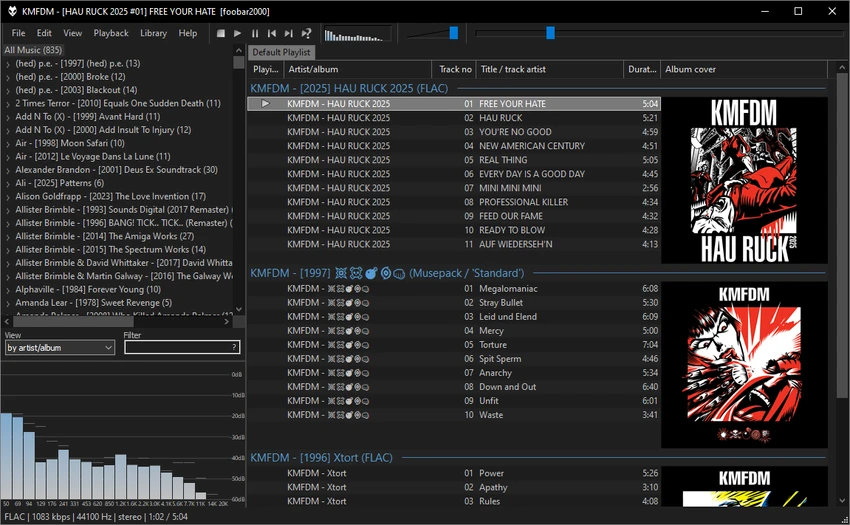
Foobar2000 is an advanced audio player designed for users who want powerful playback capabilities combined with deep customization options. It supports a wide range of audio formats including MP3, MP4, AAC, CD Audio, WMA, Vorbis, Opus, and FLAC. Foobar2000 stands out as a highly flexible music player that goes far beyond basic playback, offering tools for organizing, enhancing, and fine-tuning the listening experience.

Key Features of Foobar2000

  • Supports multiple audio formats including MP3, AAC, FLAC, Opus, and more.
  • Gapless playback for uninterrupted listening.
  • Network streaming for accessing music across devices on a local network.
  • Advanced interface customization with layout flexibility.
  • Built-in tagging tools for managing music metadata.
  • Audio CD ripping and format transcoding support.
  • ReplayGain support for consistent volume levels across tracks.
  • DSP effects for audio enhancement and sound customization.
  • Expandable through third-party components and VST/AU adapters.
  • Available across multiple platforms including Windows, macOS, Android, and iOS (with Linux support via Wine).
  • No user data collection, ensuring strong privacy protection.

User Experience

Using Foobar2000 feels minimal yet highly powerful. The interface is intentionally simple at first glance, but once explored, it reveals a wide range of customization options that allow users to design their own music player layout. Playback is smooth and stable, with gapless playback making albums and live recordings feel continuous and natural. The software’s tagging tools are especially useful for managing large music libraries, allowing for clean organization and quick searchability.

Advanced users will appreciate the DSP and plugin system, which makes it possible to adjust audio output in detail. Despite its advanced capabilities, the player remains lightweight and responsive even when handling large collections.

Who Should Use Foobar2000?

  • Audiophiles who want high-quality playback control.
  • Users managing large or complex music libraries.
  • People who prefer lightweight, customizable software.
  • Advanced users interested in DSP effects and audio tuning.
  • Privacy-conscious users who want a no-tracking music player.

Conclusion

Foobar2000 is a standout audio player that combines lightweight performance with powerful customization and audio management tools. While it may not have the most modern interface, its flexibility, stability, and feature depth make it a strong choice for serious music listeners.

Pros & Cons

Pros

  • Extremely wide audio format support.
  • Lightweight and fast performance.
  • Highly customizable interface.
  • Gapless playback for seamless listening.
  • Powerful tagging and library management tools.
  • Supports plugins and extensions.
  • No data collection, strong privacy focus.

Cons

  • Interface may feel outdated for some users.
  • Advanced features require time to learn.
  • Customization can be complex for beginners.

Frequently Asked Questions

What audio formats does Foobar2000 support?

Foobar2000 supports MP3, AAC, FLAC, WMA, Vorbis, Opus, CD Audio, and many other formats.

Does Foobar2000 support gapless playback?

Yes, it provides seamless gapless playback for uninterrupted listening.

Can Foobar2000 manage large music libraries?

Yes, it includes advanced tagging and library management tools designed for large collections.

Is Foobar2000 customizable?

Yes, it offers extensive interface customization and supports third-party components and plugins.

Does Foobar2000 collect user data?

No, Foobar2000 does not collect user data, according to the provided information.

Recommended apps [Freeware]:
  • WSCC - Windows System Control Center 10.0.3.8 WSCC - Windows System Control Center logo Windows utility manager that installs, organizes, and runs Sysinternals and system tools from one central interface
  • Tails 7.9 Tails logo a privacy-focused live operating system that enables anonymous browsing and secure communication
  • QueueExplorer 5.0.84 QueueExplorer logo helps developers and admins manage, test, troubleshoot, and monitor message queues across platforms
  • Subtitle Edit 5.0.0 Subtitle Edit logo a free subtitle editor for creating, syncing, translating, and fixing subtitles on Windows
  • 1Click Uninstaller 4.0 1Click Uninstaller logo simple Windows uninstaller tool with context menu removal, leftover cleanup, and process termination features
  • Stellarium 26.2 Stellarium logo 3D planetarium software showing stars, constellations, planets, and deep-sky objects in real time.
Recommended apps [Shareware]:
  • ViewCompanion Pro 17.03.0.1203 ViewCompanion Pro logo View, convert, annotate, and compare PDF, DWF, CAD, and technical drawing files with powerful batch tools
  • Paradox Converter 4.86 Paradox Converter logo transforms Paradox DB files into SQL, Excel, CSV, XML, DBF, HTML, and other formats
  • VovSoft Domain Checker 10.4 VovSoft Domain Checker logo check domain availability, perform WHOIS lookups, and analyze multiple domains in batch mode
  • DaVinci Resolve 21.0.1 DaVinci Resolve logo a professional video editor with advanced color grading, AI tools, and high-end post-production features.
  • R-Studio 9.5 Build 191810 R-Studio logo powerful data recovery software for recovering deleted, formatted, or damaged files across multiple file systems
  • Modern CSV 2.4.3 Modern CSV logo high-performance CSV editor for Windows with fast large-file handling, multi-cell editing, filtering, and sorting tools