TubeDownload Pro logo

TubeDownload Pro 7.5.6

  • User Rating:
    ★★★★★
    ★★★★★
    0.0 0Votes
  • Requirements:
    Windows
  • Version: 7.5.6
  • Latest updated: 1 week ago
  • License: Free Trial  
  • Publisher: My Tube Software
  • Size: 165 MB
× app stores

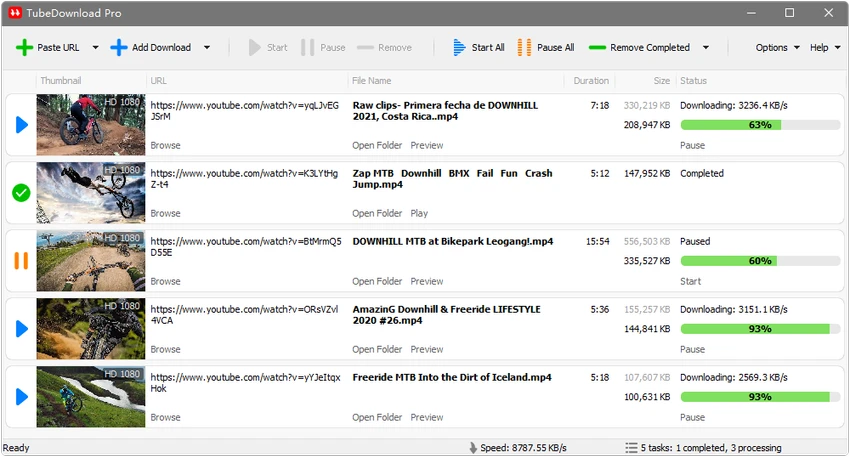
TubeDownload is a Windows-based video download manager designed for users who want to save online videos from YouTube and hundreds of other video websites. The application focuses on fast downloads, support for high-resolution video formats, playlist downloading, and built-in media conversion options. TubeDownload Pro is positioned as a professional downloading tool, offering faster download performance and support for formats ranging from standard video files to high-quality 8K content.

Features of TubeDownload

  • Download videos from YouTube and hundreds of other supported video websites.
  • Improve download speeds by up to 500% or more with TubeDownload Pro.
  • Download videos in multiple resolutions, including 720p, 1080p, 2K, 4K, and 8K HD.
  • Download complete playlists with only a few clicks.
  • Download multiple videos simultaneously.
  • Pause and resume downloads whenever needed.
  • Convert video and audio files between formats such as MP4, FLV, WebM, WMV, MP3, AAC, OGG, and other supported formats.

User Experience

Using TubeDownload feels focused on simplicity and efficient video management. The software provides essential tools for downloading online videos without adding unnecessary functions outside its main purpose. The ability to download multiple videos at the same time is useful for users managing large collections, while playlist downloading helps reduce the effort required to save multiple videos individually. The pause and resume function also provides more flexibility when handling larger downloads.

Support for HD resolutions, including 4K and 8K video downloads, makes TubeDownload suitable for users who want to keep higher-quality versions of online videos. The built-in conversion options add convenience by allowing downloaded files to be changed into commonly used video and audio formats. TubeDownload is available for Windows 11, Windows 10, Windows 8, and Windows 7 (64-bit), making it compatible with a wide range of modern Windows systems.

Who Should Use TubeDownload?

  • Users who frequently download online videos from multiple websites.
  • People who want a Windows video downloader with HD and 8K support.
  • Users who need playlist downloading and batch video downloads.
  • Anyone looking for a tool that combines downloading and basic media format conversion.

Conclusion

TubeDownload is a practical video download manager for Windows users who need a straightforward way to save online videos, manage multiple downloads, and convert files into different formats. Its support for HD, 4K, and 8K downloads makes it a useful option for users focused on video quality.

Pros & Cons

Pros

  • Supports downloads from YouTube and many other video websites.
  • Offers high-resolution downloads up to 8K.
  • Includes playlist and multiple-video downloading.
  • Provides pause and resume download controls.
  • Supports video and audio format conversion.

Cons

  • No user ratings or review data are available.
  • Available only for Windows systems.
  • The exact list of supported video websites is not provided.

Frequently Asked Questions

What is TubeDownload?

TubeDownload is a Windows application designed for downloading videos from YouTube and hundreds of other video websites. It also includes video and audio conversion features.

Does TubeDownload support 4K and 8K video downloads?

Yes. TubeDownload supports downloading videos in resolutions including 720p, 1080p, 2K, 4K, and 8K HD.

Can TubeDownload download multiple videos at once?

Yes. The software supports downloading multiple videos simultaneously.

Can TubeDownload download entire playlists?

Yes. TubeDownload allows users to download complete playlists with a few clicks.

Which operating systems support TubeDownload?

TubeDownload supports Windows 11, Windows 10, Windows 8, and Windows 7 with 64-bit systems.

Can TubeDownload convert downloaded files?

Yes. TubeDownload can convert video and audio files between formats including MP4, FLV, WebM, WMV, MP3, AAC, and OGG.

Recommended apps [Freeware]:
  • NewFileTime 8.28 NewFileTime logo a lightweight Windows utility that lets users change file creation, modification, and access timestamps easily
  • TickTick 8.1.0.1 TickTick logo Organize tasks, manage schedules, and stay focused with TickTick's calendar, Pomodoro timer, and collaboration tools
  • Training Manager 2026 v4.10.4002 Training Manager logo Track employee training, compliance, certifications, and class schedules with centralized training management tools
  • Daum PotPlayer 1.7.22960 Daum PotPlayer logo a free media player for Windows with broad format support, built-in codecs, subtitles, and customization
  • Vektorrazor 2.2 Vektorrazor logo converts logos and image sources into clean, CAD-friendly vector contours for technical workflows
  • Drupal 11.3.13 Drupal logo open-source CMS and web development framework that powers enterprise websites, digital platforms, and scalable web applications
Recommended apps [Shareware]:
  • Adobe Illustrator 2026 Adobe Illustrator logo professional vector graphic editor for creating logos, illustrations, and scalable designs.
  • Screenpresso 2.2.13 Screenpresso logo a versatile screen capture and video recording tool with editing and annotation features.
  • HWMonitor Pro 1.58 HWMonitor Pro logo extends HWMonitor with remote monitoring, logging graphs, and improved sensor interface tools.
  • Bandizip 7.44 Bandizip logo Fast and intuitive file compression software supporting ZIP, RAR, 7Z, and more with high-speed archiving features
  • Home Manager 2026 v4.10.1002 Home Manager logo track home inventory, store item details, manage repairs, and generate insurance reports
  • Cubase Pro 15.0.30 Cubase Pro logo a professional DAW for recording, composing, editing, mixing, and music production