Karaosoft Karma logo

Karaosoft Karma 2026.6.26

  • User Rating:
    ★★★★★
    ★★★★★
    0.0 0Votes
  • Requirements:
    Windows
  • Version: 2026.6.26
  • Latest updated: 3 days ago
  • License: Freemium  
  • Publisher: Karaosoft
  • Size: 31 MB
× app stores

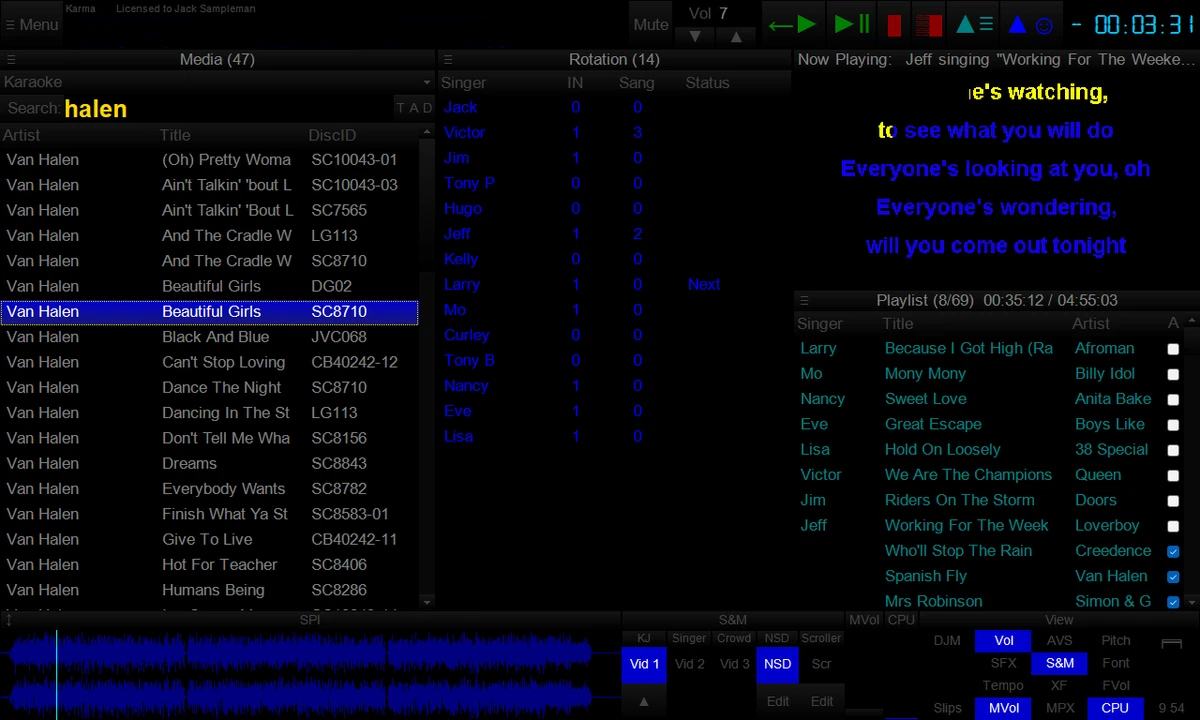
Karaosoft Karma is a dedicated karaoke show management application designed to simplify and streamline the workflow of karaoke hosts (KJs). Built from years of research into live karaoke operations, it focuses on reducing manual tasks through features like clickless search, drag-and-drop rotation control, and automated playlist management. The software is designed to handle everything from singer rotation to audio/video playback, allowing hosts to focus more on engaging with the audience rather than managing complex controls during a live show.

Key Features of Karaosoft Karma

  • Clickless song search (start typing immediately without selecting a search box).
  • Drag-and-drop singer and song rotation management.
  • Paperless karaoke slips via SingNext.com integration.
  • Triple display support:
    • KJ control screen
    • Singer lyrics display
    • Audience display with customizable visuals
  • Private messaging between KJ, singers, and audience screens.
  • High-quality audio and video playback engine.
  • Automatic playlist sorting based on singer rotation.
  • Touchscreen support with inertia scrolling.
  • Auto-play DJ mode with automatic crossfading.
  • Auto-pitch settings per song.
  • On-the-fly lyrics timing adjustment (AV sync control).
  • Version changer to switch between available song versions instantly.
  • Panel-based interface with up to 64 customizable layouts.
  • Prevents window overlap with structured control panels.
  • Automatic crossfading, multiplex routing, and show automation tools.

User Experience

Using Karaosoft Karma feels like working with a purpose-built live performance system rather than a generic media player. The interface is designed for speed, which is essential during live karaoke events where timing and organization matter. One of the most practical features is clickless search. Being able to start typing immediately without clicking into a search field significantly reduces friction during busy moments. Combined with drag-and-drop rotation management, adjusting singer order feels fast and intuitive.

The triple display system is particularly powerful in live environments. Separating the KJ interface, singer lyrics, and audience visuals helps maintain a clean workflow and ensures each group gets a tailored experience. Private messaging adds another layer of control, allowing discreet communication with performers when needed. Automation features such as auto-play, crossfading, and playlist sorting make it possible to run portions of a show with minimal manual intervention. This is especially useful when managing long events or taking short breaks without interrupting the flow of music.

Overall, Karma is clearly designed for professional karaoke hosts who need reliability, speed, and flexibility in live environments.

Who Should Use Karaosoft Karma?

Karaosoft Karma is ideal for professional karaoke hosts, DJs, event organizers, and venue operators who manage live karaoke shows. It is especially suited for users who need fast rotation control, multi-screen output, and reliable automation during live performances.

Conclusion

Karaosoft Karma is a powerful karaoke show management solution that prioritizes speed, organization, and performance reliability. With features like clickless search, triple display output, and automated playlist handling, it significantly reduces the workload of running live karaoke events.

Pros & Cons

Pros

  • Fast, clickless workflow for live show management.
  • Intuitive drag-and-drop rotation system.
  • Triple display support for KJ, singer, and audience.
  • Strong automation features (auto-play, crossfade, sorting).
  • Private messaging improves live communication control.
  • Highly customizable interface layouts.
  • Designed specifically for professional karaoke hosting.

Cons

  • Primarily designed for professional KJs, not casual users.
  • Feature-rich interface may require learning time.
  • Limited information on supported media formats in provided data.

Frequently Asked Questions

What is Karaosoft Karma?

Karaosoft Karma is karaoke show management software designed for KJs and event hosts to control songs, singers, and live performances efficiently.

Does Karaosoft Karma support multiple displays?

Yes. It supports triple display output for the KJ, singer, and audience screens.

Can I manage singer rotation easily?

Yes. The software includes drag-and-drop functionality to quickly adjust singer order in real time.

Does Karma support automated playback?

Yes. It includes auto-play, crossfading, and playlist automation features.

Is Karaosoft Karma suitable for beginners?

It is designed mainly for professional karaoke hosts, so beginners may need some time to learn its workflow.

Recommended apps [Freeware]:
  • Vivaldi Browser 8.0.4033.54 Vivaldi Browser logo a Chromium-based browser with built-in mail, calendar, notes, ad blocker, and deep customization features.
  • Prevent Restore 2026 v122 Prevent Restore logo securely wipes deleted files, blocks data recovery, and protects sensitive information on Windows
  • GOM Player 2.3.120 Build 5390 GOM Player logo a free Windows media player supporting many formats, subtitles, VR videos, and damaged file playback
  • HttpMaster Professional 7.0.0 HttpMaster Professional logo web testing tool for developers to automate HTTP requests, API testing, and response validation
  • Trellix Stinger 26.06.26.4 Trellix Stinger logo portable malware removal tool for Windows designed to detect and remove specific viruses from infected systems
  • Jailer 17.1.3 Jailer logo database subsetting and data browsing tool for exporting consistent relational datasets and navigating database relationships
Recommended apps [Shareware]:
  • Total Audio Converter 6.1.0.299 Total Audio Converter logo convert MP3, WAV, FLAC, AAC and more with batch processing, CD ripping, and Windows integration.
  • DocuFreezer 7.0.2606.20080 DocuFreezer logo a Windows batch converter for documents and images, converting files to PDF, JPG, TIFF, PNG, and TXT formats
  • SQL Backup Master 8.5.1102.0 SQL Backup Master logo SQL Server backups with cloud storage, encryption, scheduling, and recovery features
  • UVK Ultra Virus Killer 11.10.26.0 UVK Ultra Virus Killer logo removes malware, manages system processes, repairs Windows issues, and provides advanced system cleanup tools
  • Modern CSV 2.4.3 Modern CSV logo high-performance CSV editor for Windows with fast large-file handling, multi-cell editing, filtering, and sorting tools
  • LanSend 26.06 LanSend logo LAN messaging tool for system administrators to send instant messages to multiple Windows users without installing client software