FileLegit Windows Internet & Network Download Managers MediaHuman YouTube Downloader
MediaHuman YouTube Downloader logo

MediaHuman YouTube Downloader 3.9.22

  • User Rating:
    ★★★★★
    ★★★★★
    0.0 ★ 0Votes
  • Requirements:
    Windows
  • Version: 3.9.22
  • Latest updated: 3 months ago
  • License: Free Trial  
  • Publisher: MediaHuman
  • Size: 87 MB
× ❮ app stores ❯

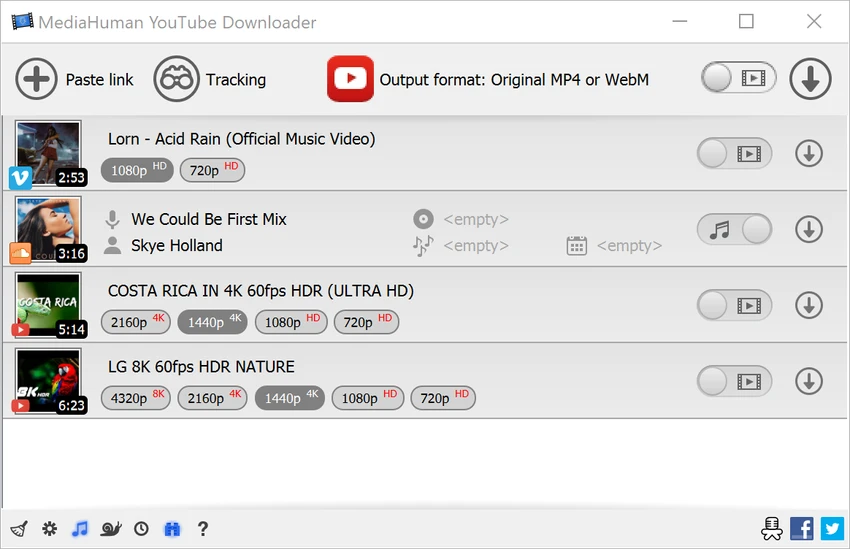
MediaHuman YouTube Downloader is a desktop application designed to download videos, playlists, and entire channels from YouTube and other supported platforms. It focuses on simplicity, speed, and high-quality downloads, allowing users to save online videos for offline viewing or audio extraction. The software supports a wide range of resolutions, including HD, 4K, and even 8K, while maintaining original video quality and audio synchronization. It is built for users who need a straightforward way to manage bulk video downloads.

Key Features of MediaHuman YouTube Downloader

  • Download full YouTube playlists and channels
  • Supports high resolutions up to 4K and 8K (with audio)
  • Multi-video simultaneous downloads
  • Extract audio and save as MP3 files
  • Supports multiple platforms (YouTube, Vimeo, Facebook, TikTok, Dailymotion, and more)
  • Clipboard monitoring for automatic link detection
  • Drag-and-drop URL support
  • Export downloads to iTunes / Music app
  • Preserves original video quality and format (MP4, WebM)
  • Simple tag editor for audio metadata (ID3 tagging)
  • Automatic channel and playlist monitoring for new uploads
  • Multilingual interface support

User Experience

After using MediaHuman YouTube Downloader, the most noticeable advantage is its simplicity. The workflow is straightforward: copy a video link, and the application automatically detects it and adds it to the download queue.

Downloading entire playlists or channels is especially convenient, removing the need to process videos individually. This makes it highly efficient for users who want to archive content or manage offline media libraries. The software handles high-resolution video downloads well, including 4K and 8K formats where available. Audio extraction to MP3 is also seamless, with automatic metadata detection helping organize music files.

The interface is clean and minimal, focusing mainly on download management rather than advanced configuration. This makes it accessible to non-technical users while still offering enough control for more advanced use cases. Overall, it performs reliably as a dedicated video downloader with strong support for bulk downloading and media conversion.

Who Should Use MediaHuman YouTube Downloader?

  • Users who want to download YouTube videos for offline viewing
  • Music listeners extracting audio from videos
  • Content curators saving playlists or channels
  • Users who need a simple, no-fuss downloader tool
  • Anyone managing offline media collections

Conclusion

MediaHuman YouTube Downloader is a reliable and easy-to-use tool for downloading online videos and audio in high quality. Its support for playlists, channels, and multiple platforms makes it a strong choice for users who want a straightforward media downloading solution.

Pros & Cons

✓

Pros

  • Supports playlists and full channel downloads
  • High-quality video support up to 8K
  • Easy-to-use drag-and-drop interface
  • Automatic clipboard link detection
  • MP3 audio extraction with tagging
  • Works with multiple video platforms
  • Simple and beginner-friendly interface
✕

Cons

  • Limited advanced download customization options
  • No built-in video editing features
  • Depends on platform availability and changes

Frequently Asked Questions

What is MediaHuman YouTube Downloader used for?

It is used to download videos, playlists, and channels from YouTube and other supported platforms.

Can it download videos in 4K or 8K?

Yes. It supports high-resolution downloads including 4K and 8K where available.

Can I extract audio from videos?

Yes. It can convert videos to MP3 audio files with tagging support.

Does it support playlists?

Yes. You can download entire playlists or channels at once.

Is it easy to use?

Yes. It features a simple interface with drag-and-drop and automatic link detection.

What platforms are supported?

It supports YouTube, Vimeo, Facebook, TikTok, Dailymotion, and many other video sites.

Recommended apps [Freeware]:
  • O&O ShutUp10++ 3.2.1111 O&O ShutUp10++ logo control Windows privacy, telemetry, updates, and system settings with a simple portable interface
  • KMPlayer 2026.6.26.11 KMPlayer logo high-performance 4K/8K media player with ad-free UI, codec support, and YouTube playback tools
  • Fastfetch 2.66.0 Fastfetch logo open-source system information tool that displays hardware and OS details with customizable output
  • SecretDNS 3.9.2 SecretDNS logo Improve online privacy with encrypted DNS requests and SNI protection while reducing access issues through secure network features.
  • Audio Tag Manager 2.0 Audio Tag Manager logo free audio tag editor for Windows that helps you edit, clean, organize, and rename music files. It supports MP3, FLAC, OGG, APE, M4A, WMA, and WAV.
  • DXVA Checker 4.8.0 DXVA Checker logo Check DXVA support, decoder compatibility, GPU usage, and hardware video acceleration capabilities for Windows media playback.
Recommended apps [Shareware]:
  • SketchUp Pro 2026 SketchUp Pro logo powerful 3D modeling software for architects, designers, and engineers with intuitive tools.
  • Start11 2.8.0 Start11 logo Windows customization tool that restores classic Start Menu styles and enhances taskbar functionality on Windows 10 and 11
  • NovaBench 6.1.2 NovaBench logo Benchmark your CPU, GPU, RAM, and storage with NovaBench to measure PC performance and compare results online
  • Pepakura Designer 6.2.6 Pepakura Designer logo converts 3D models into printable papercraft patterns with layout editing and export tools
  • Zebra CardStudio 2.5.44 Zebra CardStudio logo Zebra CardStudio helps businesses design, encode, and print professional ID cards and Digital IDs with advanced data management.
  • Chris-PC Game Booster 7.26.0706 Chris-PC Game Booster logo optimizes Windows settings, CPU, GPU, memory, storage, and network usage for gaming performance