Process Lasso logo

Process Lasso 18.2.2.10

  • User Rating:
    ★★★★★
    ★★★★★
    0.0 ★ 0Votes
  • Requirements:
    Windows
  • Version: 18.2.2.10
  • Latest updated: 2 weeks ago
  • License: Freemium  
  • Publisher: Bitsum Technologies
  • Size: 3 MB
× app stores

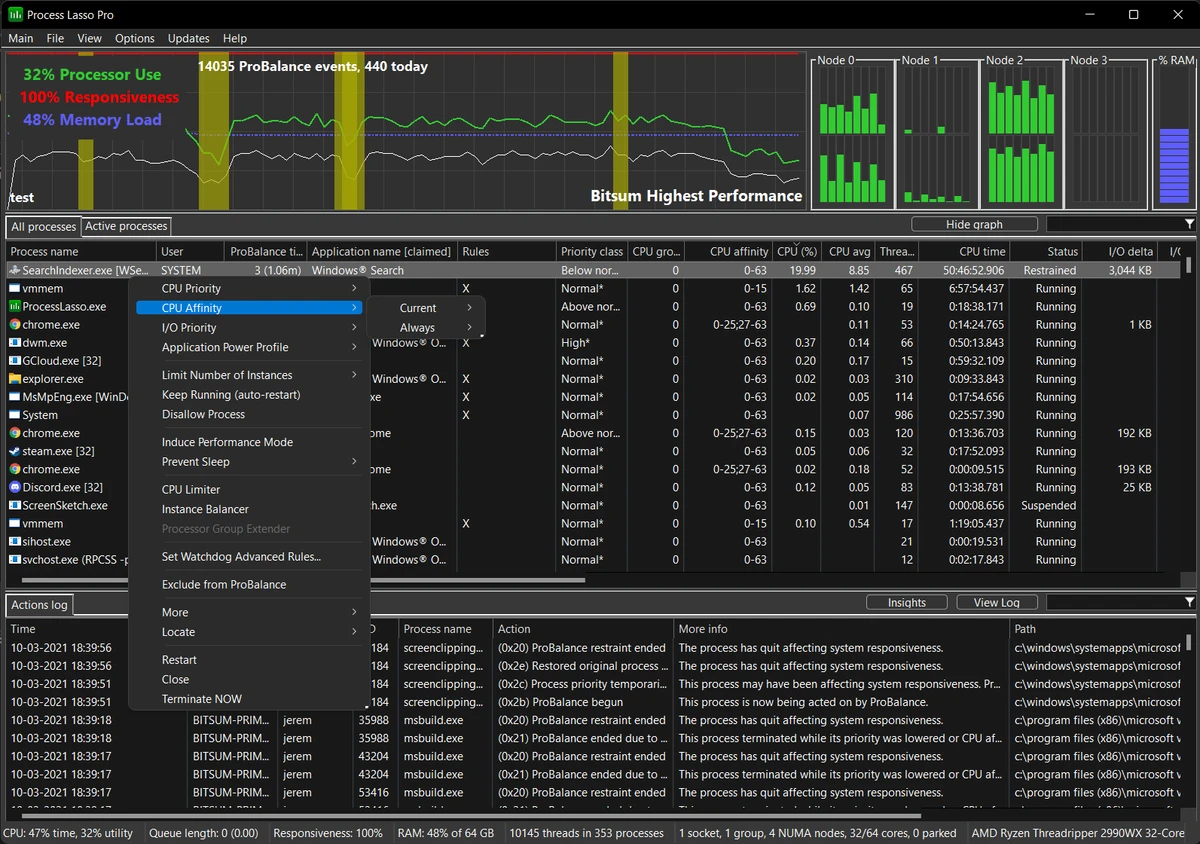
Process Lasso is a Windows system management tool designed to give users greater control over how applications, processes, and services operate. It provides advanced options for adjusting process priorities, CPU affinities, and background behavior to help improve system responsiveness. The software includes features such as ProBalance dynamic priority optimization, automatic process restarting, process restrictions, event logging, and system responsiveness monitoring. With its lightweight design and standalone process management engine, Process Lasso aims to provide detailed control without using significant system resources. It is especially useful for users who want to monitor and customize how programs run in the background.

Features of Process Lasso

  • ProBalance dynamic priority optimization to help manage process behavior.
  • Persistent process priorities and CPU affinity settings.
  • Instance count limits to control how many copies of a process can run.
  • Disallowed process rules for preventing selected processes from running.
  • Automatic process restarting to keep important applications active.
  • System responsiveness graph for monitoring performance changes.
  • Option to prevent PC sleep for designated processes.
  • Ability to differentiate between individual svchost.exe instances.
  • Lightweight operation with extremely low resource usage.
  • Standalone process management engine using as little as 1MB of RAM.
  • Event logging for tracking process activity.

Interface and Usability

Process Lasso is designed for users who want detailed control over running processes and system behavior. Instead of providing only basic task management functions, it focuses on advanced configuration options such as setting permanent priorities, managing CPU affinities, and creating rules for specific processes. The software provides monitoring tools, including a system responsiveness graph and event logging, which help users understand how processes affect system performance. Its low resource usage allows it to run in the background without significantly affecting system operation.

Because Process Lasso offers many customization options, it is best suited for users who want deeper control over Windows process management rather than a simple automatic optimization tool.

Who Should Use Process Lasso?

  • Advanced PC users who want to customize process priorities and CPU usage.
  • Users managing resource-heavy applications or background processes.
  • Gamers looking for additional control over system responsiveness.
  • Users who need automatic process rules and monitoring features.
  • Anyone who wants a lightweight process management tool.

Conclusion

Process Lasso is a powerful process management utility for users who want more control over Windows performance and background activity. With features like ProBalance optimization, persistent settings, process restrictions, and detailed monitoring tools, it provides a deeper level of customization than standard system management options.

Pros & Cons

✓

Pros

  • Provides extensive control over process priorities and CPU affinities.
  • Includes automatic optimization through ProBalance.
  • Uses very little system memory.
  • Offers process monitoring and event logging tools.
  • Supports automatic process restart and process restrictions.
✕

Cons

  • Advanced settings may be overwhelming for users who only need basic process management.
  • The available information does not include comparisons with other system optimization tools.

Frequently Asked Questions

What is Process Lasso used for?

Process Lasso is used to manage and control how Windows processes and services run. It allows users to adjust process priorities, CPU affinities, and create rules for specific applications.

Does Process Lasso improve system performance?

Process Lasso includes features such as ProBalance dynamic priority optimization and system responsiveness monitoring, which are designed to help manage process behavior and maintain system responsiveness.

Can Process Lasso automatically restart programs?

Yes. Process Lasso includes a feature that can keep selected processes running by automatically restarting them when needed.

Does Process Lasso use many system resources?

No. Process Lasso is designed to use very few resources. Its standalone process management engine can use as little as 1MB of RAM.

Can Process Lasso limit how many times a program runs?

Yes. Process Lasso includes instance count limits that allow users to control the number of running instances of selected processes.

Can Process Lasso prevent certain processes from running?

Yes. The software includes disallowed process rules that can prevent selected processes from running. It also provides event logging to help users track process activity.

Recommended apps [Freeware]:
  • Bulk Crap Uninstaller 6.2 Bulk Crap Uninstaller logo a free Windows tool that quickly removes multiple applications and cleans leftover files
  • MSI Center 2.0.71.0 MSI Center logo a system utility for MSI devices that manages performance, gaming modes, monitoring, RGB, and hardware optimization tools
  • Dashlane 6.2626.1 Dashlane logo secure password manager that stores credentials, autofills forms, and enhances online security with encryption and alerts
  • Winstep Nexus 26.6 Winstep Nexus logo customizable desktop dock for Windows with app launch shortcuts, widgets, and multi-monitor support
  • FreeFileSync 14.10 FreeFileSync logo open-source tool for folder synchronization, file comparison, and efficient backups
  • Alternate Textbrowser 4.520 Alternate Textbrowser logo View and edit source code with syntax highlighting, binary viewing, search tools, and built-in utilities in a lightweight editor.
Recommended apps [Shareware]:
  • Gilisoft Screen Recorder Pro 13.1 Gilisoft Screen Recorder Pro logo a Windows tool for capturing screen, webcam, and audio with editing features, GPU acceleration, and multiple formats
  • Tomabo MP4 Downloader 6.4.9 Tomabo MP4 Downloader logo downloads videos, playlists, subtitles, and audio while offering format conversion tools.
  • Neevia Document Converter Pro 7.7.0.292 Neevia Document Converter Pro logo Convert over 300 document formats to PDF, PDF/A, and image files
  • Sparkbooth 7.2.79 Sparkbooth logo Create a professional photo booth with Sparkbooth, featuring customizable layouts, green screen effects, instant sharing, and printing
  • Argente Registry Cleaner 4.0.8.7 Argente Registry Cleaner logo Clean invalid registry entries safely with backup protection, multiple scan modes, and an easy-to-use Windows maintenance tool.
  • SecureCRT 9.7.3 Build 3916 SecureCRT logo Secure remote connections with SSH, Telnet, scripting, session management, and secure file transfer tools for professionals.