FileLegit Windows Utilities Backup & Recovery UFS Explorer Professional Recovery
UFS Explorer Professional Recovery logo

UFS Explorer Professional Recovery 10.21.1

  • User Rating:
    ★★★★★
    ★★★★★
    0.0 ★ 0Votes
  • Requirements:
    Windows
  • Version: 10.21.1
  • Latest updated: 1 week ago
  • License: Free Trial  
  • Publisher: UFS Explorer
  • Size: 83 MB
× app stores

UFS Explorer Professional Recovery is a professional-grade data recovery solution designed specifically for data recovery specialists, IT professionals, and forensic technicians who require advanced recovery capabilities beyond standard consumer software. Rather than focusing solely on recovering deleted files, the application combines low-level storage management, in-depth data analysis, and high-level recovery tools within a single platform.

One of the software's standout characteristics is its ability to perform comprehensive storage analysis before recovery begins. This enables users to inspect file systems, verify data consistency, and better understand the condition of damaged or formatted storage devices before initiating the recovery process. The software also supports reconstruction and analysis of RAID arrays through its integrated RAID Builder, making it suitable for recovering data from complex storage environments.

Another distinguishing feature is the ability to modify original storage information, a capability unique within the UFS Explorer product family according to the provided information. The interface is designed for advanced workflows, offering multiple specialized tools for navigating storage structures, identifying files and folders, analyzing fragmentation, and targeting recovery from previous or current file system states. While the application offers powerful functionality, its sophisticated interface and professional toolset make it better suited for experienced users than beginners seeking simple file recovery.

Features of UFS Explorer Professional Recovery

  • All-in-one professional data recovery solution.
  • Combines low-level storage management with advanced recovery tools.
  • Performs pre-recovery data inspection and analysis.
  • Quick data consistency verification.
  • Context-aware storage navigation.
  • File and folder recognition.
  • Fragmentation analysis.
  • Recovery from alternative file systems.
  • Detects both current and previous file system states after formatting.
  • Targeted recovery from specific file system states.
  • Integrated RAID Builder for creating standard RAID configurations.
  • RAID analysis and virtual reconstruction of complex RAID storage.
  • Automatic data analysis and scanning modes.
  • Recovers lost and deleted files.
  • Allows modification of original storage information.

Interface and Usability

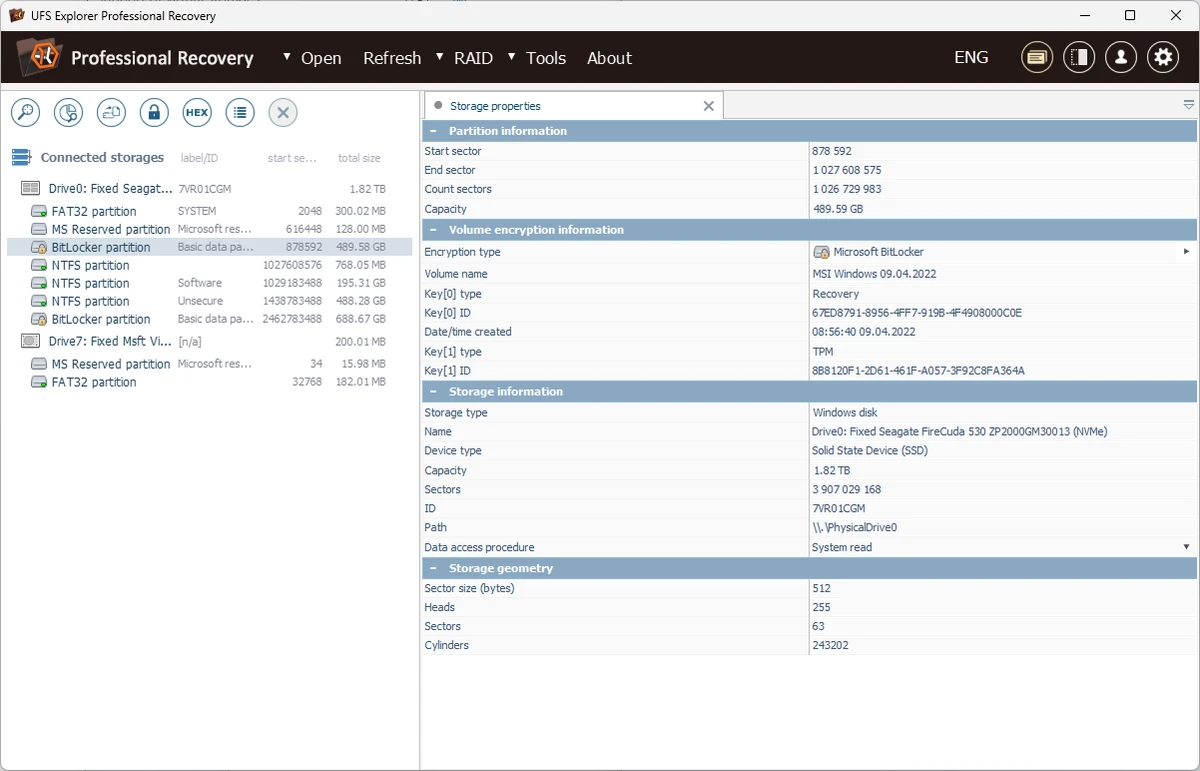
UFS Explorer Professional Recovery is clearly built with professional workflows in mind rather than ease of use for casual users. During use, the interface presents numerous specialized tools for storage inspection, RAID reconstruction, and detailed file system analysis. This multi-tool design provides extensive control but also introduces a steeper learning curve.

Navigation is organized around storage devices and recovery operations, allowing users to inspect storage structures before initiating recovery. The software provides detailed information about file systems, fragmentation, and storage layouts, helping experienced users make informed recovery decisions. Although the interface is comprehensive, beginners may find it overwhelming due to the number of available options and advanced terminology. Users with experience in data recovery, system administration, or digital forensics are more likely to appreciate the depth of functionality offered.

Who Should Use UFS Explorer Professional Recovery?

  • Professional data recovery specialists.
  • IT administrators managing storage systems.
  • Digital forensic professionals.
  • Advanced users working with damaged or formatted storage devices.
  • Users recovering data from RAID configurations.
  • Technical support professionals handling complex recovery scenarios.

Conclusion

UFS Explorer Professional Recovery is a powerful solution for professionals who require more than basic file recovery. Its combination of advanced storage analysis, RAID reconstruction, file system inspection, and targeted recovery capabilities makes it well suited for demanding recovery projects involving damaged, formatted, or complex storage devices.

The software's extensive functionality comes with increased complexity, so users without technical experience may find it challenging to master. However, for data recovery professionals and IT specialists seeking a comprehensive recovery platform, UFS Explorer Professional Recovery offers an impressive range of specialized tools within a single application.

Pros & Cons

✓

Pros

  • Comprehensive professional data recovery toolkit.
  • Advanced file system inspection and analysis.
  • Built-in RAID Builder and RAID reconstruction tools.
  • Supports recovery from formatted file systems.
  • Automatic scanning and data analysis.
  • Combines storage management and recovery in one application.
  • Suitable for complex enterprise-level recovery tasks.
✕

Cons

  • Complex interface with a steep learning curve.
  • Primarily intended for professional users rather than beginners.

Frequently Asked Questions

What is UFS Explorer Professional Recovery used for?

UFS Explorer Professional Recovery is designed for advanced data recovery tasks, including recovering lost or deleted files, analyzing storage devices, inspecting file systems, and reconstructing RAID arrays.

Can UFS Explorer Professional Recovery recover data from formatted drives?

Yes. The software can detect both current and previous file system states after formatting, allowing users to target recovery from a specific file system state when possible.

Does the software support RAID recovery?

Yes. It includes an integrated RAID Builder that allows users to create standard RAID configurations and virtually reconstruct complex RAID storage for recovery purposes.

Is UFS Explorer Professional Recovery suitable for beginners?

Not necessarily. The software is designed primarily for professional data recovery specialists and advanced users. Its extensive feature set and technical interface require a certain level of expertise.

Can the software analyze storage before recovering data?

Yes. It provides pre-recovery storage inspection, data consistency verification, file system analysis, and fragmentation details to help users assess storage conditions before performing recovery.

What types of recovery tasks is UFS Explorer Professional Recovery best suited for?

The software is best suited for complex recovery scenarios involving damaged storage devices, formatted partitions, RAID arrays, and situations where detailed storage analysis is required before data recovery.

Recommended apps [Freeware]:
  • Ventoy 1.1.16 + LiveCD Ventoy logo create bootable USB drives and boot directly from ISO files without extraction or reformatting
  • Opera GX 133.0.5932.56 Opera GX logo Chromium-based gaming browser featuring CPU, RAM, and network limiters, built-in VPN, ad blocker, and gaming integrations.
  • Uninstalr 3.1 Uninstalr logo a free software uninstaller featuring batch uninstall, leftover cleanup, and portable support
  • R-Photo 2.0.180048 R-Photo logo Restore media from HDDs, SSDs, SD cards, USB drives, RAID, and more
  • Wise Disk Cleaner 11.3.6.856 Wise Disk Cleaner logo Free up storage, remove junk files, and optimize your PC with Wise Disk Cleaner for faster Windows performance
  • VidMasta 30.7 VidMasta logo Search, preview, and manage movie downloads with advanced filtering, subtitles, trailers, and detailed title information.
Recommended apps [Shareware]:
  • MobaXterm 26.4 MobaXterm logo Manage SSH, RDP, VNC, X11, FTP, and Unix tools in one powerful Windows application
  • Atlantis Word Processor 5.0.5.3 Atlantis Word Processor logo Create documents with Atlantis Word Processor, a fast and lightweight word processor featuring spell check, formatting, and eBook export
  • Catalyst Production Suite 2026.1.1 Catalyst Production Suite logo a professional media tool for browsing, preparing, transcoding, and managing Pro video formats.
  • System Mechanic Ultimate Defense 26.5.0.227 System Mechanic Ultimate Defense logo Optimize, repair, and secure your Windows PC with System Mechanic Ultimate Defense's all-in-one maintenance suite.
  • WeBuilder 2025 v18.7.0.277 WeBuilder logo Lightweight web code editor with syntax highlighting, FTP publishing, code snippets, and support for modern web technologies.
  • Windscribe 2.23.12 Windscribe logo Browse privately with encrypted connections, ad and tracker blocking, malware protection, and free monthly data across multiple server locations.