


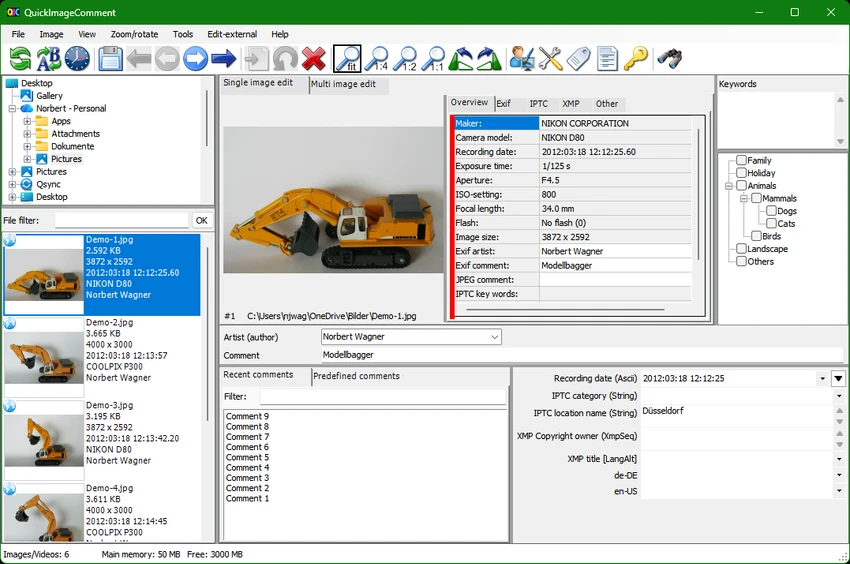

QuickImageComment is a free Windows utility designed for quickly viewing, editing, and managing image metadata. It focuses on IPTC, EXIF, and XMP data embedded in digital images such as JPEG and TIFF files. The software allows users to add or modify image comments, artist information, and other metadata fields efficiently, making it especially useful for photographers and media professionals who work with large image collections.
Features of QuickImageComment
- View IPTC, EXIF, and XMP metadata from image files
- Display additional file properties such as modification date
- Customizable list of frequently used metadata attributes
- Edit user comments and artist information in images
- Modify multiple metadata fields simultaneously
- Batch processing support for multiple image files
- Remove selected or all metadata attributes
- Rename image files based on metadata values
- Compare metadata across multiple images
- Adjust timestamps for image series from different cameras
- Export selected image properties to text files
- Export all image metadata to text files
- View metadata for video files and preview video frames
User Experience
After using QuickImageComment, I found it to be a highly practical tool for managing image metadata without unnecessary complexity. The interface is focused on displaying technical information clearly, making it easy to inspect EXIF, IPTC, and XMP data for individual images.
Editing metadata is straightforward, especially for fields like image comments, artist names, and other descriptive tags. The ability to modify multiple images at once is particularly useful when organizing large photo collections or preparing images for publication. One of the more advanced features is timestamp adjustment, which helps when working with photos taken from different cameras with unsynchronized clocks. This makes it easier to maintain correct chronological order in photo libraries.
The export functionality is also valuable, allowing users to extract metadata into text files for documentation or archival purposes. Additionally, the tool supports video metadata viewing, which extends its usefulness beyond still images. Overall, QuickImageComment provides a focused and efficient workflow for managing and editing image metadata, especially for users who need precision and batch processing capabilities.
Who Should Use QuickImageComment?
- Photographers managing large image libraries
- Media professionals working with metadata-heavy workflows
- Archivists organizing digital photo collections
- Users who need to edit IPTC, EXIF, or XMP data in batches
- Anyone preparing images for publication or cataloging
Conclusion
QuickImageComment is a powerful and efficient metadata editing tool for users who need precise control over image information. With support for IPTC, EXIF, and XMP data, batch editing, and advanced features like timestamp correction and metadata export, it offers a strong solution for professional image management workflows.


