Microsoft OneDrive logo

Microsoft OneDrive 26.113.0614.0004

  • User Rating:
    ★★★★★
    ★★★★★
    0.0 ★ 0Votes
  • Requirements:
    Windows
  • Version: 26.113.0614.0004
  • Latest updated: 2 weeks ago
  • License: Freeware  
  • Publisher: Microsoft
  • Size: 108 MB
× app stores

Microsoft OneDrive is Microsoft's cloud storage and file synchronization service that allows users to securely store files online while keeping them synchronized across multiple devices. Once installed, OneDrive creates a dedicated folder on your computer where files are automatically uploaded and kept in sync with your cloud storage account.

The service is designed to simplify file management by ensuring that any changes made to files or folders are reflected across connected devices. Whether you add, edit, rename, or delete a file, OneDrive automatically synchronizes those changes, helping you maintain the latest version of your data wherever you sign in.

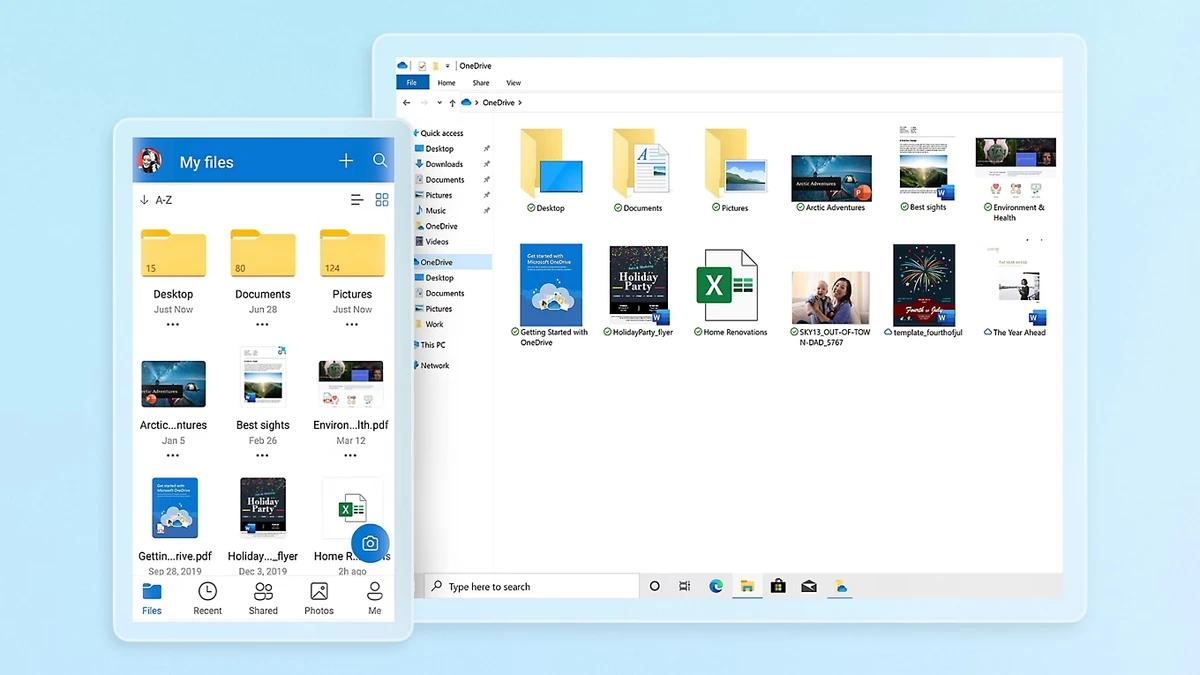
OneDrive integrates directly with Windows File Explorer, allowing users to manage cloud files just like local folders. Uploading new content is as simple as dragging and dropping files into the OneDrive folder, while synchronized files remain accessible from compatible Windows, Mac, mobile devices, and the OneDrive web interface.

In addition to synchronizing files stored in the OneDrive folder, the service also provides remote access to files stored on your PC through the web interface when enabled. For added security, remote file access includes an additional verification step and can be disabled if desired. With seamless synchronization, cloud accessibility, and integration into the Windows environment, Microsoft OneDrive provides a convenient solution for backing up important files and keeping them available across multiple devices.

Features of Microsoft OneDrive

  • Automatically synchronize files across devices
  • Cloud storage for documents, photos, and other files
  • Integrated with Windows File Explorer
  • Access files from Windows, Mac, mobile devices, and the web
  • Automatic file updates when changes are made
  • Drag-and-drop file uploads
  • Remote access to files stored on your PC
  • Optional additional verification for remote file access
  • Automatically back up files stored in the OneDrive folder

Interface and Usability

Microsoft OneDrive is designed to blend naturally into the Windows experience. After installation, it creates a dedicated folder within File Explorer, allowing users to interact with cloud storage just as they would with any local folder.

Uploading files requires little effort, as users simply copy or drag files into the OneDrive folder. The synchronization process runs in the background, automatically updating connected devices whenever changes are made. The web interface and desktop application make it easy to access files from different locations, while remote PC file access provides additional flexibility for users who occasionally need files that are not stored inside the synchronized OneDrive folder.

Overall, the interface is straightforward and suitable for both personal and everyday productivity use.

Who Should Use Microsoft OneDrive?

  • Windows users who want automatic cloud backup
  • People working across multiple devices
  • Students storing documents online
  • Professionals who need synchronized files
  • Users who want remote access to important files
  • Anyone looking for integrated cloud storage within Windows

Conclusion

Microsoft OneDrive provides a simple and reliable way to synchronize files and store them securely in the cloud. Its seamless Windows integration, automatic synchronization, and cross-device accessibility make it a practical solution for managing documents, photos, and other important files.

Pros & Cons

✓

Pros

  • Automatic file synchronization
  • Seamless integration with Windows File Explorer
  • Easy drag-and-drop uploads
  • Access files from multiple devices
  • Supports remote access to PC files
  • Simple setup and everyday usability
✕

Cons

  • Remote file access requires additional verification
  • Cloud synchronization depends on an internet connection

Frequently Asked Questions

What is Microsoft OneDrive used for?

Microsoft OneDrive is a cloud storage service that allows users to store, synchronize, and access files across multiple devices through the internet.

Does OneDrive automatically sync files?

Yes. Files placed in the OneDrive folder are automatically synchronized with your cloud storage account and other connected devices.

Can I access my OneDrive files from another computer?

Yes. You can access your synchronized files through the OneDrive desktop application or the web interface from supported devices.

Does Microsoft OneDrive work with Windows File Explorer?

Yes. OneDrive integrates directly with Windows File Explorer, allowing you to manage cloud files just like local files and folders.

Can OneDrive access files that are not in the OneDrive folder?

Yes. When the remote file access feature is enabled, OneDrive can allow access to files stored elsewhere on your PC through the web interface. This feature includes an additional verification step for security.

Is Microsoft OneDrive suitable for backing up important files?

Yes. OneDrive automatically synchronizes files stored in the OneDrive folder, making it a convenient solution for backing up documents, photos, and other important files to the cloud.

Recommended apps [Freeware]:
  • NewFileTime 8.28 NewFileTime logo a lightweight Windows utility that lets users change file creation, modification, and access timestamps easily
  • Adobe Camera Raw 18.4 Adobe Camera Raw logo Edit, process, and convert RAW photos in Photoshop with Adobe Camera Raw's powerful image workflow tools
  • Evernote 11.24.3.43761 Evernote logo Capture, organize, sync, and access notes, tasks, web content, and research across all your devices
  • Vovsoft Battery Alert 1.1 Vovsoft Battery Alert logo Monitor your laptop battery, receive charging alerts, and promote healthier battery habits with VOVSOFT Battery Alert
  • WinContig 5.0.3.4 WinContig logo a portable file defragmentation tool for Windows that optimizes file access without full disk defrag
  • Godot Game Engine 4.7.1 Godot Game Engine logo Build 2D and 3D games with a free, open-source engine featuring a visual editor, scene system, and cross-platform export tools.
Recommended apps [Shareware]:
  • SketchUp Pro 2026 SketchUp Pro logo powerful 3D modeling software for architects, designers, and engineers with intuitive tools.
  • Kettler World Tours 3.0.4.20 Kettler World Tours logo Train indoors with real-world routes, GPS integration, and online racing using Kettler World Tours
  • SkyDemon 4.3.1 SkyDemon logo Plan flights with real-time aeronautical data, dynamic charts, NOTAMs, METAR, TAF, and intelligent route planning using SkyDemon
  • Digimizer 6.5.4 Digimizer logo image analysis tool for precise measurements, object detection, and scientific image processing
  • Pazu StreamGet 3.1.5 Pazu StreamGet logo Download movies and TV shows from major streaming platforms to MP4 or MKV
  • PrintFab 3.0.7 PrintFab logo advanced printer drivers, RIP functionality, color management, and ink optimization for high-quality printing