Resolume Arena logo

Resolume Arena 7.27.0 rev 14395

  • User Rating:
    ★★★★★
    ★★★★★
    0.0 ★ 0Votes
  • Requirements:
    Windows
  • Version: 7.27.0 rev 14395
  • Latest updated: 2 weeks ago
  • License: Freeware  
  • Publisher: Acoustica
  • Size: 1 GB
× app stores

Resolume Arena is a professional live visual performance and projection mapping application designed for VJs, event producers, lighting designers, and multimedia artists. Building on the capabilities of Resolume Avenue, Arena adds advanced tools for projection mapping, multi-projector edge blending, and lighting integration for large-scale productions. The software enables users to mix HD videos, synchronize visuals with music, and control performances in real time using MIDI controllers, OSC devices, or lighting consoles through SMPTE timecode. It supports playback of both audio and video files while providing GPU-accelerated effects for smooth performance. Arena is capable of driving anything from a single display in a club to complex multi-screen installations, LED stages, immersive 360-degree projections, and architectural mapping projects. With an intuitive interface and flexible output management, it is designed to support creative live productions of various sizes without limiting visual complexity beyond the available hardware.

Features of Resolume Arena

  • Live HD video mixing with tempo adjustment and scratching
  • Real-time playback of audio and video files
  • Advanced projection mapping tools
  • Multi-projector edge blending
  • Supports multi-screen and large-scale visual installations
  • GPU-accelerated video effects and compositing
  • Clip positioning, scaling, and live visual effects
  • DMX lighting output synchronized with visuals
  • SMPTE timecode synchronization
  • MIDI controller support
  • OSC control, including iPhone compatibility
  • Intuitive interface for live performances

Interface and Usability

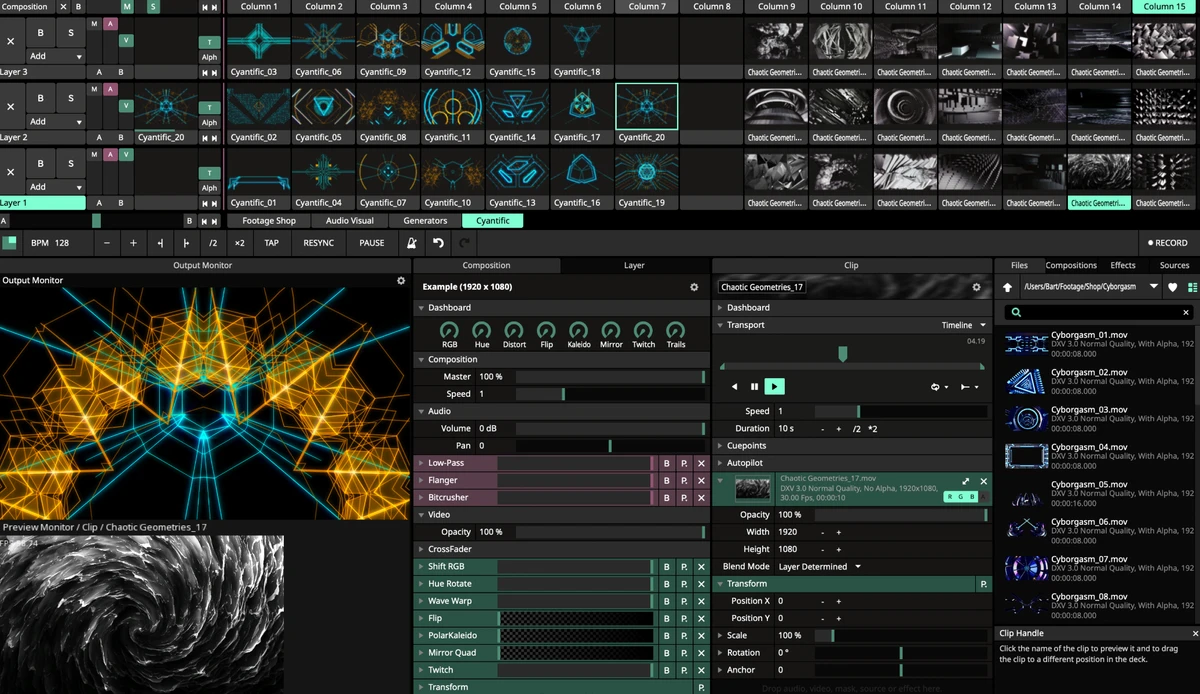
Resolume Arena features an interface built for live performance workflows, allowing users to organize clips, trigger visuals, and apply effects efficiently during events. Its workspace is designed to provide quick access to layers, clips, effects, and output settings, helping operators manage complex visual performances without unnecessary navigation. Projection mapping and edge blending tools are integrated into the workflow, reducing the need to switch between multiple applications. The software also supports external hardware control through MIDI devices, OSC, and lighting desks, making it suitable for professional stage productions.

Who Should Use Resolume Arena?

  • Professional VJs
  • Live event production teams
  • Projection mapping artists
  • Concert and festival visual designers
  • Stage production companies
  • Multimedia installation creators
  • Nightclubs and entertainment venues
  • Lighting designers using DMX fixtures

Conclusion

Resolume Arena is designed for professional live visual productions where projection mapping, synchronized visuals, and multi-display output are essential. Its combination of live video mixing, GPU-powered effects, projection mapping, edge blending, and lighting integration makes it well suited for concerts, festivals, clubs, theatrical productions, and immersive installations. Users looking for a comprehensive solution for real-time visual performances and large-scale projection projects will find Resolume Arena a capable choice, particularly when paired with suitable high-performance hardware.

Pros & Cons

✓

Pros

  • Powerful live HD video mixing capabilities
  • Advanced projection mapping features
  • Multi-projector edge blending support
  • Synchronizes visuals with lighting and timecode
  • Supports MIDI and OSC controllers
  • Handles multi-screen and large-scale installations
  • GPU-accelerated rendering for improved performance
  • Intuitive interface for live workflows
✕

Cons

  • Requires a dedicated NVIDIA or AMD graphics card
  • Performance depends on available system hardware

Frequently Asked Questions

How is Resolume Arena different from Resolume Avenue?

Resolume Arena includes all the functionality available in Resolume Avenue while adding professional projection mapping, edge blending, multi-projector output, and lighting integration features intended for larger live productions.

Can Resolume Arena be used for projection mapping?

Yes. Projection mapping is one of Arena's primary features, allowing users to project visuals onto irregular surfaces, architectural structures, stages, vehicles, and other custom objects.

Does Resolume Arena support multiple projectors?

Yes. Arena supports multiple display outputs and includes edge blending tools that enable seamless widescreen or panoramic projections across two or more projectors.

Can Resolume Arena synchronize visuals with music and lighting?

Yes. The software supports SMPTE timecode synchronization and can output DMX lighting data, allowing compatible lighting fixtures to remain synchronized with visual performances.

Does Resolume Arena support external controllers?

Yes. Users can control performances using MIDI controllers, OSC-compatible devices, and supported lighting desks, reducing reliance on keyboard and mouse input during live events.

What are the minimum system requirements for Resolume Arena?

According to the provided information, the minimum requirements include Windows 10, an NVIDIA or AMD graphics card, and at least 8 GB of RAM.

Recommended apps [Freeware]:
  • WSCC - Windows System Control Center 10.0.4.0 WSCC - Windows System Control Center logo Windows utility manager that installs, organizes, and runs Sysinternals and system tools from one central interface
  • Valentina Studio 17.5.2 Valentina Studio logo manage SQL and NoSQL databases with schema design, queries, reports, and cross-platform support.
  • SoftPerfect RAM Disk 26.7 SoftPerfect RAM Disk logo creates high-speed virtual drives in memory to boost performance and reduce disk wear
  • PilotEdit 21.0.0 PilotEdit logo a powerful text and hex editor for large files with FTP support, scripting, encryption, and search tools
  • Quick CPU 6.6.0 Quick CPU logo Monitor core parking, turbo boost, frequency scaling, and system power in real time
  • COMSS Boot USB 2021.12 COMSS Boot USB logo COMSS Boot USB combines antivirus rescue disks, disk diagnostics, and system recovery tools in one bootable USB toolkit
Recommended apps [Shareware]:
  • EF Commander 26.06 EF Commander logo a feature-rich Windows file manager with FTP, media tools, archiving, and advanced file control
  • MacDrive 12.0.1.23 MacDrive logo Access, read, and write Mac-formatted APFS and HFS+ drives on Windows with full support for encrypted volumes and RAID
  • Lansweeper 12.8.1.7 Lansweeper logo network discovery and IT asset management tool for software inventory, compliance reporting, and device tracking
  • Coolutils PDF Splitter 5.2.0.43 Coolutils PDF Splitter logo split PDF files into individual pages, custom page ranges, or chapters defined by bookmarks
  • HTTP Debugger Pro 10.5 HTTP Debugger Pro logo captures and analyzes HTTP and HTTPS traffic from browsers and apps, helping developers debug web requests in real time
  • Zebra CardStudio 2.5.44 Zebra CardStudio logo Zebra CardStudio helps businesses design, encode, and print professional ID cards and Digital IDs with advanced data management.