Don't Sleep logo

Don't Sleep 10.22

  • User Rating:
    ★★★★★
    ★★★★★
    0.0 0Votes
  • Requirements:
    Windows
  • Version: 10.22
  • Latest updated: 1 week ago
  • License: Freeware  
  • Publisher: Nenad Hrg
  • Size: 0.2 MB
× app stores

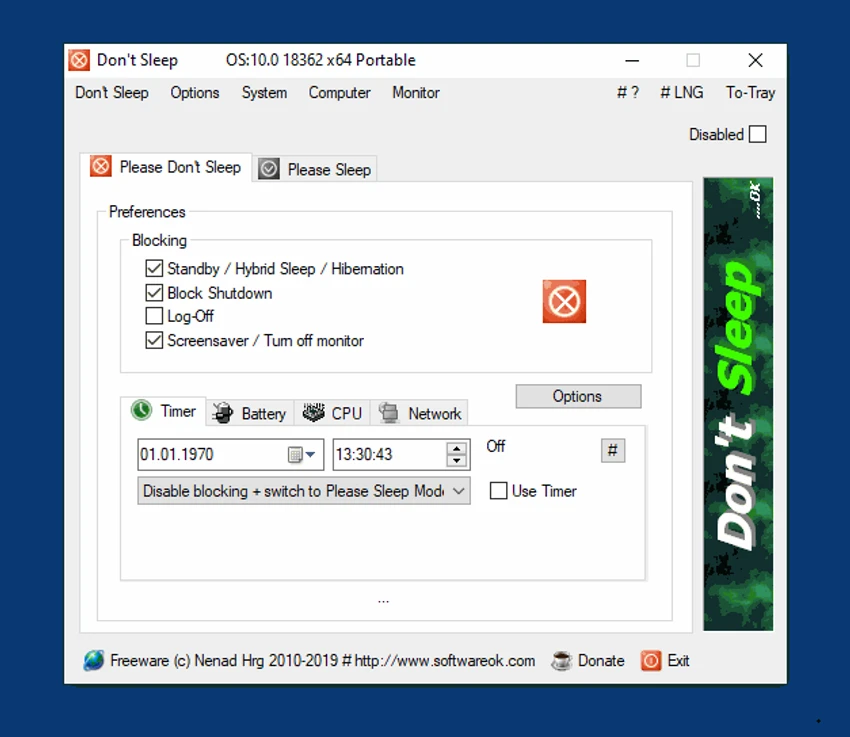
Don’t Sleep is a lightweight Windows utility designed to control and temporarily disable system power management features. It helps prevent your computer from going into sleep mode, restarting, hibernating, or activating the screensaver during critical tasks. It is especially useful when running long processes such as downloads, presentations, or system operations where uninterrupted uptime is required.

Overview

Don’t Sleep provides users with a simple way to override Windows power-saving behavior without permanently changing system settings. Instead of navigating through multiple system menus, users can quickly enable or disable power restrictions from a small interface or system tray tool. The application allows users to define custom time periods or countdown timers during which power-saving features are temporarily suspended. Once the time expires, normal system behavior is automatically restored.

Features of Don’t Sleep

  • Temporarily disables sleep, restart, and hibernation functions
  • Prevents system shutdown or automatic restart
  • Stops screensaver activation during active periods
  • Custom time scheduling for re-enabling power management
  • Countdown timer mode for temporary suspension
  • Ability to set specific activation and deactivation times
  • Option to disable or control system screensaver behavior
  • Lightweight system utility with minimal resource usage
  • Quick access to power control settings

User Experience

Don’t Sleep is designed for simplicity and speed. The interface is minimal, allowing users to activate or deactivate protection with just a few clicks. Most users will interact with it through a small window or system tray icon, making it unobtrusive during daily use. The ability to quickly set timers or schedules is particularly useful for time-sensitive tasks like presentations or overnight processing.

Conclusion

Don’t Sleep is a simple yet effective utility for temporarily disabling Windows power-saving features. Its lightweight design and quick-access controls make it ideal for users who need to keep their system active during important tasks without modifying permanent settings.

Pros & Cons

Pros

  • Very lightweight and fast
  • Easy to use with minimal setup
  • Prevents sleep, restart, and hibernation effectively
  • Timer and scheduling options available
  • Runs quietly in the background

Cons

  • Limited functionality beyond power control
  • No advanced system optimization features

Frequently Asked Questions

What is Don’t Sleep used for?

It is used to prevent Windows from entering sleep mode, restarting, or hibernating temporarily.

Can I set a timer in Don’t Sleep?

Yes, it supports countdown timers and scheduled activation.

Does Don’t Sleep affect system performance?

No, it is lightweight and uses minimal system resources.

Can it disable the screensaver?

Yes, it can temporarily disable screensaver activation.

Is Don’t Sleep suitable for everyday use?

Yes, it is useful whenever you need uninterrupted system activity.

Recommended apps [Freeware]:
  • Far Manager 3.0 Build 6699 Far Manager logo Manage files efficiently with Far Manager's fast text-based interface, plugins, and archive support
  • AIMP 5.40.2721 AIMP logo a lightweight audio player with high-quality sound, playlist tools, equalizer, and audio conversion features
  • Claude Desktop 1.15962.1 Claude Desktop logo Anthropic's AI assistant to Windows and macOS for writing, coding, research, and file analysis
  • Kali Linux 2026.2 Kali Linux logo a powerful penetration testing OS with tools for cybersecurity, digital forensics, and ethical hacking
  • Uninstalr 3.1 Uninstalr logo a free software uninstaller featuring batch uninstall, leftover cleanup, and portable support
  • F-Secure Uninstallation Tool 19.3.15 F-Secure Uninstallation Tool logo completely removes F-Secure security products, including files, services, and registry entries from Windows
Recommended apps [Shareware]:
  • Topaz Photo 1.6.1 Topaz Photo logo advanced AI to sharpen photos, remove noise, and enhance image quality with ease
  • Okdo Pdf to All Converter Professional 6.0 Okdo Pdf to All Converter Professional logo Convert PDF files to Word, Excel, PowerPoint, images, HTML, text, and more with batch processing support
  • EF Duplicate MP3 Finder 26.05 EF Duplicate MP3 Finder logo Find and remove duplicate MP3, FLAC, WMA, and OGG audio files using tag-based and similarity analysis
  • EaseUS Data Recovery Wizard 20.5.0 EaseUS Data Recovery Wizard logo Recover deleted or lost files with EaseUS Data Recovery Wizard using quick and deep scans for hard drives
  • Macro Commander Pro 2.8.7 Macro Commander Pro logo Automate repetitive tasks using macros, scripting, scheduling, and powerful data entry tools
  • Ableton Live 12.4.2 Ableton Live logo a professional DAW for music production, MIDI editing, recording, and live performance