FileLegit Windows Internet & Network Download Managers MediaHuman YouTube to MP3 Converter
MediaHuman YouTube to MP3 Converter logo

MediaHuman YouTube to MP3 Converter 3.9.21

  • User Rating:
    ★★★★★
    ★★★★★
    0.0 0Votes
  • Requirements:
    Windows
  • Version: 3.9.21
  • Latest updated: 1 week ago
  • License: Free Trial  
  • Publisher: MediaHuman
  • Size: 80.3 MB
× app stores

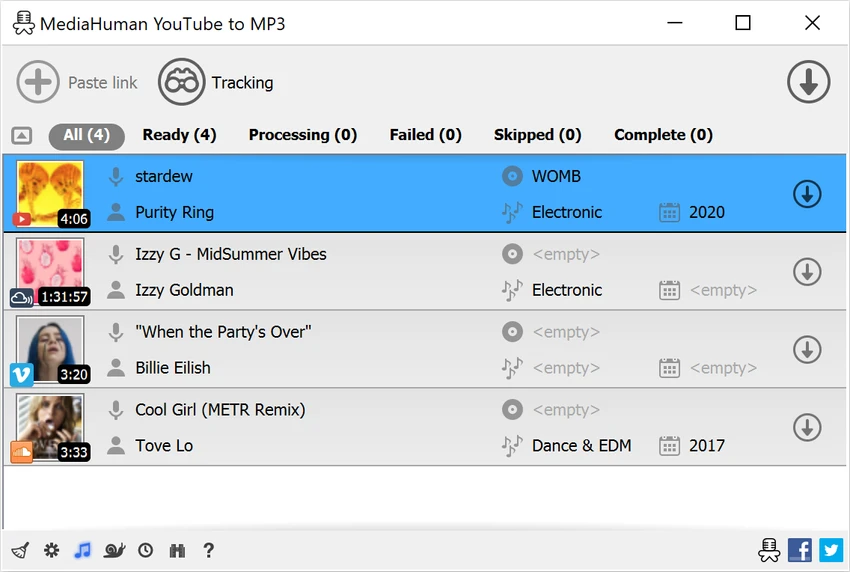
MediaHuman YouTube To MP3 Converter is a dedicated tool for downloading audio tracks from popular online platforms such as YouTube and SoundCloud. It is designed for users who want to save music or audio content for offline listening without dealing with complex conversion steps. During my experience with it, I found that it focuses on simplicity, speed, and batch downloading capabilities.

Features of MediaHuman YouTube To MP3 Converter

  • Downloads audio from YouTube playlists and channels
  • Supports multiple platforms:
    • YouTube
    • Vimeo
    • SoundCloud
    • Dailymotion
    • VEVO
    • Bandcamp and others
  • High-quality audio downloads up to 320 kbps
  • Simultaneous multi-track downloading
  • Automatic detection of audio streams (no video download needed)
  • Simple built-in tag editor
    • Artist and title detection
    • Album cover art support
  • Playlist and channel subscription support for new uploads
  • iTunes integration and automatic playlist export
  • Clipboard monitoring for easy URL importing
  • Saves audio in original format when available (no forced conversion)
  • Multilingual interface support
  • Cross-platform compatibility (Windows, macOS, Linux)

User Experience

After using MediaHuman YouTube To MP3 Converter, I found it to be extremely straightforward. The workflow is simple: copy a URL, and the software automatically detects it and queues it for download. This makes it very convenient for quickly building offline music collections. Playlist downloading works smoothly, allowing entire channels or playlists to be processed without manual selection of each track. This is especially useful for users who want to archive music or follow long-running playlists.

The built-in tag editor is another useful feature. It automatically fills in metadata like artist and title, but still allows manual adjustments when needed. Cover art support helps keep downloaded music libraries organized and visually consistent. Performance is generally fast because the tool downloads only the audio stream instead of full video files. This reduces both bandwidth usage and download time. While the software is efficient and user-friendly, it is clearly focused on a single purpose: extracting audio from online video platforms. It does not provide broader audio editing or media management features.

Who Should Use MediaHuman YouTube To MP3 Converter?

  • Users who want offline music from YouTube or SoundCloud
  • Playlist collectors and music archivists
  • Podcast and audio content listeners
  • Users needing batch audio downloads
  • People who prefer simple, no-config tools
  • Users managing personal music libraries

Conclusion

MediaHuman YouTube To MP3 Converter is a simple yet powerful solution for downloading audio from online platforms. Its ease of use, batch processing capabilities, and high-quality output make it especially appealing for users who want offline access to music or audio content without complexity. If your goal is quick and reliable audio downloading, this tool delivers exactly that.

Pros & Cons

Pros

  • Very easy to use with minimal setup
  • Supports playlists and channels
  • High-quality audio downloads (up to 320 kbps)
  • Fast batch downloading
  • Automatic metadata tagging
  • Clipboard integration for quick URL capture
  • Works across multiple platforms

Cons

  • Limited to audio extraction (no video tools)
  • No advanced audio editing features
  • Focused primarily on online sources only
  • Dependent on external platform availability

Frequently Asked Questions

What is MediaHuman YouTube To MP3 Converter used for?

It is used to download audio from YouTube, SoundCloud, and other platforms in MP3 format.

Does it support playlists?

Yes. It can download entire playlists and channels automatically.

What audio quality does it support?

It supports high-quality downloads up to 320 kbps.

Can it add music to iTunes?

Yes. It includes iTunes integration and playlist export options.

Does it download video files?

No. It extracts and downloads only audio streams.

Is it easy to use?

Yes. It is designed for simple, one-click URL downloading.

Which platforms are supported?

It supports Windows, macOS, and Linux.

Recommended apps [Freeware]:
  • WinBin2Iso 6.77 WinBin2Iso logo a free, portable utility that quickly converts BIN CD and DVD image files to ISO format on Windows.
  • Prime95 31.06 Build 1 Prime95 logo CPU stress testing tool used for overclocking stability checks and Mersenne prime number calculations
  • Q-Dir 12.69 Q-Dir logo a lightweight quad-pane file manager for Windows, offering fast navigation, drag-and-drop, and portable access
  • 7-Zip 26.02 7-Zip logo free file compression tool with high compression ratio, strong encryption, and wide format support on Windows
  • Monkey's Audio 13.13 Monkey's Audio logo a free lossless audio compressor that reduces file size while preserving original sound quality
  • VovSoft VCF Editor 2.6 VovSoft VCF Editor logo offline vCard editor for managing, editing, and exporting contact information securely
Recommended apps [Shareware]:
  • LumaBooth 8.2.1.0 LumaBooth logo professional photo booth software for photos, GIFs, videos, 360 booths, and event customization
  • GetFLV 32.2606.25 GetFLV logo combines video downloading, conversion, audio extraction, and basic editing tools in one Windows application
  • Rons WebLynx 2026.6.23.820 Rons WebLynx logo offline Windows bookmark manager with tagging, automation, RSS support, and link checking
  • Bandicam 8.3.1.2537 Bandicam logo Record your screen, gameplay, and streaming videos with Bandicam, a fast screen recorder for Windows with high-quality compression
  • ReclaiMe Build 6447 ReclaiMe logo easy-to-use Windows data recovery tool for hard drives, USB drives, RAID arrays, and memory cards
  • Karaosoft Karma 2026.6.26 Karaosoft Karma logo Manage karaoke shows using drag-and-drop rotation, triple display support, and smart search tools.