Telegram logo

Telegram 7.0.2

  • User Rating:
    ★★★★★
    ★★★★★
    0.0 ★ 0Votes
  • Requirements:
    Windows
  • Version: 7.0.2
  • Latest updated: 1 week ago
  • License: Freeware  
  • Publisher: Telegram
  • Size: 52 MB
× app stores

Telegram is a cloud-based messaging platform designed to provide fast, reliable communication across smartphones, tablets, desktops, and laptops. Combining messaging, file sharing, voice communication, and community-building tools, it serves both personal conversations and large-scale collaboration. Its cross-platform synchronization allows users to access chats from multiple devices without requiring their phone to remain connected after the initial setup.

One of Telegram's defining features is its flexibility. Users can create private conversations, join large groups with up to 200,000 members, or follow channels that broadcast content to unlimited subscribers. The platform also supports customizable themes, stickers, bots, and usernames, allowing users to personalize their messaging experience while choosing whether to share their phone number with others.

Telegram places a strong emphasis on privacy by offering Secret Chats with end-to-end encryption and self-destructing messages for sensitive conversations. Standard cloud chats use encrypted connections between devices and Telegram's servers, enabling seamless synchronization across devices while maintaining cloud backups. In addition, Telegram provides generous cloud storage for messages and media files, supports file sharing of up to 2 GB per file, and offers an optional Premium subscription with faster downloads and larger upload limits.

Features of Telegram

  • Fast cloud-based messaging
  • Cross-platform synchronization across multiple devices
  • Secret Chats with end-to-end encryption
  • Self-destructing messages in Secret Chats
  • Large group chats with up to 200,000 members
  • Channels for broadcasting to unlimited subscribers
  • Unlimited cloud storage for messages and media
  • File sharing with uploads up to 2 GB per file
  • Usernames for communication without sharing phone numbers
  • Custom themes, stickers, and bots
  • Privacy controls for phone number visibility
  • Telegram Premium for enhanced features and faster downloads

Interface and Usability

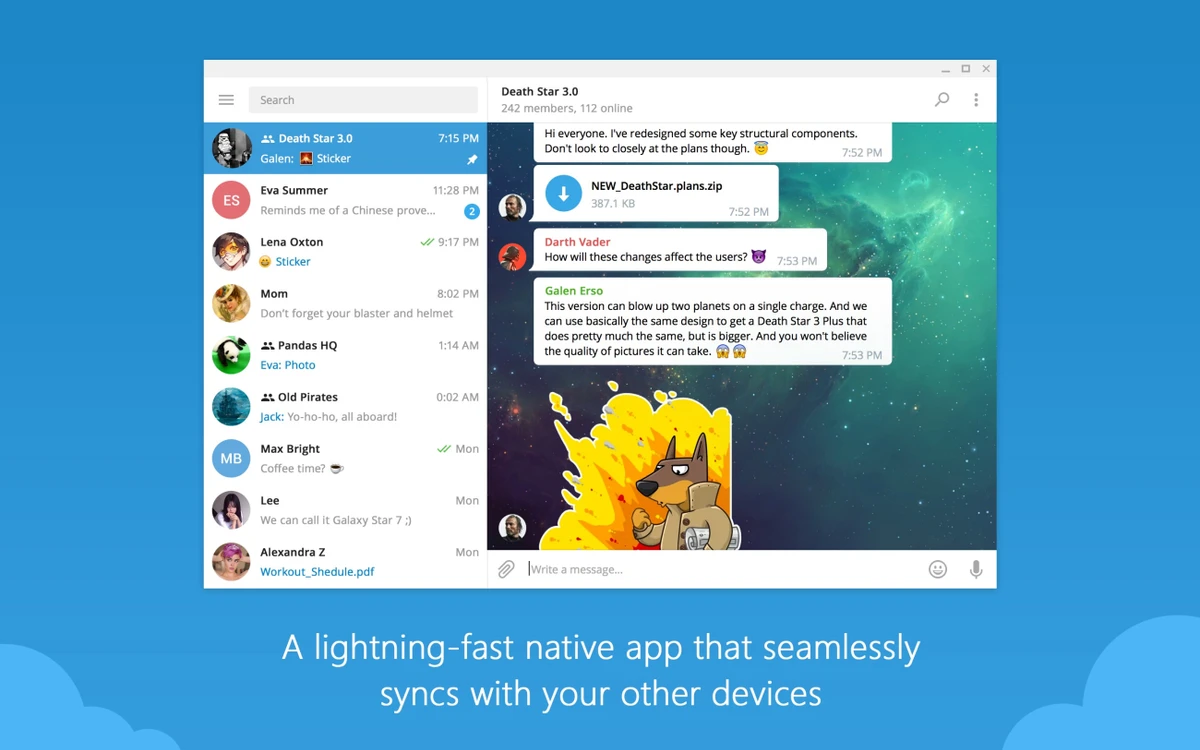
Telegram offers a clean, responsive interface that makes conversations easy to navigate across desktop and mobile devices. Chats, groups, channels, and contacts are organized in a familiar layout, allowing new users to get started quickly while still providing advanced tools for experienced users.

Customization is one of the application's strengths. Users can personalize the interface with themes, stickers, and bots, while privacy settings make it simple to control who can view personal information such as phone numbers. Managing large groups and channels is straightforward once users become familiar with Telegram's administrative features, although advanced options like bots and community management may require some learning.

Who Should Use Telegram?

  • Individuals looking for a feature-rich messaging app
  • Privacy-conscious users who use Secret Chats
  • Businesses communicating with customers through channels
  • Community managers running large groups
  • Content creators sharing updates with followers
  • Teams collaborating across multiple devices
  • Users who frequently share large files

Conclusion

Telegram combines messaging, file sharing, cloud synchronization, and community management into a single platform that works across nearly every major device. Its flexible privacy controls, customizable interface, support for large communities, and cloud-based architecture make it suitable for both everyday communication and professional collaboration. While default cloud chats do not use end-to-end encryption, Secret Chats provide an additional layer of privacy for sensitive conversations.

Pros & Cons

✓

Pros

  • Cross-platform access with cloud synchronization
  • Secret Chats support end-to-end encryption
  • Large groups with up to 200,000 members
  • Channels for broadcasting to unlimited audiences
  • Generous cloud storage for messages and media
  • Supports large file sharing
  • Extensive customization through themes, stickers, and bots
  • Strong privacy controls for account visibility
✕

Cons

  • End-to-end encryption is only available in Secret Chats
  • Phone number is required to register
  • Advanced features may take time to learn
  • Some Premium features require a subscription
  • Limited integration with third-party applications

Frequently Asked Questions

What is Telegram used for?

Telegram is a cloud-based messaging application used for text messaging, file sharing, voice communication, managing large group chats, and broadcasting content through channels.

Is Telegram free to use?

Yes. Telegram is free to use. It also offers an optional Telegram Premium subscription that provides additional features such as faster downloads and larger upload limits.

Are Telegram messages end-to-end encrypted?

Only Secret Chats use end-to-end encryption. Regular cloud chats and group chats use encrypted connections between your device and Telegram's servers but are not end-to-end encrypted.

Can I use Telegram on multiple devices?

Yes. After registering with a phone number, you can access Telegram from smartphones, tablets, desktops, and laptops without keeping your phone connected.

Do I need to share my phone number with other users?

No. Although a phone number is required to create an account, Telegram allows you to control who can see your number and lets users communicate through usernames instead.

How many people can join a Telegram group?

Telegram supports group chats with up to 200,000 members, making it suitable for large communities, organizations, and public discussions.

Recommended apps [Freeware]:
  • Vivaldi Browser 8.1.4087.55 Vivaldi Browser logo a Chromium-based browser with built-in mail, calendar, notes, ad blocker, and deep customization features.
  • O&O ShutUp10++ 3.2.1111 O&O ShutUp10++ logo control Windows privacy, telemetry, updates, and system settings with a simple portable interface
  • Markdown Monster 4.4.4 Markdown Monster logo a powerful Windows Markdown editor with live preview, HTML/PDF export, Git integration, and blogging tools
  • Doro PDF Writer 2.27 Doro PDF Writer logo Create PDF files from any printable Windows application with encryption, customization options, and a simple virtual printer.
  • Mumble 1.5.901 Mumble logo A low-latency encrypted voice communication app with positional audio, noise suppression, and gaming-focused features.
  • Imagine 2.6.1 Imagine logo View, manage, and convert images quickly with support for many formats, EXIF details, animations, screenshots, and batch processing.
Recommended apps [Shareware]:
  • EF Duplicate Files Manager 26.05 EF Duplicate Files Manager logo finds and removes duplicate files by name, size, or content to reclaim storage space.
  • EF File Catalog 26.05 EF File Catalog logo Catalog disks, folders, archives, and media for fast offline browsing, searching, and file organization
  • Tomabo MP4 Downloader 6.4.9 Tomabo MP4 Downloader logo downloads videos, playlists, subtitles, and audio while offering format conversion tools.
  • Home Manager 2026 v4.10.1002 Home Manager logo track home inventory, store item details, manage repairs, and generate insurance reports
  • Cubase Pro 15.0.30 Cubase Pro logo a professional DAW for recording, composing, editing, mixing, and music production
  • CrawlRhino SEO Monitor 1.1.17.0 CrawlRhino SEO Monitor logo Monitor website uptime, response times, SEO changes, and HTTP status codes with a lightweight desktop monitoring solution for Windows.