


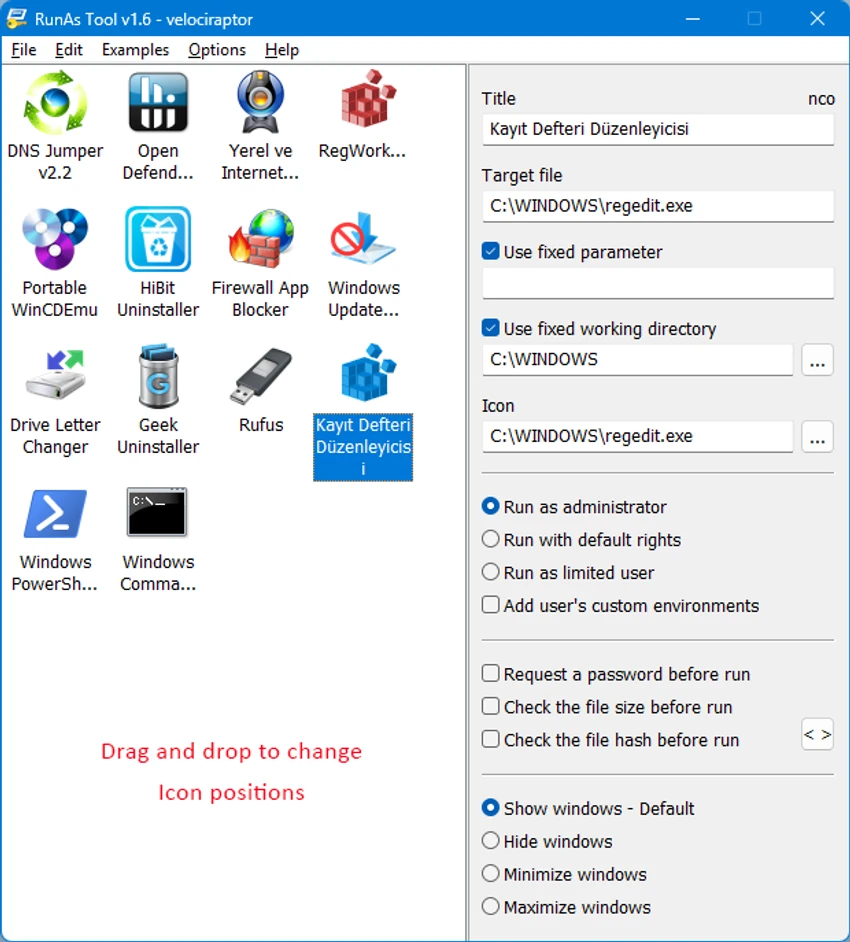

RunAsTool is a lightweight Windows utility designed to simplify the process of running applications with administrator privileges without requiring users to enter an admin password each time. It acts as an enhanced alternative to the built-in Windows “Run as” functionality, addressing its limitation of requiring manual password input when switching user contexts.
The tool is especially useful in environments where standard (non-admin) user accounts are preferred for security reasons, but certain applications still require elevated permissions to function correctly. By using RunAsTool, administrators can define which programs are allowed to run with elevated rights, reducing the need to grant full administrator access to users.
Because it is portable, RunAsTool does not require installation and can be run directly from a folder or USB drive, making it convenient for IT support scenarios and mobile troubleshooting.
Features of RunAsTool
- Run programs with administrator privileges without manual password entry.
- Designed as a portable application (no installation required).
- Allows standard users to access admin-required applications safely.
- Stores login credentials in encrypted form.
- Supports domain environments.
- Verifies file integrity using hash checking before execution.
- Supports password prompts before launching applications.
- Can inherit system environment variables.
- Portable usage from USB drives or external storage.
- Helps reduce the need for full administrator accounts.
- Enhanced security compared to full admin login usage.
Interface and Usability
RunAsTool features a minimal and functional interface focused on assigning applications to predefined elevated execution rules. Users typically configure which programs can run with administrator privileges and then launch them directly through the tool.
The workflow is straightforward, making it suitable for IT administrators managing multiple user systems. Since it is portable, deployment is simple and does not require system installation or administrative setup. While the interface is not heavily feature-rich or visually modern, it prioritizes efficiency and quick access to privilege control functions.
Who Should Use RunAsTool?
- IT administrators managing restricted user environments.
- Organizations that avoid giving full admin rights to users.
- Helpdesk technicians supporting multiple systems.
- Users who need occasional admin access for specific apps.
- Security-conscious environments requiring controlled privilege escalation.
- Portable troubleshooting scenarios using USB tools.
Conclusion
RunAsTool is a practical Windows utility for managing application-level administrator privileges without exposing full system admin rights to users. It strikes a balance between usability and security by allowing controlled elevation of specific programs while keeping user accounts restricted.


