RustDesk logo

RustDesk 1.4.8

  • User Rating:
    ★★★★★
    ★★★★★
    0.0 0Votes
  • Requirements:
    Windows
  • Version: 1.4.8
  • Latest updated: 1 week ago
  • License: Freeware  
  • Publisher: RustDesk
  • Size: 23.3 MB
× app stores

RustDesk is an open-source remote desktop and remote support platform designed as an alternative to commercial solutions like TeamViewer, AnyDesk, and Splashtop. Its standout feature is self-hosting, allowing organizations and individuals to maintain complete control over their remote access infrastructure and data.

Overview

RustDesk focuses on providing secure and reliable remote access without requiring dependence on third-party cloud services. Unlike many remote desktop platforms that rely primarily on vendor-hosted servers, RustDesk allows users to deploy and manage their own servers, giving them greater control over security, privacy, and performance.

The software supports multiple operating systems and offers both traditional remote desktop functionality and advanced deployment options for businesses. Organizations can customize the client, host web-based access tools, and configure numerous settings to fit their infrastructure requirements. Its open-source nature and active community support have contributed to its growing popularity among IT professionals, businesses, and privacy-conscious users.

Features of RustDesk

  • Open-source remote desktop software
  • Self-hosted remote access infrastructure
  • Full control over remote access data
  • Cross-platform support:
    • Windows
    • macOS
    • Linux
    • Android
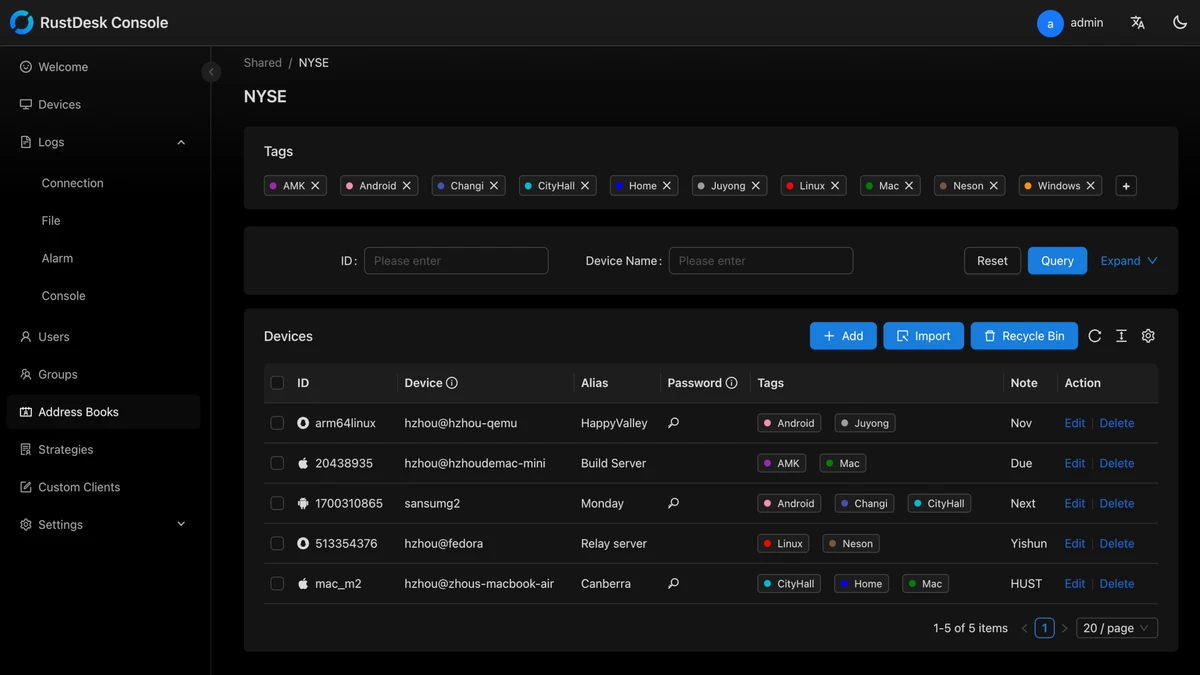
  • Custom-branded client support
  • Client customization with logos, icons, and branding
  • Web client hosting on your own domain
  • Remote support and remote administration capabilities
  • Easy server deployment and configuration
  • Advanced configuration options (90+ settings available)
  • On-premises deployment support
  • Community-driven open-source development
  • No dependency on third-party SaaS infrastructure when self-hosted

User Experience

RustDesk delivers a familiar remote desktop experience while offering significantly more control than many cloud-based alternatives. Installation is straightforward for standard client use, while organizations that choose self-hosting can deploy their own servers for complete infrastructure ownership. The remote access experience is responsive and designed to support everyday administration, troubleshooting, and support tasks. The ability to operate independently from vendor-managed cloud services can improve predictability and control for businesses with strict security or compliance requirements.

One of RustDesk's biggest advantages is flexibility. Users can run it as a simple remote desktop application or build a fully customized remote support environment with branding, custom domains, and advanced server configurations. The self-hosting option does require additional technical knowledge compared to fully managed SaaS platforms. However, organizations that prioritize privacy, compliance, and infrastructure ownership may find this trade-off worthwhile.

Who Should Use RustDesk?

  • IT administrators
  • Managed service providers (MSPs)
  • Businesses requiring on-premises remote access
  • Privacy-conscious users
  • Organizations with compliance requirements
  • Open-source software enthusiasts
  • Technical support teams

Conclusion

RustDesk is a compelling remote desktop solution for users and organizations seeking greater control over their remote access infrastructure. Its combination of open-source transparency, self-hosting capabilities, and cross-platform support makes it a strong alternative to traditional commercial remote access software.

Pros & Cons

Pros

  • Open-source and community-driven
  • Self-hosted deployment available
  • Full control over data and infrastructure
  • Cross-platform compatibility
  • Custom branding support
  • Web client hosting options
  • Extensive configuration flexibility
  • Reduced dependence on third-party cloud providers

Cons

  • Self-hosting requires technical expertise
  • Setup can be more involved than SaaS alternatives
  • Some advanced deployments may require server management experience

Frequently Asked Questions

What is RustDesk used for?

RustDesk is used for remote desktop access, remote support, and remote system administration across multiple platforms.

Is RustDesk open source?

Yes. RustDesk is an open-source remote access solution supported by a global community.

What makes RustDesk different from TeamViewer or AnyDesk?

Its primary differentiator is self-hosting, which allows users to control their own servers and remote access infrastructure.

Can RustDesk be self-hosted?

Yes. Self-hosting is one of RustDesk's core features and allows complete control over data and connectivity.

Does RustDesk support multiple operating systems?

Yes. It supports Windows, macOS, Linux, and Android.

Can companies customize RustDesk?

Yes. Organizations can customize the client with their own branding, including names, icons, and logos.

Is there a web client available?

Yes. RustDesk supports hosting a web client on your own server and domain for browser-based remote access.

Recommended apps [Freeware]:
  • Winhance 26.06.12 Winhance logo Windows optimization tool to debloat apps, tweak settings, and customize Windows 10/11
  • OCCT 16.1.11.99 OCCT logo hardware monitoring and stress testing tool for CPU, GPU, memory, and power supply performance analysis.
  • Opera One 133.0.5932.10 Opera One logo a fast Chromium-based browser with built-in VPN, AI assistant, tab management, and productivity tools for Windows users
  • DefenderUI 2.10 DefenderUI logo enhances Microsoft Defender on Windows 10/11 with advanced security profiles and easier system protection control
  • DAEMON Tools Lite 12.6.0.2458 DAEMON Tools Lite logo Create, mount, and manage ISO, MDF, and other disc images with virtual CD/DVD/Blu-ray drives
  • Dropbox 258.4.3749 Dropbox logo cloud storage service for syncing files, backup, and sharing documents across Windows, mobile, and web devices
Recommended apps [Shareware]:
  • Audio Transcoder 2.12.24 Audio Transcoder logo all-in-one audio converter and CD ripper supporting MP3, FLAC, AAC, WMA, and more
  • Quick Heal AntiVirus Pro 26.1.0.2 Quick Heal AntiVirus Pro logo real-time malware protection, ransomware defense, and email security
  • Mountain Duck 5.3.0.29446 Mountain Duck logo mounts cloud storage and servers as local drives with smart sync, offline access, and seamless file integration
  • TweakNow WinSecret Plus 9.5.4 TweakNow WinSecret Plus logo Windows optimization, hidden tweaks, PDF tools, image conversion, and system utilities
  • Rollback RX 12.91 Rollback RX logo instant system restore software for Windows lets users recover PCs via snapshots in seconds
  • Driver Easy 7.1.3.5200 Driver Easy logo Windows utility for scanning, updating, and managing hardware drivers with offline support