


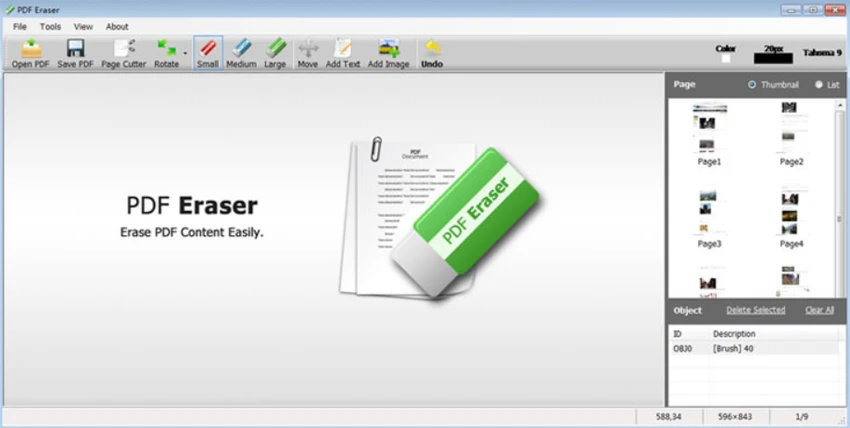

Editing PDF files can be challenging, especially when you need to remove unwanted text, images, or entire pages from a document. PDF Eraser is a Windows application designed to simplify this process by providing direct editing tools for modifying PDF content. Instead of requiring complex PDF editing software, it allows users to erase elements from a PDF, insert new text or images, and manage pages using built-in tools such as page cutting and rotation.
Overview
PDF Eraser is a Windows-based PDF editing tool that enables users to modify existing PDF documents by removing unwanted content and adding new elements. It is particularly useful for scanned documents or PDFs that require cleanup or correction. The software allows users to erase text, images, logos, and other objects from a PDF file. After removing unwanted elements, users can save the modified document as a new PDF. In addition to erasing content, the application also supports inserting custom text and images into the document.
PDF Eraser includes additional tools such as a page cutter for removing unnecessary pages and a rotation feature to correct page orientation, which is especially useful for scanned PDFs.
Key Features of PDF Eraser
- Erase text from PDF files
- Remove images, logos, and objects from PDFs
- Edit and modify existing PDF content
- Add custom text to PDF pages
- Insert images into PDF documents
- Built-in PDF Page Cutter for deleting pages
- Rotate PDF pages for correct orientation
- Save edited files as new PDFs
- Suitable for scanned PDF documents
- Simple Windows-based interface
User Experience
PDF Eraser focuses on straightforward PDF editing rather than advanced document management. The workflow is simple: open a PDF file, select the elements you want to remove, apply changes, and save the modified file. The ability to erase content directly from a PDF is particularly useful for scanned documents where unwanted marks, text, or logos may need to be removed. Users can also insert new text or images, making it possible to correct or customize documents without recreating them from scratch. The built-in page cutter adds another layer of convenience, allowing users to delete unnecessary pages quickly. This is helpful when working with long documents where only specific sections are needed.
Rotation tools are also useful for fixing improperly scanned pages, requiring only a couple of clicks to adjust orientation. Overall, PDF Eraser is designed to provide essential PDF editing tools in a simple and accessible format, making it suitable for users who need basic document modification capabilities without advanced complexity.
Who Should Use PDF Eraser?
- Users editing scanned PDF documents
- Office workers needing quick PDF corrections
- Students modifying study materials
- Users removing unwanted content from PDFs
- Anyone needing simple PDF cleanup tools
Conclusion
PDF Eraser provides a practical and easy-to-use solution for basic PDF editing tasks. Its ability to remove text, images, and unwanted objects makes it useful for cleaning up scanned documents or modifying existing PDFs.


