


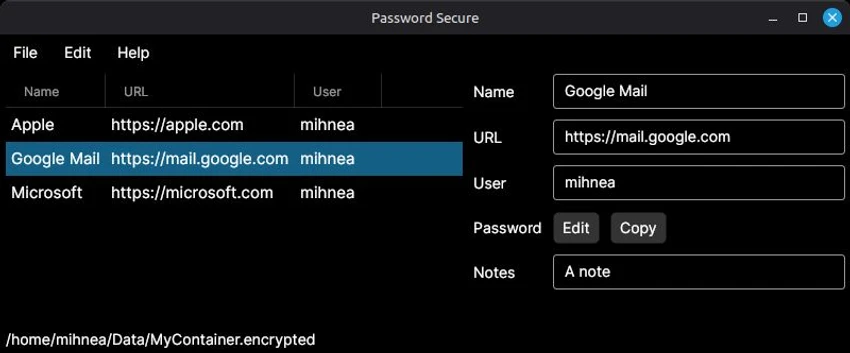

Password Secure is a portable, cross-platform password manager designed to help users securely store and organize login credentials without relying on cloud services. By keeping all password data offline in portable files, the software offers greater control over sensitive information while reducing the risks associated with online storage. Whether you need to manage personal accounts or professional credentials, Password Secure provides a centralized library that keeps everything organized and protected.
Security is at the core of the application, with AES-256 symmetric-key encryption safeguarding stored passwords against unauthorized access. Users unlock their password library using a master password, allowing quick access to saved credentials while maintaining strong protection. The software also includes automatic backups before any changes are made, helping prevent accidental data loss.
Beyond security, Password Secure focuses on usability with a clean interface that makes password management straightforward. Features such as secure password copying and editing prevent passwords from being unnecessarily exposed, while automatic clipboard clearing upon exiting the application adds another layer of protection. Combining offline storage with practical security features, Password Secure offers a reliable solution for users who prefer to keep their password database entirely under their own control.
Features of Password Secure
- Portable, cross-platform password manager
- Offline password storage using portable files
- AES-256 symmetric-key encryption
- Secure password library protected by a master password
- Automatic backups before updating stored data
- Secure password copying and editing without revealing passwords
- Automatic clipboard clearing when the application exits
- Organized storage for login credentials and associated websites
- Clean and easy-to-use interface
Interface and Usability
Password Secure offers a clean and intuitive interface that makes organizing login credentials straightforward. Passwords and associated websites are stored in a dedicated library, making it easy to browse and manage saved accounts. Access is protected by a master password, providing a balance between convenience and security.
Common tasks such as copying, editing, and updating passwords are simple to perform, while security-focused features like hidden password handling and automatic clipboard clearing help protect sensitive information during daily use. The overall experience is efficient without adding unnecessary complexity.
Who Should Use Password Secure?
- Users who prefer offline password management
- Professionals managing multiple accounts
- Individuals who want to avoid cloud-based password storage
- Privacy-conscious users seeking local encrypted storage
- Anyone looking for a portable password management solution
Conclusion
Password Secure is a practical password manager for users who prioritize privacy and local control over their sensitive information. Its offline storage model, AES-256 encryption, automatic backups, and security-focused clipboard protection provide a dependable environment for managing login credentials. If you're looking for a lightweight password manager that keeps your data off the cloud while remaining easy to use, Password Secure is a solid choice.


