FileLegit Windows Internet & Network Download Managers Free Music & Video Downloader
Free Music & Video Downloader logo

Free Music & Video Downloader 3.19

  • User Rating:
    ★★★★★
    ★★★★★
    0.0 0Votes
  • Requirements:
    Windows
  • Version: 3.19
  • Latest updated: 2 weeks ago
  • License: Freeware  
  • Publisher: The SZ Development
  • Size: 80 MB
× app stores

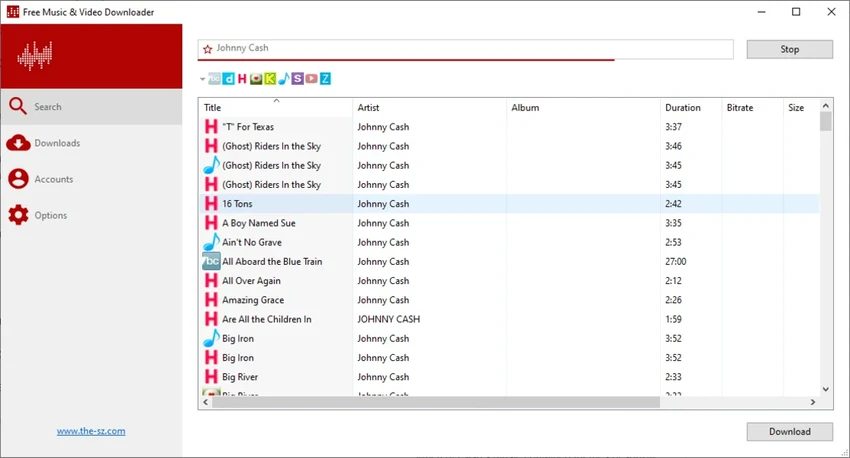
Free Music & Video Downloader, also known as Lacey, is a media downloading application designed to help users find and save music and video content from various online sources. The software allows users to search for artists, songs, and media files directly from the application and download available results to their computer.

The program focuses on simplifying the process of finding music by combining search and download features in one interface. Users can enter an artist name or song title, review available results, and download selected tracks as MP3 files. It also supports downloading videos and converting compatible video content into MP3 audio files. Free Music & Video Downloader works with multiple online platforms, including services such as VKontakte, SoundCloud, MixCloud, Bandcamp, Vimeo, and other supported sources. Users can customize search services, choose a local download folder, and automatically organize downloaded songs into artist-based folders for easier management.

The application includes a dedicated download section where users can view previously downloaded files and quickly access their storage locations. Additional options include download settings, simultaneous downloading of multiple songs, and music sharing through Skype. With its search-based workflow and media organization features, Free Music & Video Downloader provides a convenient way to manage downloaded audio content from supported online sources.

Features of Free Music & Video Downloader

  • Search for music by artist name or song title
  • Download music files in MP3 format
  • Download videos from supported sources
  • Convert supported videos into MP3 audio files
  • Supports multiple online media platforms
  • Customize search providers used by the application
  • Choose local download folders
  • Automatically organize songs into artist folders
  • Dedicated download history section
  • Quickly access downloaded files
  • Download multiple songs simultaneously
  • Adjustable download settings
  • Share songs through Skype

Interface and Usability

Free Music & Video Downloader provides a simple search-based workflow. Users can enter a song title or artist name, browse available results, and select files to download without manually visiting multiple websites.

The application includes options for managing download locations and organizing saved music automatically. The built-in download section makes it easier to review previously downloaded files and locate them without manually searching through folders. Its straightforward design is focused on finding and managing media downloads rather than offering advanced editing or playback features. Users who frequently download supported media content may find the workflow convenient and easy to understand.

Who Should Use Free Music & Video Downloader?

  • Users who want a simple media download manager
  • People who need to save supported online music content
  • Users converting compatible videos into MP3 files
  • Anyone managing downloaded audio collections
  • Users looking for a search-based music downloading tool

Conclusion

Free Music & Video Downloader offers a convenient way to search for and manage downloaded music and video content from supported online sources. Its built-in search, MP3 download support, video conversion capabilities, and file organization features make it a practical tool for users who regularly manage media files.

Pros & Cons

Pros

  • Simple search and download workflow
  • Supports music and video downloads
  • Can convert supported videos to MP3
  • Works with multiple online sources
  • Includes download organization features
  • Supports simultaneous downloads

Cons

  • Availability depends on supported online sources
  • Does not provide advanced media editing features
  • Users should ensure downloaded content is obtained legally and respects copyright rules

Frequently Asked Questions

What is Free Music & Video Downloader used for?

Free Music & Video Downloader is used to search for, download, and organize music and video content from supported online sources. It can save music as MP3 files and download compatible videos.

Can Free Music & Video Downloader convert videos to MP3?

Yes. The application can download supported video content and convert it into MP3 audio files.

Which websites does Free Music & Video Downloader support?

The software supports various online sources, including platforms such as VKontakte, SoundCloud, MixCloud, Bandcamp, Vimeo, and other supported services.

Can I search for songs inside Free Music & Video Downloader?

Yes. Users can enter an artist name or song title and search for available results directly within the application.

Where are downloaded files stored?

Downloaded MP3 files are stored in the application’s Download section and can also be saved to a user-selected local folder.

Does Free Music & Video Downloader organize downloaded songs?

Yes. The application can automatically organize downloaded songs into folders named after the corresponding artists.

Recommended apps [Freeware]:
  • Adobe DNG Converter 18.4 Adobe DNG Converter logo Convert camera-specific RAW files to Adobe DNG format for improved compatibility and flexible photo workflows
  • Viber for Windows 28.3.1 Viber for Windows logo make free calls, send messages, and sync chats across devices via WiFi or 3G
  • Proton VPN 4.4.1 Proton VPN logo secure, open-source VPN for Windows offering strong privacy, no-logs protection, and encrypted internet access
  • PrivaZer 4.0.124.3 PrivaZer logo a privacy cleaning tool that removes PC traces, frees disk space, and helps protect personal data
  • Argente System Repair 1.0.8.2 Argente System Repair logo scans and fixes Windows errors to improve performance with simple, recommended, and custom modes
  • VLC Media Player 3.0.23 VLC Media Player logo a free, open-source multimedia player supporting nearly all video formats, streaming, and playback features across platforms.
Recommended apps [Shareware]:
  • Wondershare Filmora 15.3.20.18660 Wondershare Filmora logo a powerful, user-friendly video editor with effects, transitions, and 4K support.
  • Rollback RX 12.91 Rollback RX logo instant system restore software for Windows lets users recover PCs via snapshots in seconds
  • Coolutils PDF Splitter Pro 6.1.0.86/58 Coolutils PDF Splitter Pro logo Split large PDF files by keywords, page breaks, or document patterns with Coolutils PDF Splitter Pro for Windows.
  • GlassWire 3.9.1102 GlassWire logo monitors network activity, alerts you to suspicious internet behavior, tracks bandwidth usage, and helps protect your privacy and security
  • TunnelBear 4.3.0 TunnelBear logo Secure your internet connection with TunnelBear VPN, featuring encrypted browsing, IP masking, and easy server selection
  • SmartGit 26.1.045 SmartGit logo Manage Git repositories easily with visual history, merging tools, platform integrations, and customizable workflows.