FileLegit Windows Utilities System Tools Elcomsoft Forensic Disk Decryptor
Elcomsoft Forensic Disk Decryptor logo

Elcomsoft Forensic Disk Decryptor 2.21.1036

  • User Rating:
    ★★★★★
    ★★★★★
    0.0 ★ 0Votes
  • Requirements:
    Windows
  • Version: 2.21.1036
  • Latest updated: 3 weeks ago
  • License: Free Trial  
  • Publisher: Elcomsoft
  • Size: 42 MB
× app stores

Elcomsoft Forensic Disk Decryptor (EFDD) is a professional-grade forensic utility designed to access and analyze encrypted storage volumes across multiple encryption systems. It supports a wide range of disk encryption technologies, including BitLocker, FileVault 2, PGP, TrueCrypt, and VeraCrypt.

During review of its documented capabilities, EFDD is clearly positioned as a specialized tool for digital investigation environments where encrypted drives or disk images must be examined. Instead of relying on a single approach, it provides multiple methods for accessing encrypted data, including recovery keys, memory-based extraction, and integration with password recovery workflows. The software is built for forensic professionals and operates on the principle of extracting or leveraging available cryptographic artifacts to gain access to protected volumes.

Features of Elcomsoft Forensic Disk Decryptor

  • Supports encrypted volumes from:
    • BitLocker
    • FileVault 2
    • PGP
    • TrueCrypt
    • VeraCrypt
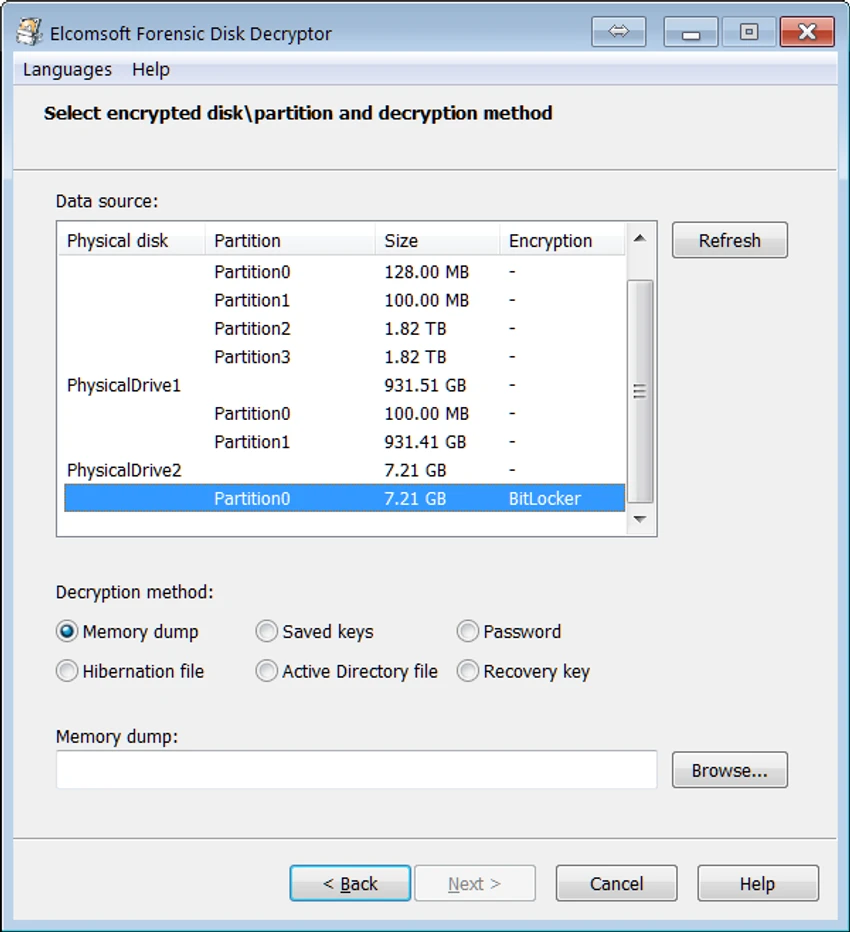
  • Automatically detects encrypted volumes and identifies encryption settings.
  • Supports access through:
    • Plain-text passwords
    • Recovery keys (escrow keys)
    • Keys extracted from memory images or hibernation files
  • Mounts encrypted volumes as drive letters for real-time access.
  • Supports full volume decryption for unrestricted data access.
  • Works with physical disks, logical disks, and disk images.
  • Integrates with encrypted container metadata extraction for password recovery workflows.
  • Enables real-time decryption when mounting encrypted volumes.
  • Supports VeraCrypt volumes with advanced encryption and hashing methods.
  • Works with forensic memory dumps and hibernation file analysis.
  • Supports recovery key sources such as:
    • Active Directory (BitLocker)
    • Microsoft Account
    • iCloud (FileVault 2 via external tools)
  • Compatible with VHD and VHDX disk images (Windows 8.1+).

Interface and Usability

EFDD is designed for professional forensic environments rather than general consumer use. Based on its feature description, the workflow is highly technical and centered around selecting encrypted containers or disk images for analysis.

The tool automates detection of encryption types and settings, which reduces manual configuration. Once a volume is identified, users can either mount it as an accessible drive or perform full decryption for deeper analysis. Its usability depends heavily on user expertise in digital forensics, encryption systems, and disk imaging workflows.

Who Should Use Elcomsoft Forensic Disk Decryptor?

  • Digital forensic investigators.
  • Cybersecurity professionals.
  • Incident response teams.
  • Law enforcement agencies.
  • Data recovery specialists working with encrypted disks.
  • Security researchers analyzing encryption implementations.

System Requirements

  • Operating System
    • Windows 7 or higher
  • Required conditions depending on use case
    • Memory image or hibernation file containing encryption keys (when available)
    • Recovery keys for BitLocker and PGP
    • Active Directory database (BitLocker environments)
    • iCloud or locally stored recovery tokens (FileVault 2 scenarios)
    • Windows 8.1 or higher for VHD/VHDX images

Conclusion & Recommendation

Elcomsoft Forensic Disk Decryptor is a powerful and highly specialized tool designed for professional forensic and cybersecurity investigations involving encrypted storage. Its ability to work across multiple encryption platforms and utilize different key recovery methods makes it a valuable asset in environments where encrypted data must be analyzed legally and methodically.

Pros & Cons

✓

Pros

  • Supports major encryption systems (BitLocker, FileVault 2, VeraCrypt, etc.)
  • Multiple decryption methods (password, recovery key, memory extraction)
  • Real-time encrypted volume mounting
  • Works with disk images and physical drives
  • Integrates with forensic workflows
  • Automatic detection of encrypted volumes
  • Supports advanced VeraCrypt encryption schemes
✕

Cons

  • Requires strong technical and forensic expertise
  • Dependent on availability of keys or memory artifacts
  • Not suitable for general consumer use
  • Complex workflows for non-specialists

Frequently Asked Questions

What is Elcomsoft Forensic Disk Decryptor used for?

It is used to access and analyze encrypted disk volumes from systems such as BitLocker, FileVault 2, VeraCrypt, TrueCrypt, and PGP in forensic environments.

Can EFDD decrypt a disk without a password?

It may be possible if recovery keys, memory dumps, or hibernation files containing encryption keys are available. Without any key material, additional password recovery tools may be required.

Does EFDD support VeraCrypt?

Yes. EFDD includes support for VeraCrypt volumes and can extract metadata for further password recovery analysis using external tools.

Can encrypted disks be mounted instead of fully decrypted?

Yes. EFDD can mount encrypted volumes as drive letters, allowing real-time access without performing full decryption.

What types of data sources can EFDD analyze for keys?

It can analyze memory dumps, hibernation files, disk images, and recovery key sources such as Active Directory, Microsoft Accounts, or iCloud (depending on encryption type).

Is Elcomsoft Forensic Disk Decryptor suitable for everyday users?

No. It is designed specifically for forensic and cybersecurity professionals and requires technical knowledge of encryption systems and disk analysis workflows.

Recommended apps [Freeware]:
  • Garmin Express 7.29.0.0 Garmin Express logo manage Garmin GPS devices with map updates, backups, software updates, and device registration
  • NewFileTime 8.28 NewFileTime logo a lightweight Windows utility that lets users change file creation, modification, and access timestamps easily
  • KiCad 10.0.4 KiCad logo electronic design tool for creating schematics, PCB layouts, 3D models, and circuit designs on Windows
  • Vektorrazor 2.2 Vektorrazor logo converts logos and image sources into clean, CAD-friendly vector contours for technical workflows
  • VirtualBox 7.2.12 VirtualBox logo Run multiple operating systems on one PC with VirtualBox, a free open-source virtualization platform for Windows
  • Patch My PC 5.4.5.0 Patch My PC logo Keep installed applications updated automatically with silent updates, software scanning, scheduling, and easy patch management.
Recommended apps [Shareware]:
  • Text Edit Plus 16.5 Text Edit Plus logo a lightweight text editor with text analysis, word frequency statistics, and document editing tools
  • reaConverter Pro 8.0.231 reaConverter Pro logo batch image converter and editor supporting 700+ formats with automation and advanced processing tools
  • DBF Recovery 4.74 DBF Recovery logo repairs corrupted DBF database files from dBASE, FoxPro, and Visual FoxPro formats with automatic recovery tools
  • WinCatalog 2026.2.0.629 WinCatalog logo a disk and file cataloging tool for Windows that indexes files for fast search and organization
  • Google Satellite Maps Downloader 8.419 Google Satellite Maps Downloader logo downloads satellite map tiles from Google Maps for offline viewing, GIS projects, and map export
  • Cisdem Video Compressor 3.0.0 Cisdem Video Compressor logo Compress video and audio files while preserving quality with customizable settings, batch processing, and support for popular media formats.