HyperSnap logo

HyperSnap 10.0.3

  • User Rating:
    ★★★★★
    ★★★★★
    0.0 0Votes
  • Requirements:
    Windows
  • Version: 10.0.3
  • Latest updated: 7 hours ago
  • License: Free Trial  
  • Publisher: Hyperionics Technology
  • Size: 13.1 MB
×

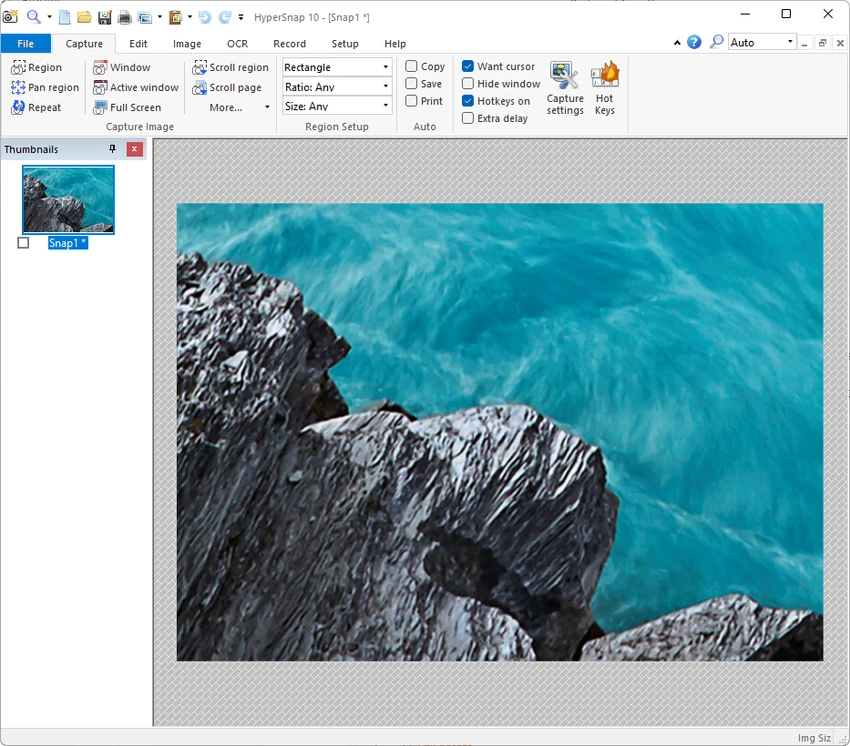
HyperSnap 10 is a Windows-based screen capture and recording tool designed for users who need more than a basic screenshot utility. It goes beyond the standard Print Screen function by capturing scrolling windows, complex interface states, and multi-monitor setups. With built-in OCR and immediate editing tools, it is positioned as a productivity-focused solution for documentation, testing, and technical communication tasks.

Overview

HyperSnap 10 combines screen capture, video recording, and OCR text extraction into a single workflow. It is designed for situations where traditional screenshot tools fall short—such as capturing long web pages, dropdown menus that disappear quickly, or interface elements spread across multiple monitors. The software also includes built-in editing tools, allowing users to annotate, highlight, and refine images immediately after capture. This makes it especially useful for creating documentation, tutorials, and technical support materials without needing separate image editing software.

Features of HyperSnap 10

  • Capture screenshots from any screen region, including irregular and scrolling content
  • Record video from screen activity
  • Built-in OCR to extract editable text from images and screen regions
  • Capture delayed or transient UI elements such as dropdown menus
  • Multi-monitor screenshot support
  • Immediate in-app editing with annotations, highlights, and visual markers
  • Workflow tools including hotkeys, clipboard integration, and auto-saving
  • Export options designed for documentation and support workflows

User Experience

HyperSnap 10 is clearly designed for efficiency in professional environments. The capture process is flexible, allowing users to grab content that typical Windows tools often miss. Scrolling window capture and delayed menu freezing are particularly useful for software testing and documentation work. The integrated OCR feature removes the need to manually retype text from images, which can significantly speed up reporting and knowledge base creation. Meanwhile, the built-in editor keeps the workflow uninterrupted by eliminating the need to switch between multiple applications.

Overall, the experience is focused on productivity rather than simplicity, making it more suitable for users who frequently work with technical documentation or UI capture tasks.

Who Should Use HyperSnap 10?

HyperSnap 10 is best suited for professionals who rely heavily on screen documentation, including:

  • Technical writers creating manuals, help articles, and tutorials
  • QA testers documenting bugs and interface behavior
  • Developers capturing UI states for debugging or reporting
  • Trainers and marketers producing instructional or presentation materials
  • Support teams needing accurate visual documentation of software issues

Conclusion

HyperSnap 10 stands out as a powerful screen capture and OCR tool built for demanding workflows. It is particularly valuable for professionals who need precise screenshots, structured documentation, and efficient text extraction.

Pros & Cons

Pros

    • Captures scrolling and complex UI elements effectively
    • Built-in OCR for extracting editable text
    • Includes editing tools without needing external software
    • Supports multi-monitor setups
    • Strong workflow automation with hotkeys and auto-saving

Cons

    • May feel advanced for casual users who only need basic screenshots
    • Focused heavily on professional workflows rather than lightweight use cases

Frequently Asked Questions

What is HyperSnap 10 used for?

HyperSnap 10 is used for capturing screenshots, recording screen activity, and extracting text using OCR, especially in professional documentation workflows.

Does HyperSnap 10 support scrolling screenshots?

Yes, it can capture long or scrolling windows that do not fit on a single screen.

Can HyperSnap 10 extract text from images?

Yes, it includes OCR functionality that allows users to copy editable text from images and screen regions.

Is HyperSnap 10 suitable for beginners?

It can be used by beginners, but it is primarily designed for professional and technical users.

Recommended apps [Freeware]:
  • Trillian 6.6 Build 15 Trillian logo all-in-one chat software designed to simplify online communication
  • Simple IP Config 2.9.7 Simple IP Config logo a lightweight, portable tool for quickly changing Windows IP, DNS, and network settings
  • DirPrintOK 7.61 DirPrintOK logo fast and portable tool to print or export directory contents in XLS, HTML, CSV, or TXT formats.
  • UltraSearch 4.9.2.1208 UltraSearch logo locates files and folders on local NTFS drives in seconds without building an index. Fast, precise, and lightweight.
  • Stretchly 1.21.0 Stretchly logo reminds you to take breaks while working on your computer, promoting better health and productivity.
  • HWMonitor 1.64 HWMonitor logo a free system tool that monitors CPU, GPU, voltages, temperatures, and fan speeds in real time.
Recommended apps [Shareware]:
  • Audio Transcoder 2.12.24 Audio Transcoder logo all-in-one audio converter and CD ripper supporting MP3, FLAC, AAC, WMA, and more
  • Typing Instructor Platinum 21.1 Typing Instructor Platinum logo improve typing speed and accuracy through interactive lessons, games, and 10-finger typing practice.
  • Wondershare AllMyTube 7.4.9.2 Wondershare AllMyTube logo download and convert videos from YouTube and 100+ sites into multiple formats for offline viewing.
  • Wondershare PDFelement Professional 12.1.23 Wondershare PDFelement Professional logo a PDF editor for editing, converting, signing, and managing documents easily.
  • COAA PlanePlotter 6.7.5.9 COAA PlanePlotter logo a Windows tool that decodes live aircraft data like ADS-B and ACARS and displays real-time radar-style tracking
  • HWMonitor Pro 1.58 HWMonitor Pro logo extends HWMonitor with remote monitoring, logging graphs, and improved sensor interface tools.