Calibre logo

Calibre 9.10.0

  • User Rating:
    ★★★★★
    ★★★★★
    0.0 0Votes
  • Requirements:
    Windows
  • Version: 9.10.0
  • Latest updated: 4 days ago
  • License: Open Source  
  • Publisher: Kovid Goyal
  • Size: 213 MB
× app stores

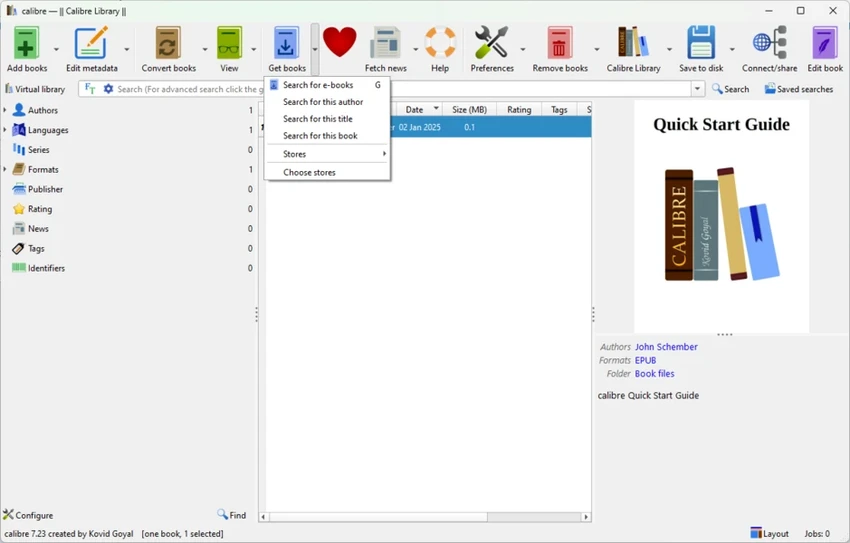
Calibre is a free and open-source e-book management application designed to help users organize, convert, and read digital books in a wide variety of formats. It functions as a complete e-library solution, combining library management, format conversion, and device synchronization into one powerful tool. The software is cross-platform and works on Windows, Linux, and macOS. It is widely used by readers, researchers, and digital library enthusiasts for maintaining structured and searchable ebook collections.

Features of Calibre

E-Book Library Management

  • Add books via drag-and-drop or file browser
  • Import books using ISBN codes
  • Organize library by author, title, series, publisher, rating, tags, and more
  • Create and manage multiple libraries
  • Search and sort large ebook collections easily

Format Conversion

  • Convert ebooks between multiple formats (EPUB, MOBI, XML, CSV, and more)
  • Bulk conversion support for multiple files
  • Edit metadata during conversion
  • Merge or modify ebook records

Reading & Device Sync

  • Built-in ebook reader for multiple formats
  • Send ebooks directly to supported reading devices
  • Sync with external devices and applications

News & Content Tools

  • Fetch news from websites and convert into ebook format
  • Schedule automatic news downloads
  • Add custom news sources
  • Download multiple news feeds at once

Advanced Library Features

  • Metadata editing (individually or in bulk)
  • Automatic cover fetching
  • Backup and restore library collections
  • Content server for remote library access
  • Integration with external services like iTunes (where applicable)

User Experience

After using Calibre, the most noticeable strength is its comprehensive approach to ebook management. It is not just a reader or converter but a full library system that allows users to maintain large digital collections with detailed organization.

Adding books is flexible, whether through drag-and-drop, folder import, or ISBN lookup. Once imported, books can be sorted and filtered using a powerful tag browser, making it easy to manage large libraries. The conversion engine is one of Calibre’s strongest features. It handles multiple formats reliably and supports batch processing, which is useful for users converting entire libraries at once.

The built-in news feature adds extra value by allowing users to turn online articles into readable ebook formats, which can be scheduled for automatic downloads. While the interface may feel slightly technical for beginners, it becomes very efficient once users understand its structure. Performance is generally stable even with large libraries, though resource usage can increase depending on workload.

Who Should Use Calibre?

  • Avid ebook readers with large collections
  • Researchers managing digital libraries
  • Users converting ebooks between formats
  • People who want full control over ebook metadata
  • Anyone building a personal digital library system

Conclusion

Calibre is one of the most powerful and versatile ebook management tools available. With strong support for organization, conversion, and synchronization, it serves as a complete digital library solution for both casual readers and advanced users.

Pros & Cons

Pros

  • Free and open-source
  • Powerful ebook organization tools
  • Supports many ebook formats
  • Reliable bulk conversion features
  • Built-in ebook reader and content server
  • News-to-ebook conversion feature
  • Cross-platform support

Cons

  • Interface can feel complex for beginners
  • Uses noticeable system resources with large libraries
  • Slight learning curve for advanced features
  • UI design is functional but not modern

Frequently Asked Questions

What is Calibre used for?

Calibre is used to manage, convert, and read ebooks in multiple formats.

Does Calibre support EPUB and MOBI?

Yes. It supports a wide range of formats including EPUB, MOBI, and many others.

Can I convert ebooks with Calibre?

Yes. It supports individual and batch ebook conversion between formats.

Is Calibre free?

Yes. Calibre is completely free and open-source.

Can Calibre download news?

Yes. It can fetch news from websites and convert them into ebook format.

Does Calibre work on Windows?

Yes. It supports Windows 10 and newer versions, as well as Linux and macOS.

Recommended apps [Freeware]:
  • Stretchly 1.21.0 Stretchly logo reminds you to take breaks while working on your computer, promoting better health and productivity.
  • Easy Gamer Utility 1.3.107 Easy Gamer Utility logo a Windows tool that optimizes gaming performance, clears cache, and fixes common game issues.
  • Universal USB Installer 2.0.3.7 Universal USB Installer logo create bootable Linux USB drives easily with ISO support and persistence options on Windows.
  • DefenderUI 2.10 DefenderUI logo enhances Microsoft Defender on Windows 10/11 with advanced security profiles and easier system protection control
  • ExpanDrive 2026.06.11 ExpanDrive logo mounts cloud storage and remote servers as local drives for seamless file access in Windows Explorer
  • UninstallView 1.52 UninstallView logo View detailed information about installed programs and uninstall software on local or remote Windows computers
Recommended apps [Shareware]:
  • Any video Converter 9.2.3 Any video Converter logo video conversion tool that supports multiple formats, editing features, and device-ready output profiles
  • SkyDemon 4.3.1 SkyDemon logo Plan flights with real-time aeronautical data, dynamic charts, NOTAMs, METAR, TAF, and intelligent route planning using SkyDemon
  • Araxis Merge 2026.0 Araxis Merge logo a powerful file comparison and merging tool for developers, legal teams, and professionals handling version control
  • My Music Collection 3.4.16.178 My Music Collection logo organize CDs, vinyl, and MP3s with cataloging, tracking, and export features on Windows
  • EF CheckSum Manager 26.05 EF CheckSum Manager logo creates and verifies MD5, SHA, and SFV checksums to ensure file integrity and detect corruption.
  • Rollback RX 12.91 Rollback RX logo instant system restore software for Windows lets users recover PCs via snapshots in seconds