Royal TS logo

Royal TS 7.4.50622

  • User Rating:
    ★★★★★
    ★★★★★
    0.0 0Votes
  • Requirements:
    Windows
  • Version: 7.4.50622
  • Latest updated: 1 week ago
  • License: Free Trial  
  • Publisher: Royal Apps GmbH
  • Size: 285 MB
× app stores

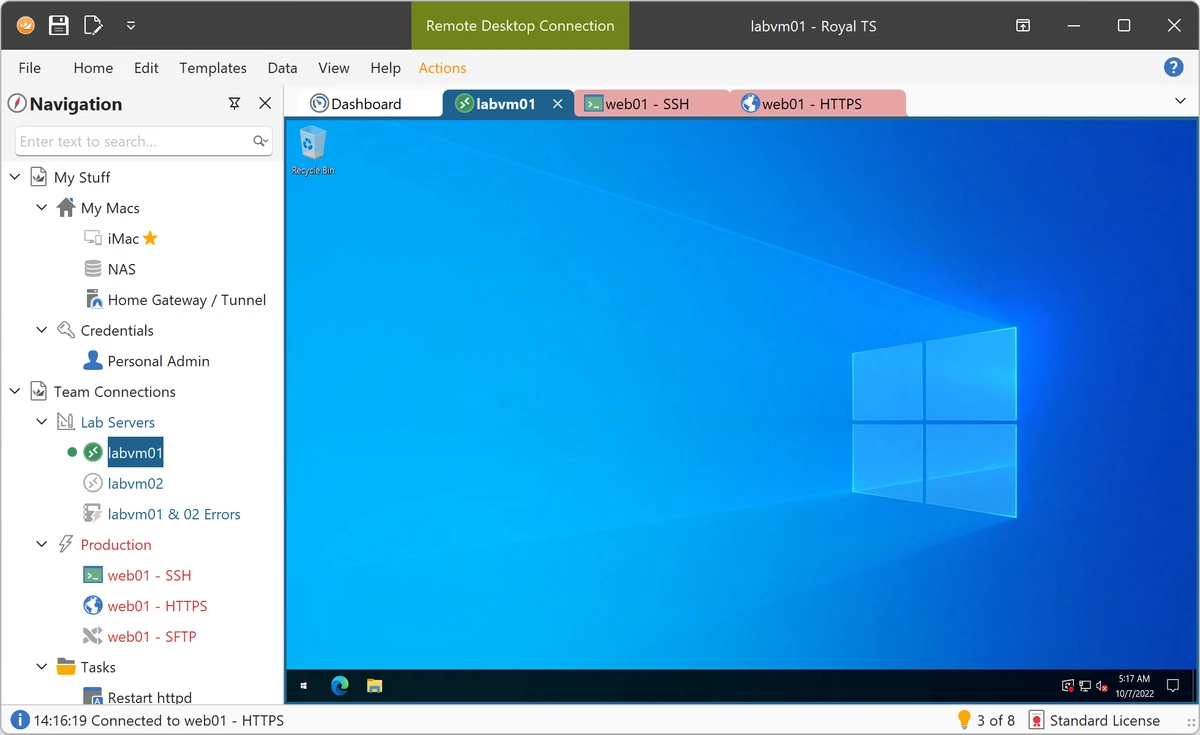
Royal TS is a professional remote connection management platform designed for system administrators, network engineers, and IT teams. It consolidates multiple remote access protocols, credential management, automation tools, and secure document sharing into a single workspace, helping teams streamline infrastructure management.

Overview

Managing dozens or even hundreds of remote systems can quickly become challenging when connections, credentials, and workflows are scattered across multiple tools. Royal TS addresses this problem by providing a centralized environment for organizing and accessing remote resources. The platform supports a variety of connection types, including RDP, VNC, SSH-based terminals, S/FTP, and web-based interfaces. Combined with integrated credential management, encryption, secure document sharing, and task automation, Royal TS serves as a comprehensive workspace for IT operations. Its focus on productivity and collaboration makes it particularly attractive for teams that manage complex infrastructures across multiple environments.

Features of Royal TS

  • Centralized remote connection management
  • Support for RDP connections
  • Support for VNC connections
  • Support for SSH-based terminal sessions
  • Support for S/FTP connections
  • Support for web-based interfaces
  • Built-in credential management
  • Credential inheritance through folder structures
  • Reusable credential objects
  • Access credentials from external sources
  • Secure multi-user document sharing
  • Encrypted storage of sensitive data
  • Password-protected shared documents
  • Secure credential separation from connection data
  • SSH-based tunneling (Secure Gateway) support
  • Dynamic folders for importing external data
  • Command task automation
  • Key sequence task automation
  • Built-in tools such as ping and traceroute
  • Automation using connection and credential properties
  • Team collaboration features

User Experience

Royal TS is built with productivity in mind. Instead of managing remote sessions through multiple standalone tools, users can organize connections, credentials, and automation workflows within a single interface.

The ability to group connections into folders and apply inherited credentials significantly reduces repetitive administrative work. This becomes especially valuable in environments with numerous servers, devices, or remote systems. One of the most useful aspects of Royal TS is its secure sharing model. Teams can distribute connection documents without exposing personal credentials, allowing collaboration without sacrificing security.

Automation features further enhance efficiency. Command Tasks and Key Sequence Tasks can eliminate repetitive administrative processes, helping users execute routine operations more consistently and with fewer manual steps. While the software offers extensive functionality, new users may need some time to fully explore its advanced capabilities. However, experienced IT professionals will likely appreciate the depth and flexibility available.

Who Should Use Royal TS?

  • System administrators
  • Network engineers
  • IT support teams
  • Infrastructure managers
  • DevOps professionals
  • Managed service providers (MSPs)
  • Organizations managing large numbers of remote systems

Conclusion

Royal TS is a powerful solution for IT professionals who need more than a simple remote desktop client. By combining connection management, credential security, team collaboration, and automation features, it helps organizations manage remote infrastructure more efficiently. For administrators handling multiple systems across various protocols, Royal TS offers a well-rounded and productivity-focused platform that can significantly simplify day-to-day operations. Its strong security features and automation capabilities make it a valuable addition to any professional IT toolkit.

Pros & Cons

Pros

  • Supports multiple remote access protocols
  • Centralized connection management
  • Strong credential management capabilities
  • Secure team sharing without exposing credentials
  • Encryption and password protection features
  • Built-in SSH tunneling support
  • Powerful automation tools
  • Dynamic folder integration with external data sources
  • Improves team productivity and workflow consistency

Cons

  • Learning curve for new users
  • Extensive feature set may be excessive for basic remote access needs
  • Some environments may require additional runtime dependencies

Frequently Asked Questions

What is Royal TS used for?

Royal TS is used to manage remote connections, credentials, and administrative workflows across multiple systems and protocols from a centralized interface.

Which connection protocols does Royal TS support?

Royal TS supports RDP, VNC, SSH-based terminals, S/FTP, and web-based interfaces.

Does Royal TS include credential management?

Yes. It includes built-in credential management with reusable credential objects, inheritance options, and secure sharing capabilities.

Can teams securely share connection documents?

Yes. Royal TS allows teams to share connection information without exposing personal credentials, improving both collaboration and security.

Does Royal TS support automation?

Yes. The platform includes Command Tasks and Key Sequence Tasks that can automate repetitive administrative operations.

Is sensitive information encrypted?

Yes. Sensitive document data is encrypted and can also be protected with passwords for additional security.

Which operating systems are supported?

Royal TS officially supports Windows 10 Client (22H2) and Windows Server 2016/2019. It is also likely to run on Windows 7 SP1 and Windows 8.1, subject to required dependencies such as Microsoft Visual C++ runtimes.

Recommended apps [Freeware]:
  • Garmin Express 7.29.0.0 Garmin Express logo manage Garmin GPS devices with map updates, backups, software updates, and device registration
  • Easy System Utility 1.1.65 Easy System Utility logo clean junk files, repair tools, passwords and system optimization.
  • ExpanDrive 2026.06.11 ExpanDrive logo mounts cloud storage and remote servers as local drives for seamless file access in Windows Explorer
  • Ventoy 1.1.16 + LiveCD Ventoy logo create bootable USB drives and boot directly from ISO files without extraction or reformatting
  • HttpMaster Professional 7.0.0 HttpMaster Professional logo web testing tool for developers to automate HTTP requests, API testing, and response validation
  • Ultimaker Cura 5.13.0 Ultimaker Cura logo Prepare, slice, and manage 3D prints with Ultimaker Cura, an open-source software for beginners and professionals
Recommended apps [Shareware]:
  • Coolutils Print Maestro 4.2.0.0 Coolutils Print Maestro logo print folder contents, export directory trees, and generate detailed file reports quickly
  • All Video Downloader Pro 10.4.7 All Video Downloader Pro logo Download videos, playlists, subtitles, and audio from popular sites with built-in conversion and playback tools
  • 4DDiG File Repair 4.4.2.9 4DDiG File Repair logo a Windows tool for repairing damaged photos and videos in batch mode with a simple, automated workflow
  • SysTools SQL Backup Recovery 12.0.0 SysTools SQL Backup Recovery logo Repair and recover corrupt SQL Server BAK files, restore database objects, and export recovered data with ease.
  • Password Depot 19.2.0 Password Depot logo a secure password manager with AES encryption, auto-fill, and cloud sync support for Windows users
  • Fast Video Cutter Joiner 7.1.4.0 Fast Video Cutter Joiner logo a lightweight video editing tool for quickly cutting, trimming, and joining videos