NWinfo logo

NWinfo 1.6.5

  • User Rating:
    ★★★★★
    ★★★★★
    0.0 ★ 0Votes
  • Requirements:
    Windows
  • Version: 1.6.5
  • Latest updated: 3 weeks ago
  • License: Open Source  
  • Publisher: A1ive
  • Size: 6 MB
× app stores

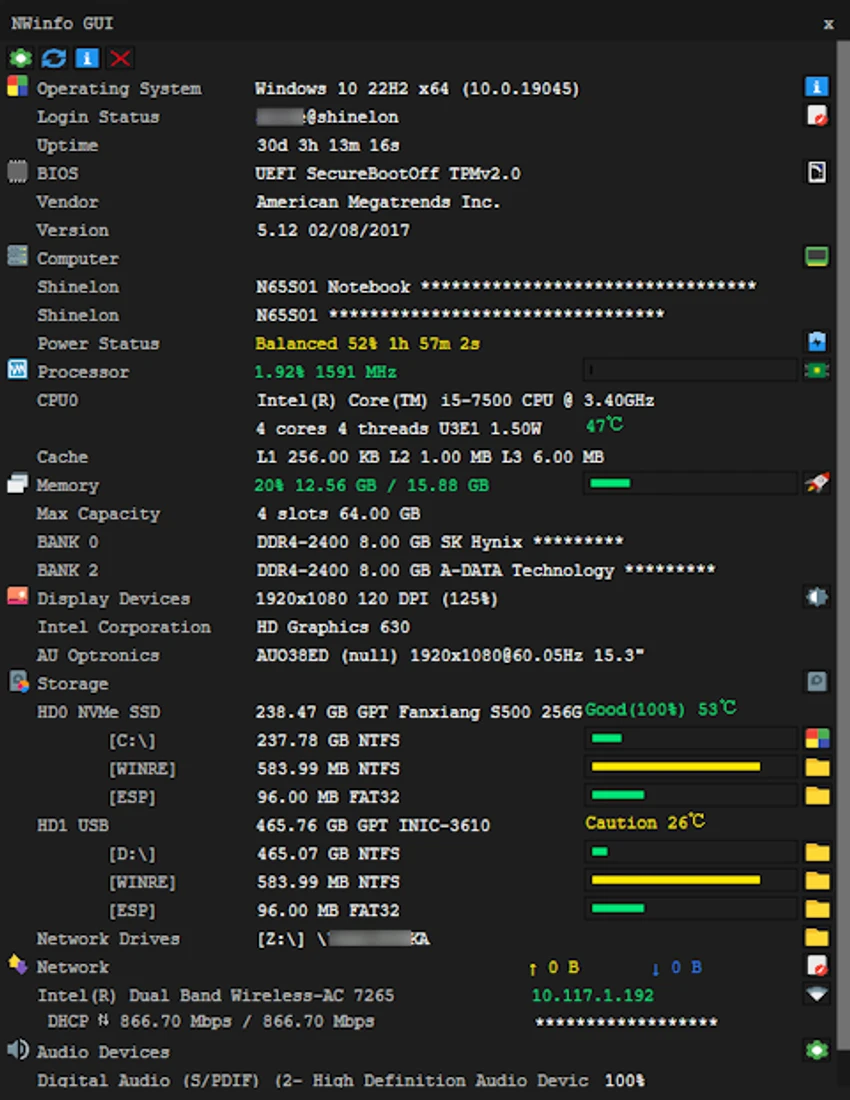
NWinfo is a lightweight, open-source utility that gathers detailed hardware and system information directly from your Windows PC. During my evaluation, I found it to be a practical diagnostic tool for users who want comprehensive hardware details without relying on Windows Management Instrumentation (WMI).

The application displays information about the processor, memory, storage devices, graphics hardware, motherboard, network adapters, BIOS, displays, and more. Because it is portable, NWinfo can be run directly from a USB drive without installation, making it especially useful for technicians, system administrators, and enthusiasts who frequently troubleshoot different computers.

Despite its compact size of only 2 MB, NWinfo provides an impressive amount of technical information while supporting multiple export formats for documentation and analysis.

Features of NWinfo

  • Displays detailed system and hardware information.
  • Retrieves information directly without relying on WMI.
  • Shows detailed information for:
    • SMBIOS
    • CPUID
    • S.M.A.R.T.
    • PCI
    • EDID
  • Displays CPU model, specifications, and operating speed.
  • Shows memory (RAM) specifications and usage.
  • Provides storage device information, including capacity and usage.
  • Lists network adapters and IP addresses.
  • Displays motherboard model and manufacturer.
  • Shows graphics card information and driver details.
  • Displays monitor specifications, including resolution and refresh rate.
  • Reports BIOS version and firmware information.
  • Shows operating system version and system uptime.
  • Provides a summary of running processes and services.
  • Generates detailed logs for troubleshooting or sharing.
  • Supports exporting information in:
    • JSON
    • YAML
    • LUA table formats
  • Portable application that can run from a USB drive.
  • Free and open-source.

Interface and Usability

NWinfo focuses on presenting technical information clearly rather than providing visual enhancements. During my experience with the software, I found it straightforward to launch and immediately begin examining hardware specifications without requiring installation.

Its portable design is one of its biggest strengths. Running directly from removable media makes it convenient for diagnosing multiple systems or collecting hardware reports in environments where software installation is restricted. The export options are also valuable, allowing users to save hardware information in structured formats suitable for automation, scripting, or documentation.

Who Should Use NWinfo?

  • IT professionals.
  • System administrators.
  • PC technicians.
  • Hardware enthusiasts.
  • Developers who need structured hardware information.
  • Users troubleshooting Windows computers.
  • Anyone looking for a portable hardware information utility.

System Requirements

  • Operating System
    • Windows 7
    • Windows 8
    • Windows 8.1
    • Windows 10
    • Windows 11

Conclusion

NWinfo is a compact yet capable hardware information utility that delivers detailed system diagnostics without unnecessary complexity. Its ability to collect data directly, operate as a portable application, and export results in developer-friendly formats makes it valuable for both everyday troubleshooting and professional system analysis.

Pros & Cons

✓

Pros

  • Lightweight portable application
  • No installation required
  • Retrieves information without depending on WMI
  • Comprehensive hardware reporting
  • Supports JSON, YAML, and LUA exports
  • Generates detailed diagnostic logs
  • Free and open-source
  • Compatible with older and newer Windows versions
✕

Cons

  • Interface prioritizes technical information over visual presentation
  • Primarily intended for diagnostics rather than system optimization

Frequently Asked Questions

Is NWinfo free to use?

Yes. NWinfo is free and open-source, allowing users to inspect hardware information, generate reports, and even customize the software through its publicly available source code.

Does NWinfo require installation?

No. NWinfo is a portable application that can run directly without installation, making it suitable for use from a USB flash drive or other removable storage.

What hardware information can NWinfo display?

NWinfo reports detailed information about the CPU, memory, storage devices, motherboard, graphics card, network adapters, BIOS, display hardware, operating system, and other low-level hardware components.

Does NWinfo rely on Windows Management Instrumentation (WMI)?

No. One of NWinfo's distinguishing features is that it gathers hardware information directly rather than relying on WMI, which can improve reliability in environments where WMI is unavailable or restricted.

Can NWinfo export system information?

Yes. NWinfo supports exporting collected hardware and system information in JSON, YAML, and LUA table formats, making it useful for documentation, scripting, and automation.

Which Windows versions are supported?

NWinfo supports Windows 7, Windows 8, Windows 8.1, Windows 10, and Windows 11.

Recommended apps [Freeware]:
  • iTop Easy Desktop 4.4.0.348 iTop Easy Desktop logo declutter, organize, and manage Windows desktop items efficiently and quickly
  • CrossFTP 2.00.1 CrossFTP logo a multi-protocol FTP client for Windows supporting SFTP, WebDAV, S3, Azure, and secure file transfers
  • Czkawka 12.0.0 Czkawka logo open-source file cleanup tool that finds duplicates, empty folders, similar images, and large files across your system
  • Argente System Repair 1.0.8.2 Argente System Repair logo scans and fixes Windows errors to improve performance with simple, recommended, and custom modes
  • SecretDNS 3.9.2 SecretDNS logo Improve online privacy with encrypted DNS requests and SNI protection while reducing access issues through secure network features.
  • Universal Media Server 15.6.0 Universal Media Server logo Stream videos, music, and images across devices with a flexible DLNA server supporting multiple platforms and formats.
Recommended apps [Shareware]:
  • App Builder 2026.18 App Builder logo a visual development environment for creating HTML5, mobile, desktop, and PWA applications
  • Google Antigravity 2.3.0 Google Antigravity logo AI-powered IDE that uses autonomous agents to automate coding, testing, and software development workflows
  • UniFab 4.1.7.0 UniFab logo Enhance videos with AI using UniFab. Upscale footage, reduce noise, boost frame rates, convert HDR, and improve audio quality
  • Becky! Internet Mail 2.83.03 Becky! Internet Mail logo a fast, feature-rich Windows email client with POP3/IMAP support and advanced mailbox management
  • Cyber Privacy Suite 4.5.5 Cyber Privacy Suite logo protect privacy with VPN, tracking protection, encryption, and real-time security tools for Windows users
  • Chris-PC CPU Booster 3.26.0706 Chris-PC CPU Booster logo optimizes CPU usage, prioritizes applications, and helps improve performance for demanding software