FileLegit Windows Internet & Network Remote Desktop Network LookOut Administrator Pro
Network LookOut Administrator Pro logo

Network LookOut Administrator Pro 5.5.5

  • User Rating:
    ★★★★★
    ★★★★★
    0.0 0Votes
  • Requirements:
    Windows
  • Version: 5.5.5
  • Latest updated: 2 weeks ago
  • License: Free Trial  
  • Publisher: EduIQ
  • Size: 46 MB
× app stores

Network LookOut Administrator Pro is a Windows-based remote monitoring and administration solution designed to help administrators view and manage connected computers across a network. The software allows users to monitor employee PC screens in real time, interact with remote desktops, and perform various administrative actions without physically accessing each workstation.

The application focuses on centralized PC management, making it suitable for environments where administrators need visibility over multiple computers from a single location. It provides features for displaying multiple remote screens, organizing computers into groups, controlling keyboards and mice, and managing workstation settings remotely.

Beyond screen monitoring, Network LookOut Administrator Pro includes administrative controls such as restarting or shutting down computers, managing running applications and processes, controlling audio settings, disabling certain functions, and launching programs or web pages on connected machines. Security features are included through encrypted connections, password protection, and protected agent settings. The software supports multi-monitor environments and different remote access scenarios, including Remote Desktop, Terminal Services, and Citrix sessions. It is designed primarily for network administrators and organizations that require centralized control over multiple Windows computers.

Features of Network LookOut Administrator Pro

  • Real-time viewing of employee PC screens from a central console
  • Remote control of mouse and keyboard input
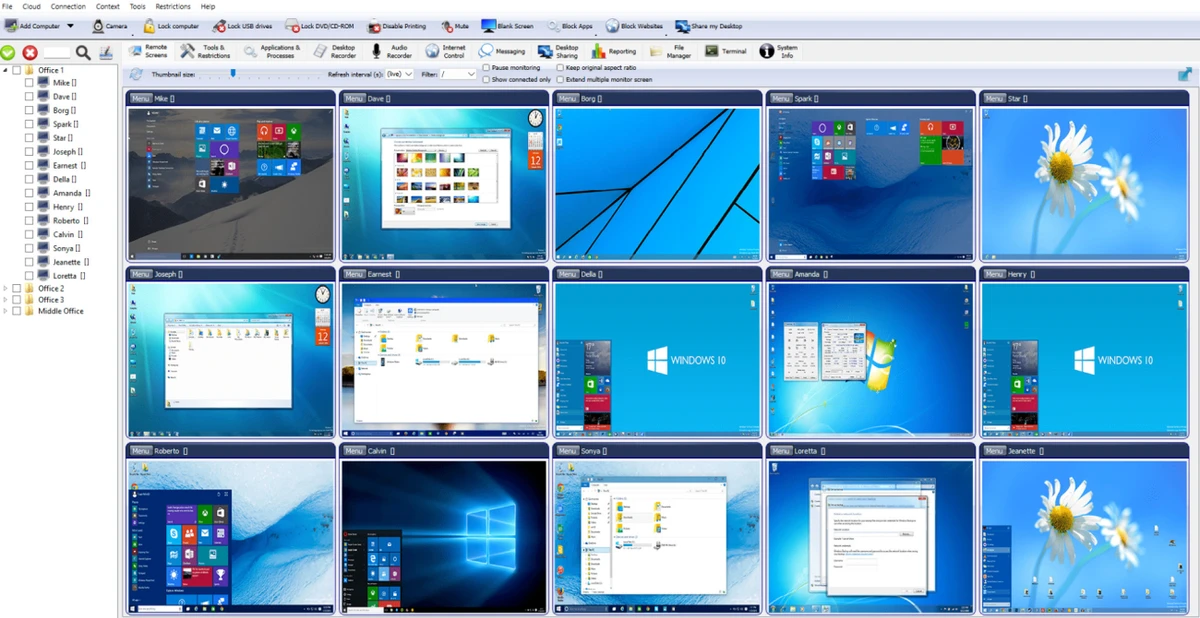
  • Display multiple remote screens in a table view
  • Organize connected computers into groups
  • Zoom remote screens to actual size
  • Show connected user names
  • Remote power management including shutdown, restart, hibernate, and suspend
  • Log off users and lock workstations
  • Control screen saver settings
  • Block applications and manage running processes
  • Start programs remotely and view output
  • Open web pages on connected computers
  • Multi-monitor support
  • Adjust refresh intervals for lower bandwidth usage
  • Encrypted and password-protected connections
  • Remote agent installation support
  • Multi-session support for Remote Desktop, Terminal Services, and Citrix

Interface and Usability

Network LookOut Administrator Pro is designed around a centralized monitoring console where administrators can view and manage connected computers. The ability to display multiple remote screens in a table layout helps users monitor several systems at once, while grouping options make it easier to organize larger networks.

The remote control functions provide direct interaction with connected computers, including mouse and keyboard control. Administrative tools are accessible from the management interface, allowing common tasks such as restarting systems, locking workstations, or managing applications without visiting individual PCs. The software includes password protection and encrypted communication settings, which help secure remote administration activities. Its feature set is focused on functionality rather than consumer-style simplicity, making it more suitable for IT administrators managing Windows networks.

Who Should Use Network LookOut Administrator Pro?

  • IT administrators managing multiple Windows computers
  • Businesses needing centralized workstation monitoring
  • Organizations that require remote troubleshooting capabilities
  • Schools, offices, and network environments with many connected PCs
  • Administrators who need remote control and system management tools

Conclusion

Network LookOut Administrator Pro provides a comprehensive set of remote monitoring and administration tools for Windows networks. Its combination of live screen viewing, remote control, system management options, and security features makes it a practical solution for administrators responsible for multiple computers.

Pros & Cons

Pros

  • Real-time remote screen monitoring
  • Supports remote mouse and keyboard control
  • Includes many system administration actions
  • Supports multiple connected computers
  • Provides encrypted and password-protected connections
  • Includes multi-monitor and multi-session support

Cons

  • Designed mainly for network administrators rather than casual users
  • Requires Windows-based environments

Frequently Asked Questions

What is Network LookOut Administrator Pro used for?

Network LookOut Administrator Pro is used to monitor and manage computers connected to a network. It allows administrators to view remote screens, control workstations, and perform various administrative tasks from a central computer.

Can Network LookOut Administrator Pro control another computer remotely?

Yes. The software allows administrators to control a connected PC’s mouse and keyboard, enabling remote interaction with the workstation.

Does Network LookOut Administrator Pro support multiple computers?

Yes. The software can display multiple remote screens in a table view and allows computers to be organized into groups for easier management.

Is the connection between computers secure?

Network LookOut Administrator Pro includes encrypted connections and password protection for remote access, monitoring consoles, and agent settings.

Can administrators restart or shut down remote computers?

Yes. The software includes remote power management options such as shutdown, restart, hibernate, and suspend for connected PCs.

What operating systems does Network LookOut Administrator Pro support?

The provided system requirements list Windows 7, Windows 8, Windows 10, and Windows 11, including both 32-bit and 64-bit versions.

Recommended apps [Freeware]:
  • DefenderUI 2.10 DefenderUI logo enhances Microsoft Defender on Windows 10/11 with advanced security profiles and easier system protection control
  • Advanced Trigonometry Calculator 2.1.7 Advanced Trigonometry Calculator logo Solve advanced trigonometry, scientific notation, complex numbers, and equations with Advanced Trigonometry Calculator
  • MetaFox 2.6.3 MetaFox logo Convert popular video formats to MKV quickly with a lightweight drag-and-drop tool designed for simple and efficient conversion.
  • Microsoft Edge WebView2 Runtime 150.0.4078.83 Microsoft Edge WebView2 Runtime logo Enable modern Windows apps to display web content with Chromium-based rendering, HTML, CSS, JavaScript support, and native integration.
  • CudaText 1.234.6.0 CudaText logo Edit code efficiently with a lightweight editor supporting many programming languages, syntax highlighting, plugins, and customization.
  • Notepad++ 8.9.7 Notepad++ logo Edit code and plain text with a fast, lightweight editor featuring syntax highlighting, multiple tabs, plugins, and support for many programming languages.
Recommended apps [Shareware]:
  • Quick Heal AntiVirus Pro 26.1.0.2 Quick Heal AntiVirus Pro logo real-time malware protection, ransomware defense, and email security
  • Topaz Photo 1.6.1 Topaz Photo logo advanced AI to sharpen photos, remove noise, and enhance image quality with ease
  • Digimizer 6.5.4 Digimizer logo image analysis tool for precise measurements, object detection, and scientific image processing
  • NTLite 2026.07.11258 NTLite logo Windows customization tool for removing components, integrating drivers, and creating optimized Windows installation images
  • Batch It Ultra 6.77 Batch It Ultra logo Process thousands of images with batch resizing, conversion, effects, watermarking, captions, and advanced automation tools.
  • SecureCRT 9.7.3 Build 3916 SecureCRT logo Secure remote connections with SSH, Telnet, scripting, session management, and secure file transfer tools for professionals.