CrawlRhino SEO Monitor logo

CrawlRhino SEO Monitor 1.1.17.0

  • User Rating:
    ★★★★★
    ★★★★★
    0.0 ★ 0Votes
  • Requirements:
    Windows
  • Version: 1.1.17.0
  • Latest updated: 2 weeks ago
  • License: Freemium  
  • Publisher: CrawlRhino
  • Size: 2 MB
× app stores

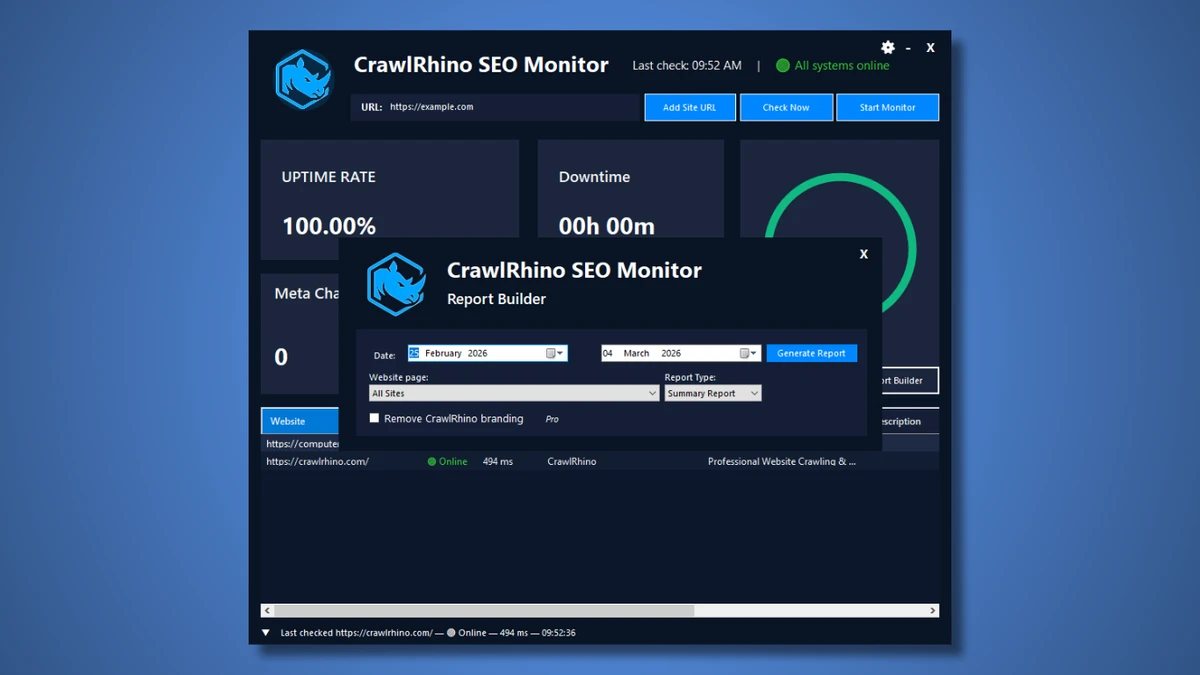
CrawlRhino SEO Monitor is a desktop website monitoring application for Windows that combines website uptime monitoring with SEO change detection. Designed for website owners, developers, SEO professionals, and digital marketers, it helps identify website outages, monitor response times, and detect unexpected changes that could affect website performance or search engine visibility.

The software continuously monitors multiple websites from a centralized dashboard, recording uptime events, response times, and HTTP status codes. This allows users to quickly identify issues such as server outages, redirects, or inaccessible pages before they significantly impact visitors or search rankings.

Beyond availability monitoring, CrawlRhino SEO Monitor tracks important SEO elements, including page titles, headings, and metadata. By comparing these elements between monitoring sessions, it can detect unexpected edits, CMS updates, or configuration changes that may influence website performance in search engines.

Unlike cloud-based monitoring services, CrawlRhino SEO Monitor operates entirely on the local computer, storing monitoring data on the user's system without requiring online accounts or external services. Built-in reporting, data export, filtering, and monitoring history make it easy to review website performance over time and share results when needed.

Features of CrawlRhino SEO Monitor

  • Website uptime monitoring
  • Monitor up to 15 URLs in the free version
  • Monitor multiple websites from a single dashboard
  • Bulk monitoring across tracked URLs
  • HTTP status code monitoring (200, 301, 302, 404, and 5xx)
  • Website response time monitoring
  • Website change detection
  • Monitor page titles, headings, and metadata
  • Detect unexpected SEO changes
  • Downtime event logging
  • Monitoring history
  • SEO status monitoring
  • Structured monitoring dashboard
  • Connection speed simulation for desktop broadband and 4G
  • Built-in report builder
  • Export monitoring reports and data
  • Sortable monitoring results
  • Status filtering
  • Local desktop monitoring
  • Native Windows application
  • No account required

Interface and Usability

CrawlRhino SEO Monitor provides a clean dashboard that displays the status of all monitored websites in one place. URLs, response times, HTTP status codes, and monitoring results are organized in sortable tables, making it easy to identify websites that require attention.

Adding websites is straightforward, and bulk monitoring allows multiple URLs to be checked simultaneously. Filtering options help users quickly locate redirects, errors, or successful responses, while monitoring history makes it simple to review past performance and downtime events. The application runs locally on Windows, eliminating the need for online accounts or cloud services while keeping monitoring data stored on the user's own system.

Who Should Use CrawlRhino SEO Monitor?

  • SEO professionals
  • Website owners
  • Web developers
  • Digital marketing agencies
  • System administrators
  • Businesses managing multiple websites

Conclusion

CrawlRhino SEO Monitor offers a practical combination of website uptime monitoring and SEO change detection in a lightweight Windows desktop application. Its ability to monitor response times, HTTP status codes, website availability, and important SEO elements provides valuable insight into website health without relying on cloud services.

Pros & Cons

✓

Pros

  • Combines uptime monitoring with SEO monitoring
  • Detects changes to titles, headings, and metadata
  • Tracks response times and HTTP status codes
  • Supports monitoring multiple websites
  • Local desktop monitoring with no cloud dependency
  • Built-in reporting and export features
  • No account registration required
✕

Cons

  • Free version is limited to monitoring 15 URLs
  • Some advanced monitoring features require the Pro version

Frequently Asked Questions

What is CrawlRhino SEO Monitor used for?

CrawlRhino SEO Monitor is used to monitor website uptime, response times, HTTP status codes, and changes to important SEO elements such as page titles, headings, and metadata.

How many websites can the free version monitor?

The free version supports monitoring up to 15 URLs simultaneously.

Does CrawlRhino SEO Monitor detect website changes?

Yes. It can detect changes to page titles, headings, and metadata between monitoring sessions, helping identify unexpected SEO-related modifications.

Does the software require a cloud account?

No. CrawlRhino SEO Monitor runs locally on Windows and stores monitoring data on your own computer without requiring online accounts.

Can CrawlRhino monitor multiple websites at once?

Yes. The application allows you to monitor multiple websites from a single dashboard and perform bulk monitoring checks across all tracked URLs.

Does CrawlRhino SEO Monitor generate reports?

Yes. It includes built-in reporting tools and export options so you can review monitoring history and share results for further analysis.

Recommended apps [Freeware]:
  • Garmin Express 7.29.0.0 Garmin Express logo manage Garmin GPS devices with map updates, backups, software updates, and device registration
  • OcenAudio 3.20.0 OcenAudio logo a fast and easy-to-use audio editor with real-time effects, spectrogram analysis, and VST plugin support
  • DISMTools 0.8 DISMTools logo open-source GUI for Windows DISM that simplifies image management, system repair, and maintenance
  • Wagnardsoft Tools 1.0.8.2 Wagnardsoft Tools logo Clean temporary files, repair Windows system files, and maintain your PC with Wagnardsoft Tools (WTools)
  • Xreveal 2.9.6 Xreveal logo a lightweight disc decryption tool that removes supported Blu-ray, UHD, DVD, and CD protections for compatible media
  • UEFITool A75 UEFITool logo Analyze, extract, and modify UEFI firmware images with support for multiple BIOS formats and detailed firmware structure viewing.
Recommended apps [Shareware]:
  • Total Excel Converter 7.1.0.138 Total Excel Converter logo convert Excel, ODS, CSV, DBF, and more into PDF, DOC, HTML, SQL, and other formats on Windows.
  • Softros LAN Messenger 12.6.3.0 Softros LAN Messenger logo secure encrypted LAN messaging, group chat, and file sharing for office communication
  • Adobe Audition 2026 v26.3 Adobe Audition logo professional audio editor for recording, mixing, restoration, podcasting, and sound design
  • Google Satellite Maps Downloader 8.419 Google Satellite Maps Downloader logo downloads satellite map tiles from Google Maps for offline viewing, GIS projects, and map export
  • Vovsoft Speech to Subtitle Converter 2.0 Vovsoft Speech to Subtitle Converter logo Convert audio and video files into synchronized subtitles with support for over 50 languages and popular SRT and VTT formats.
  • Blocker Web 1.1.5.0 Blocker Web logo Block distracting websites on Windows, manage blocked URLs, and stay focused with a lightweight website blocking utility.