FileLegit Windows Utilities File Managers Duplicate Photos Fixer Pro
Duplicate Photos Fixer Pro logo

Duplicate Photos Fixer Pro 1.3.1086.1158

  • User Rating:
    ★★★★★
    ★★★★★
    0.0 ★ 0Votes
  • Requirements:
    Windows
  • Version: 1.3.1086.1158
  • Latest updated: 4 months ago
  • License: Free Trial  
  • Publisher: Systweak Software
  • Size: 14.5 MB
× ❮ app stores ❯

Duplicate Photos Fixer Pro is a photo management utility designed to help users identify and remove duplicate and similar-looking images. By eliminating unnecessary copies, it helps organize photo collections and recover valuable storage space. During my experience with it, I found the software straightforward to use and particularly effective for cleaning up large image libraries.

Features of Duplicate Photos Fixer Pro

  • Detects exact duplicate photos
  • Finds similar-looking images
  • Fast and accurate scanning engine
  • Helps organize cluttered photo collections
  • Frees up storage space occupied by duplicate files
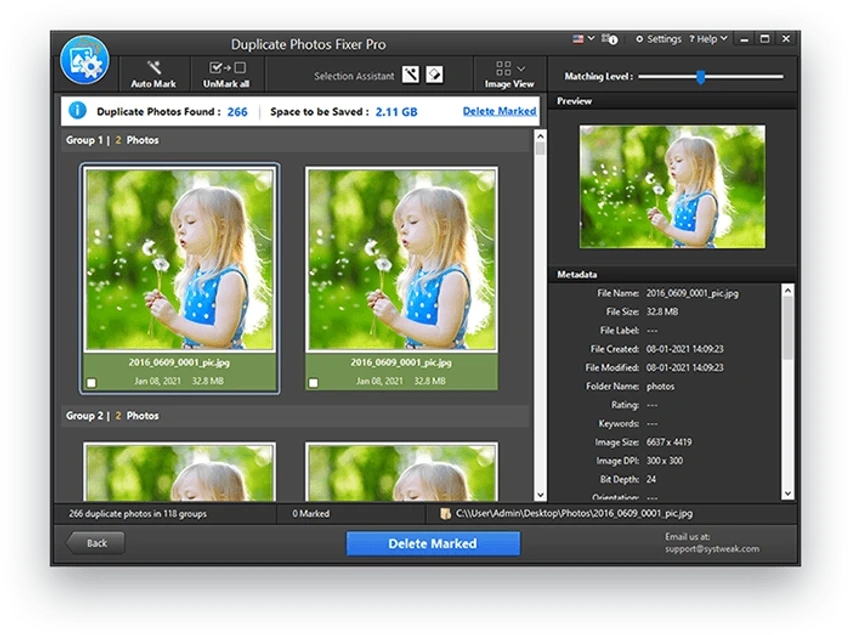
  • Group-wise display of detected duplicates for easier review
  • Simplifies duplicate removal in a few steps
  • Suitable for both home and professional users
  • Compatible with Windows 11, Windows 10, Windows 8.1, Windows 8, and Windows 7
  • Supports both 32-bit and 64-bit systems

User Experience

After launching Duplicate Photos Fixer Pro, I found the interface easy to understand, even for users with little technical experience. The scanning process is quick and automatically identifies both identical images and photos that appear visually similar. One aspect I appreciated was the group-wise presentation of results. Instead of displaying duplicates in one large list, the software organizes them into groups, making it easier to compare images before deleting anything. This approach reduces the risk of accidentally removing important photos.

For users with large collections accumulated over many years, the software can save considerable time compared to manually sorting through folders. Whether dealing with imported smartphone pictures or multiple backup copies, the cleanup process remains simple and efficient. Although the application focuses solely on duplicate detection rather than broader image management, it performs its primary task well and without unnecessary complexity.

Who Should Use Duplicate Photos Fixer Pro?

  • Users with large photo collections
  • People trying to recover storage space
  • Photographers managing thousands of images
  • Home users organizing family pictures
  • Users with multiple backups containing duplicate photos
  • Anyone wanting a cleaner photo library

Conclusion

Duplicate Photos Fixer Pro is a practical solution for cleaning up duplicate and similar images. Its simple workflow, fast scans, and organized results make managing large photo collections much easier. If your photo library has become cluttered over time and you're looking to reclaim storage space without manually sorting files, Duplicate Photos Fixer Pro is worth considering.

Pros & Cons

✓

Pros

  • Finds both duplicate and similar-looking photos
  • Fast scanning performance
  • Easy-to-use interface
  • Grouped results simplify review
  • Helps recover wasted storage space
  • Suitable for beginners and advanced users
  • Supports both 32-bit and 64-bit Windows systems
✕

Cons

  • Focused exclusively on photo duplicates
  • No image editing capabilities

Frequently Asked Questions

What is Duplicate Photos Fixer Pro used for?

Duplicate Photos Fixer Pro is designed to locate and remove duplicate and similar-looking photos to organize image collections and free storage space.

Can it find similar photos, not just exact duplicates?

Yes. The software detects both identical images and visually similar photos.

Does it organize duplicates into groups?

Yes. Detected duplicates are displayed in groups, making review and cleanup easier.

Will removing duplicate photos free up storage space?

Yes. Eliminating unnecessary copies can recover significant disk space.

Is Duplicate Photos Fixer Pro suitable for large photo libraries?

Yes. It is designed to quickly scan and clean both small and extensive image collections.

Which Windows versions are supported?

The software supports Windows 11, Windows 10, Windows 8.1, Windows 8, and Windows 7, on both 32-bit and 64-bit systems.

Is Duplicate Photos Fixer Pro an image editor?

No. It focuses on finding and removing duplicate and similar photos rather than editing images.

Recommended apps [Freeware]:
  • Prevent Restore 2026 v123 Prevent Restore logo securely wipes deleted files, blocks data recovery, and protects sensitive information on Windows
  • WinBin2Iso 6.77 WinBin2Iso logo a free, portable utility that quickly converts BIN CD and DVD image files to ISO format on Windows.
  • Urban VPN 5.2.1 Urban VPN logo virtual private network tool designed to help users protect their identity and privacy while browsing the internet
  • Drupal 11.4.2 Drupal logo open-source CMS and web development framework that powers enterprise websites, digital platforms, and scalable web applications
  • GetPixelColor 3.55 GetPixelColor logo Identify exact pixel colors on Windows with GetPixelColor, a lightweight tool supporting RGB, RGBA, and HLS color values
  • PropertySystemView 1.22 PropertySystemView logo View and modify Windows file metadata, timestamps, and system properties with this portable utility designed for advanced users.
Recommended apps [Shareware]:
  • Gilisoft SnapID 8.8.0 Gilisoft SnapID logo Edit, enhance, retouch, and transform images with powerful tools in Gilisoft SnapID for Windows
  • DBF Converter 7.87 DBF Converter logo convert DBF files to CSV, Excel, SQL and text with fast batch processing and filtering
  • Total Image Converter 8.5.0.322 Total Image Converter logo Windows tool for converting, resizing, and editing images in bulk with support for RAW, TIFF, PSD, and more
  • Adlice Protect 16.7.0.0 Adlice Protect logo Detect and remove stubborn malware with Adlice Protect, an advanced anti-malware tool using signature and heuristic analysis
  • WinCam 4.1 WinCam logo Record screens, applications, audio, and tutorials with a lightweight Windows recorder featuring real-time capture and editing tools.
  • ComboTIFF Pro 2.97 ComboTIFF Pro logo Manage multipage TIFF files with image merging, extraction, conversion, resizing, compression, and advanced editing options.