iToolab WatsGo logo

iToolab WatsGo 9.0.0

  • User Rating:
    ★★★★★
    ★★★★★
    0.0 0Votes
  • Requirements:
    Windows
  • Version: 9.0.0
  • Latest updated: 4 days ago
  • License: Free Trial  
  • Publisher: iToolab
  • Size: 3 MB
× app stores

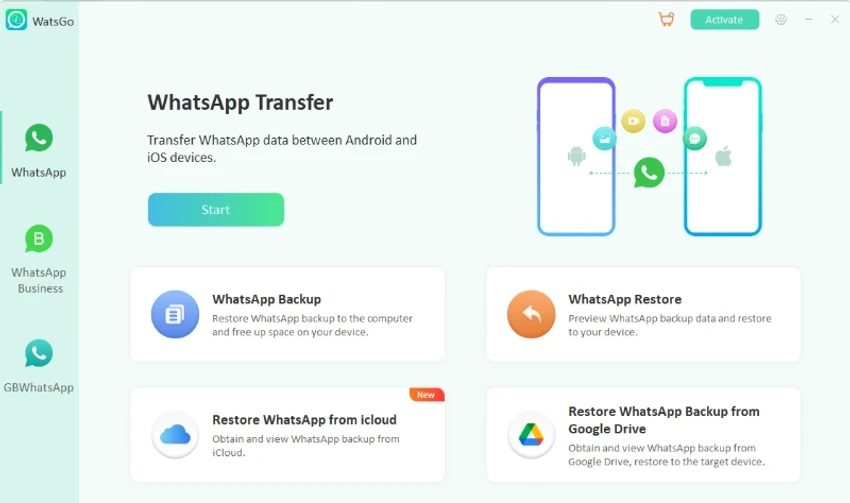
iToolab WatsGo is a data migration and backup tool designed specifically for WhatsApp and WhatsApp Business. It allows users to transfer chat history, media files, contacts, and attachments between Android and iOS devices without relying on traditional cloud services like Google Drive or iCloud. The software focuses on simplifying WhatsApp migration, especially for users switching between different mobile platforms.

Key Features of iToolab WatsGo

  • One-click transfer of WhatsApp and WhatsApp Business data.
  • Supports Android to iPhone migration.
  • Supports iPhone to Android transfer.
  • Supports Android to Android transfer.
  • Supports iPhone to iPhone transfer without iCloud.
  • Transfers messages, images, videos, and contacts.
  • Backup WhatsApp data to computer on Android and iOS.
  • Restore WhatsApp backups from local storage or backup history.
  • Restore WhatsApp data from Google Drive backups to devices.
  • View and manage backup history before restoration.
  • Supports GBWhatsApp migration to official WhatsApp or GBWhatsApp.
  • Compatible with Android 14 and iOS 17.

User Experience

Using iToolab WatsGo feels like a guided migration tool rather than a complex data utility. The workflow is structured around selecting source and destination devices, after which the software handles the transfer process.

One of the most useful aspects is its ability to bypass cloud storage requirements. Instead of relying on iCloud or Google Drive, users can back up WhatsApp data directly to a computer, which adds flexibility and control over stored data. The restore feature is also practical, allowing users to browse backup history and selectively restore data. This is especially helpful when only specific chat histories or media files are needed.

Who Should Use iToolab WatsGo?

  • Users switching from Android to iPhone or vice versa.
  • People upgrading to new smartphones.
  • Users who want to back up WhatsApp without cloud storage.
  • Individuals needing to restore WhatsApp data selectively.
  • WhatsApp Business users managing chat migration.

Conclusion

iToolab WatsGo is a focused WhatsApp transfer and backup solution designed to simplify cross-platform data migration. Its ability to transfer chats between Android and iOS without relying on cloud services makes it particularly useful for users changing devices.

Pros & Cons

Pros

  • Supports cross-platform WhatsApp transfers (Android ↔ iOS).
  • No mandatory reliance on cloud services.
  • Backup and restore functionality to local computer storage.
  • Supports WhatsApp and WhatsApp Business.
  • Allows preview and selection of backup history.
  • Compatible with latest Android and iOS versions.

Cons

  • Focuses only on WhatsApp-related data.
  • Requires a computer to perform transfers and backups.
  • Performance may depend on device compatibility and connection stability.

Frequently Asked Questions

What is iToolab WatsGo used for?

It is used to transfer and back up WhatsApp and WhatsApp Business data between Android and iPhone devices.

Does WatsGo require Google Drive or iCloud?

No. It can back up and transfer WhatsApp data without relying on cloud services.

Can I transfer WhatsApp from Android to iPhone?

Yes. It supports Android to iPhone WhatsApp transfers with full data retention.

Can I restore old WhatsApp backups?

Yes. You can restore backups from local storage or backup history, including iTunes backups.

Does it support WhatsApp Business?

Yes. It supports both WhatsApp and WhatsApp Business data migration.

Recommended apps [Freeware]:
  • Helium Music Manager 18.1.777 Helium Music Manager logo Organize, tag, play, sync, and manage your music collection with Helium Music Manager for Windows
  • DefenderUI 2.10 DefenderUI logo enhances Microsoft Defender on Windows 10/11 with advanced security profiles and easier system protection control
  • TickTick 8.1.0.1 TickTick logo Organize tasks, manage schedules, and stay focused with TickTick's calendar, Pomodoro timer, and collaboration tools
  • K-Lite Codec Pack Full 19.8.2 K-Lite Codec Pack Full logo Play all audio and video formats on Windows with K-Lite Codec Pack Full, a lightweight and reliable codec package
  • Executor 2.3.8 Executor logo a customizable Windows launcher with hotkeys, keyword commands, automation tools, notes, and workflow enhancements
  • Vektorrazor 2.2 Vektorrazor logo converts logos and image sources into clean, CAD-friendly vector contours for technical workflows
Recommended apps [Shareware]:
  • Syncovery 12.2.1 Syncovery logo fast backup and file synchronization tool with real-time sync, versioning, and advanced automation features
  • VideoPad Video Editor 18.38 VideoPad Video Editor logo a Windows movie maker for editing videos, adding effects, transitions, audio, and exporting to social platforms
  • Adobe Media Encoder 2026 Adobe Media Encoder logo a powerful video encoding and media management tool for exporting and transcoding
  • Rons WebLynx 2026.6.23.820 Rons WebLynx logo offline Windows bookmark manager with tagging, automation, RSS support, and link checking
  • CloudMounter 3.7.2137 CloudMounter logo mounts cloud storage and remote servers like local drives for easy file access and management on Windows
  • Pano2VR 8.0.4 Pano2VR logo powerful software for building interactive panoramic images and virtual tours for desktop and mobile platforms