SysTools PDF Unlocker logo

SysTools PDF Unlocker 6.0.0

  • User Rating:
    ★★★★★
    ★★★★★
    0.0 0Votes
  • Requirements:
    Windows
  • Version: 6.0.0
  • Latest updated: 1 day ago
  • License: Free Trial  
  • Publisher: SysTools Software
  • Size: 31.1 MB
× app stores

SysTools PDF Unlocker is a Windows utility designed to remove owner-level restrictions from PDF documents, allowing users to edit, print, copy, extract content, and perform other restricted actions. The software supports PDF files protected with 128-bit and 256-bit encryption and works without requiring Adobe Acrobat. In addition to unlocking individual PDF files, Business and Enterprise editions support batch processing, making the software suitable for organizations that frequently work with protected PDF documents.

Features of SysTools PDF Unlocker

  • Remove owner-password restrictions from PDF files
  • Enable:
    • Editing
    • Printing
    • Copying
    • Page extraction
  • Remove restrictions on:
    • Comments
    • Document assembly
    • Digital signatures
    • Form filling
  • Supports PDF files protected with:
    • 128-bit encryption
    • 256-bit encryption
  • No Adobe Acrobat required
  • Save unlocked PDFs to any preferred location
  • Create new folders directly from the application
  • Preview PDF permissions before and after unlocking
  • Maintains original document formatting and attachments
  • Supports user-password protected PDFs by allowing users to enter the required password
  • Batch PDF unlocking available with Business and Enterprise licenses
  • Search and load PDF files from selected drives
  • Offline license activation support

User Experience

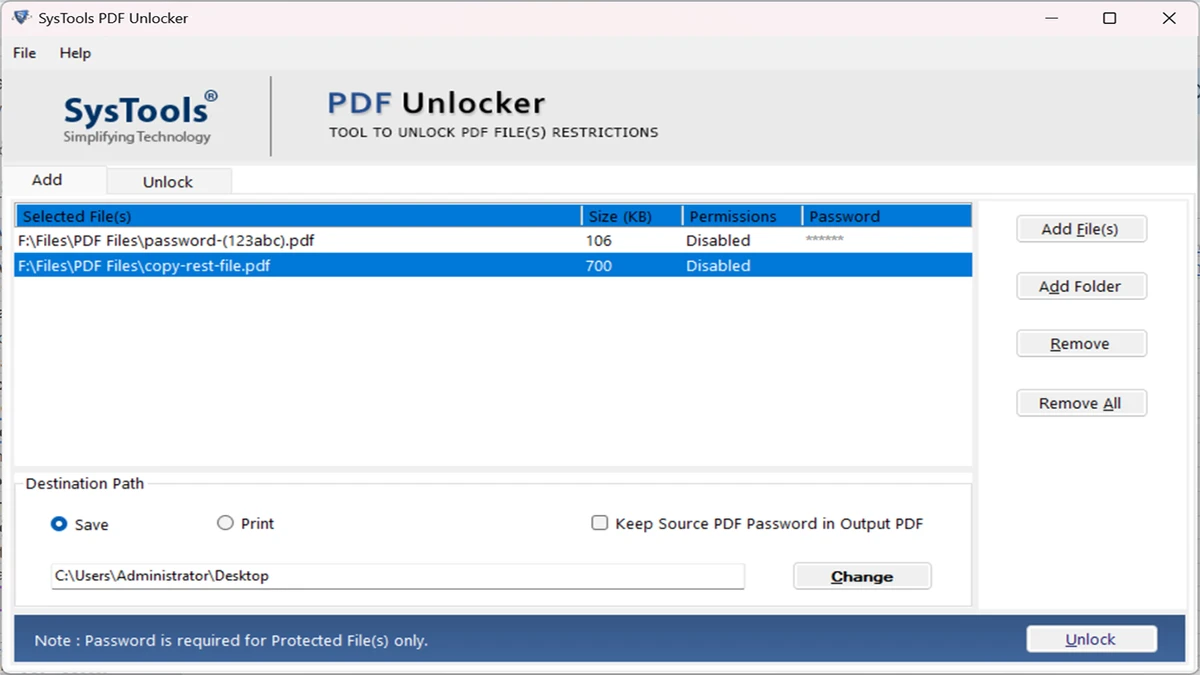
SysTools PDF Unlocker provides a straightforward interface focused on a single task: removing restrictions from PDF documents. After selecting a file, the software displays its current permissions, making it easy to understand which actions are restricted before the unlocking process begins.

The permission preview updates after processing, allowing users to verify that editing, printing, copying, or other operations have been successfully enabled. This visual feedback simplifies the workflow, particularly when working with multiple secured documents. The application preserves the original formatting, layout, and embedded attachments throughout the unlocking process, helping ensure the resulting PDF remains identical to the source aside from the removed restrictions.

For users who regularly process numerous protected PDFs, the Business and Enterprise editions offer batch unlocking capabilities, significantly reducing repetitive manual work. The ability to search drives for PDF files and save unlocked documents directly to newly created folders further streamlines file management. Overall, the software focuses on ease of use and reliable PDF permission removal without requiring Adobe Acrobat.

Who Should Use SysTools PDF Unlocker?

  • Office professionals handling protected PDF documents
  • Legal and administrative teams
  • Businesses processing multiple secured PDFs
  • Students and educators working with restricted documents
  • Users who need to print, edit, or copy protected PDF content
  • Organizations requiring batch PDF permission removal

Conclusion

SysTools PDF Unlocker offers a focused and efficient way to remove owner-level restrictions from PDF files, making them easier to edit, print, copy, and manage. Its support for encrypted PDFs, permission previews, and document integrity preservation makes it a dependable utility for everyday PDF workflows.

Pros & Cons

Pros

  • Removes common PDF restrictions quickly
  • Supports editing, printing, copying, and page extraction
  • Works without Adobe Acrobat
  • Preserves document formatting and attachments
  • Displays permissions before and after unlocking
  • Supports modern PDF encryption standards
  • Batch processing available in Business and Enterprise editions
  • Compatible with a wide range of Windows versions

Cons

  • Batch unlocking is not available in the single-user license
  • Does not repair or unlock corrupted PDF files
  • User-password protected PDFs still require the correct password

Frequently Asked Questions

What is SysTools PDF Unlocker used for?

It removes owner-level restrictions from PDF files, allowing users to edit, print, copy, extract pages, add comments, fill forms, and perform other previously restricted actions.

Does SysTools PDF Unlocker remove passwords required to open a PDF?

It removes owner-password restrictions. If a PDF is protected with a user (open) password, you must enter the correct password before the document can be unlocked.

Is Adobe Acrobat required?

No. The software works independently and does not require Adobe Acrobat to remove PDF restrictions.

Can SysTools PDF Unlocker process multiple PDF files at once?

Yes, batch unlocking is available with the Business and Enterprise licenses.

Does the software preserve the original PDF formatting?

Yes. It maintains the document's formatting, layout, and attachments while removing supported restrictions.

Recommended apps [Freeware]:
  • XMedia Recode 3.6.3.1 XMedia Recode logo Free video and audio converter with GPU acceleration, batch conversion, editing tools, and subtitle support
  • FlowHeater 4.5.5 FlowHeater logo data integration tool connecting files and databases like Excel, Access, SQL Server and MySQL
  • BDtoAVCHD 3.2.0 BDtoAVCHD logo convert Blu-ray and MKV files into AVCHD or MKV for DVD or USB high-definition backups
  • Urban VPN 5.2.1 Urban VPN logo virtual private network tool designed to help users protect their identity and privacy while browsing the internet
  • Quick CPU 6.6.0 Quick CPU logo Monitor core parking, turbo boost, frequency scaling, and system power in real time
  • Czkawka 12.0.0 Czkawka logo open-source file cleanup tool that finds duplicates, empty folders, similar images, and large files across your system
Recommended apps [Shareware]:
  • DBF Converter 7.85 DBF Converter logo convert DBF files to CSV, Excel, SQL and text with fast batch processing and filtering
  • My Music Collection 3.4.16.178 My Music Collection logo organize CDs, vinyl, and MP3s with cataloging, tracking, and export features on Windows
  • Tomabo MP4 Downloader 6.4.6 Tomabo MP4 Downloader logo downloads videos, playlists, subtitles, and audio while offering format conversion tools.
  • VovSoft Domain Checker 10.4 VovSoft Domain Checker logo check domain availability, perform WHOIS lookups, and analyze multiple domains in batch mode
  • Home Manager 2026 v4.10.1002 Home Manager logo track home inventory, store item details, manage repairs, and generate insurance reports
  • Smart Game Booster 6.0.0.1164 Smart Game Booster logo Optimize Windows, monitor FPS and temperatures, and reduce lag with one click