NVIDIA App logo

NVIDIA App 11.0.8.299

  • User Rating:
    ★★★★★
    ★★★★★
    0.0 ★ 0Votes
  • Requirements:
    Windows
  • Version: 11.0.8.299
  • Latest updated: 2 weeks ago
  • License: Freeware  
  • Publisher: NVIDIA
  • Size: 169 MB
× app stores

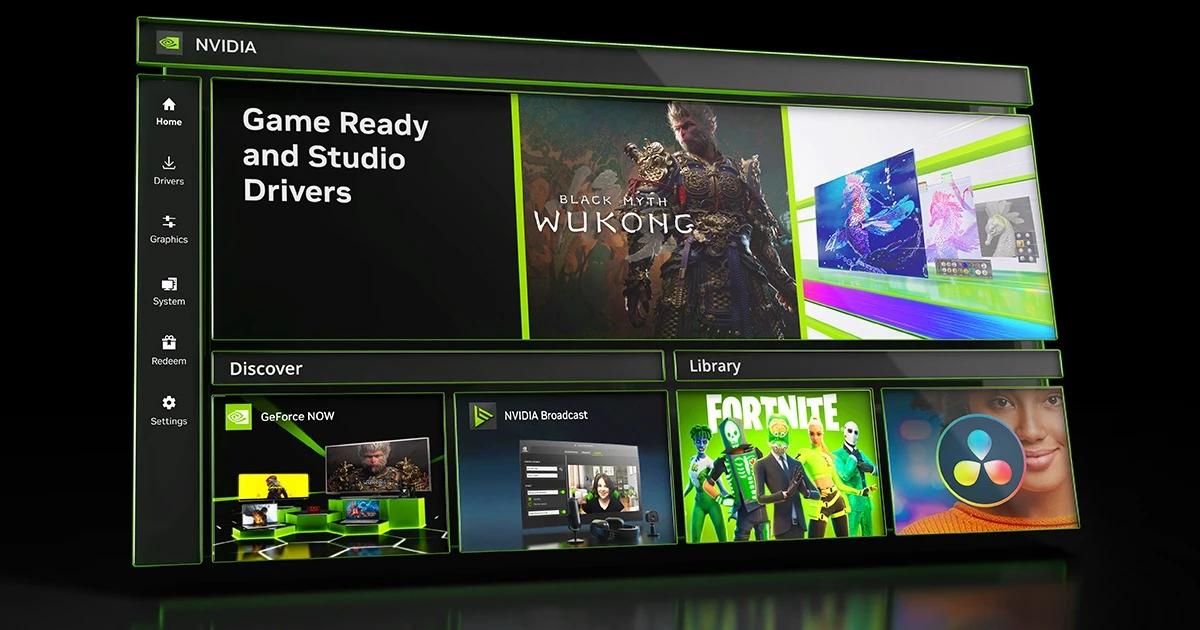
NVIDIA App is a centralized software platform designed for users with NVIDIA graphics hardware, combining essential GPU management features into a single interface. It brings together game optimization options from GeForce Experience and 3D settings from the NVIDIA Control Panel, making it easier to adjust graphics preferences and manage driver-related features. The application provides access to the latest Game Ready Drivers and Studio Drivers, helps optimize games and creative applications, and includes built-in tools for recording gameplay and capturing screenshots. Designed for both gamers and creators, NVIDIA App simplifies GPU management by reducing the need to switch between multiple NVIDIA applications.

Features of NVIDIA App

  • Unified GPU control center combining features from GeForce Experience and NVIDIA Control Panel.
  • Adjust graphics settings for individual applications or create global profiles for games and programs.
  • Access the latest Game Ready Drivers and Studio Drivers.
  • View driver updates with easy-to-read summaries showing what is new, what is fixed, and supported games.
  • Optimize games and applications with NVIDIA recommended settings.
  • Use the in-game overlay to access recording and capture tools.
  • Record gameplay sessions and capture screenshots with NVIDIA ShadowPlay.
  • Save the previous 30 seconds of gameplay instantly with Instant Replay.
  • Record gameplay manually at up to 8K HDR at 30 fps or 4K HDR at 120 fps.
  • Automatically capture important gaming moments with NVIDIA Highlights.

Interface and Usability

NVIDIA App focuses on creating a simpler experience for managing NVIDIA hardware. By combining features previously found across different NVIDIA applications, it provides a more convenient location for adjusting GPU settings, checking drivers, and accessing gaming tools.

The redesigned driver section makes updates easier to understand by presenting key information in a quick-to-read format. Users can view details about new features, fixes, and game support without searching through multiple pages. The unified interface also makes it easier to switch between performance settings, application optimizations, and capture features. For gamers and creators already using NVIDIA products, NVIDIA App provides a more streamlined way to manage graphics settings and related tools.

Who Should Use NVIDIA App?

  • PC gamers who want easier game optimization and gameplay recording tools.
  • Content creators using NVIDIA Studio Drivers for creative applications.
  • Users who regularly update NVIDIA drivers and want clearer update information.
  • NVIDIA GPU owners who prefer managing graphics settings from one application.

Conclusion

NVIDIA App offers a more organized way for NVIDIA GPU users to manage drivers, optimize games, adjust graphics settings, and capture gameplay. By bringing together features from GeForce Experience and NVIDIA Control Panel, it creates a more convenient workflow for both gamers and creators.

Pros & Cons

✓

Pros

  • Combines multiple NVIDIA management tools into one interface.
  • Provides access to Game Ready Drivers and Studio Drivers.
  • Includes built-in gameplay recording and screenshot features.
  • Makes driver updates easier to review.
  • Supports both gaming and creative workflows.
✕

Cons

  • Designed specifically for NVIDIA hardware users.
  • The available information does not include performance comparisons with other GPU management tools.

Frequently Asked Questions

What is NVIDIA App used for?

NVIDIA App is used to manage NVIDIA graphics hardware, update drivers, optimize games and applications, and access features such as gameplay recording and screenshots.

Does NVIDIA App replace GeForce Experience and NVIDIA Control Panel?

NVIDIA App combines features from GeForce Experience and the NVIDIA Control Panel into a unified interface, making GPU management easier from one location.

Can NVIDIA App optimize games automatically?

Yes. NVIDIA App includes game and application optimization features that help users adjust settings for individual programs or apply global profiles.

What are Game Ready Drivers and Studio Drivers in NVIDIA App?

Game Ready Drivers are designed for gaming experiences, while Studio Drivers are intended for creators using specific applications. NVIDIA App provides access to both driver types.

Can NVIDIA App record gameplay?

Yes. NVIDIA App includes NVIDIA ShadowPlay, which allows users to record gameplay, capture screenshots, use Instant Replay, and automatically capture important moments with NVIDIA Highlights.

What recording quality does NVIDIA App support?

NVIDIA App supports manual gameplay recording up to 8K HDR at 30 fps or 4K HDR at 120 fps, according to the provided software information. It also includes Instant Replay for saving the previous 30 seconds of gameplay.

Recommended apps [Freeware]:
  • NewFileTime 8.28 NewFileTime logo a lightweight Windows utility that lets users change file creation, modification, and access timestamps easily
  • Cyberduck 9.5.2.45323 Cyberduck logo Manage FTP, SFTP, and cloud storage services like Google Drive, Dropbox, and Amazon S3 with Cyberduck for Windows
  • Futuremark SystemInfo 5.92.1497 Futuremark SystemInfo logo scans your PC hardware and system components, generating detailed diagnostic reports.
  • SecretDNS 3.9.2 SecretDNS logo Improve online privacy with encrypted DNS requests and SNI protection while reducing access issues through secure network features.
  • MetaFox 2.6.3 MetaFox logo Convert popular video formats to MKV quickly with a lightweight drag-and-drop tool designed for simple and efficient conversion.
  • Godot Game Engine 4.7.1 Godot Game Engine logo Build 2D and 3D games with a free, open-source engine featuring a visual editor, scene system, and cross-platform export tools.
Recommended apps [Shareware]:
  • Internet Download Manager (IDM) 6.43 Build 5 Internet Download Manager (IDM) logo boosts download speeds up to 5x, schedules downloads, and supports all major browsers and protocols
  • Syncovery 12.3.4 Syncovery logo fast backup and file synchronization tool with real-time sync, versioning, and advanced automation features
  • DocuFreezer 7.0.2606.20080 DocuFreezer logo a Windows batch converter for documents and images, converting files to PDF, JPG, TIFF, PNG, and TXT formats
  • Text Edit Plus 16.5 Text Edit Plus logo a lightweight text editor with text analysis, word frequency statistics, and document editing tools
  • XL-Connector 3.7.18.0 XL-Connector logo Excel plugin for Salesforce data export, import, bulk updates, and metadata management.
  • Cutting Optimization Pro 5.18.27.3 Cutting Optimization Pro logo Optimize 1D and 2D cutting layouts for wood, metal, glass, and more with Cutting Optimization Pro software