CrawlRhino SEO Crawler logo

CrawlRhino SEO Crawler 1.1.36.0

  • User Rating:
    ★★★★★
    ★★★★★
    0.0 ★ 0Votes
  • Requirements:
    Windows
  • Version: 1.1.36.0
  • Latest updated: 1 week ago
  • License: Freemium  
  • Publisher: CrawlRhino
  • Size: 37 MB
× app stores

CrawlRhino SEO Crawler is a desktop website analysis tool designed to help users evaluate website structure, identify technical SEO issues, and generate detailed optimization reports. It combines website crawling, SEO auditing, and reporting features into a single application, making it useful for website owners, SEO professionals, developers, and digital marketers.

The software crawls websites to collect detailed information about pages, links, metadata, response times, and overall site structure. It can analyze entire domains, subdomains, or sitemap URLs, providing flexibility for different website architectures. During each crawl, CrawlRhino identifies issues such as broken links, duplicate content, blocked pages, and other structural problems that may affect search engine visibility or user experience.

Beyond technical crawling, CrawlRhino includes an SEO analysis module that generates an overall SEO score and highlights areas that may require improvement. The application also features Off-Page Intelligence, allowing users to examine backlinks, review anchor profiles, and identify referral sources to support off-page SEO strategies.

Additional tools such as content topic mapping, content depth analysis, customizable reporting, and website comparison features provide broader insights into website health. Together, these capabilities make CrawlRhino a comprehensive solution for auditing and monitoring website performance from an SEO perspective.

Features of CrawlRhino SEO Crawler

  • Crawl entire websites, subdomains, or sitemap URLs
  • Analyze website structure
  • Detect broken links
  • Identify duplicate entries
  • Detect blocked pages
  • View page statistics
  • Measure page response times
  • Generate SEO scores
  • SEO health analysis
  • Backlink analysis
  • Anchor profile analysis
  • Referral source discovery
  • Content topic mapping
  • Content depth analysis
  • Website comparison tools
  • Customizable report builder
  • Detailed processing logs
  • HTML report export (Pro)
  • Comprehensive SEO audit reporting

Interface and Usability

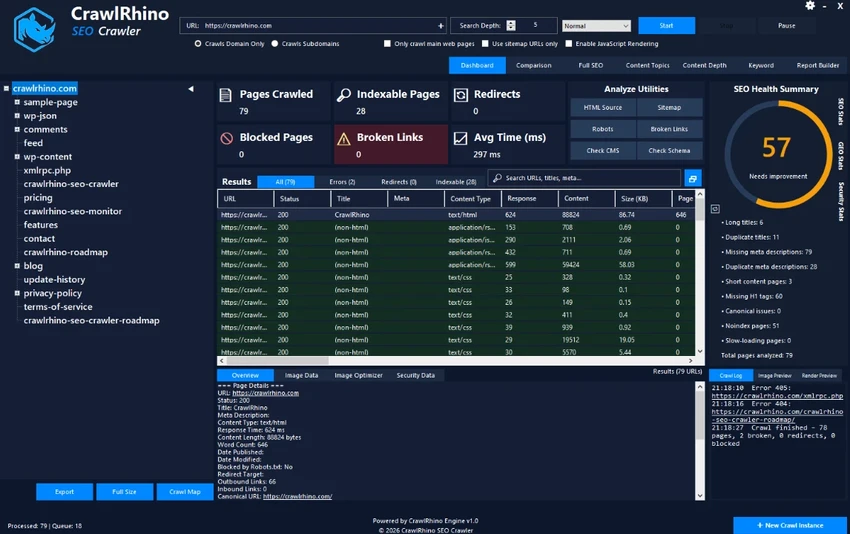
CrawlRhino SEO Crawler features a well-organized interface that separates crawl data into multiple sections, making large amounts of website information easier to review. The layout combines website statistics, crawl progress, and processing logs, allowing users to monitor scans while reviewing results.

Setting up a crawl is straightforward, with options to analyze a primary domain, subdomains, or sitemap URLs. Once scanning is complete, findings are categorized into logical sections that simplify navigation between technical issues, metadata, backlinks, and overall SEO metrics. Although the software offers a wide range of analysis tools, the interface remains structured enough for users familiar with website management and SEO workflows.

Who Should Use CrawlRhino SEO Crawler?

  • SEO professionals
  • Website owners
  • Digital marketers
  • Web developers
  • Technical SEO consultants
  • Agencies managing multiple websites

Conclusion

CrawlRhino SEO Crawler provides a comprehensive collection of website auditing and SEO analysis tools in a single desktop application. Its combination of technical crawling, website health reporting, backlink analysis, and customizable reports makes it well suited for identifying issues that can impact search engine performance.

Pros & Cons

✓

Pros

  • Comprehensive website crawling
  • Technical SEO auditing tools
  • Broken link and duplicate content detection
  • Backlink and anchor profile analysis
  • Website health scoring
  • Customizable reporting
  • Website comparison capabilities
✕

Cons

  • Pro version displays upgrade prompts
  • Some export features require the Pro license
  • Advanced SEO concepts may require prior knowledge

Frequently Asked Questions

What is CrawlRhino SEO Crawler used for?

CrawlRhino SEO Crawler is used to analyze website structure, identify technical SEO issues, detect broken links, review metadata, and generate detailed website audit reports.

Can CrawlRhino crawl subdomains?

Yes. The application can crawl main domains, subdomains, and sitemap URLs, depending on the analysis you want to perform.

Does CrawlRhino detect broken links?

Yes. It scans websites for broken links and other structural issues that may affect usability or search engine optimization.

Does CrawlRhino analyze backlinks?

Yes. The software includes Off-Page Intelligence features that help analyze backlinks, anchor profiles, and referral sources.

Can CrawlRhino generate SEO reports?

Yes. It provides detailed SEO reports, website health analysis, and customizable reporting tools. HTML export is available in the Pro edition.

Is CrawlRhino SEO Crawler suitable for beginners?

The software is easy to navigate, but users with basic knowledge of SEO and website management will benefit the most from its advanced analysis and reporting features.

Recommended apps [Freeware]:
  • Wondershare Recoverit 14.0.30 Wondershare Recoverit logo Recover deleted, lost, formatted, or corrupted files from PCs, USB drives, SD cards, and more with Wondershare Recoverit
  • SoftPerfect RAM Disk 26.7 SoftPerfect RAM Disk logo creates high-speed virtual drives in memory to boost performance and reduce disk wear
  • Directory Opus 13.24 Directory Opus logo a powerful Windows file manager with dual-pane navigation, FTP support, file tagging, and Explorer replacement
  • PointerStick 7.17 PointerStick logo a virtual pointer to Windows desktops, helping presenters highlight mouse movements on large screens
  • Xreveal 2.9.6 Xreveal logo a lightweight disc decryption tool that removes supported Blu-ray, UHD, DVD, and CD protections for compatible media
  • Process Governor 4.1 Process Governor logo Manage CPU and memory limits for Windows processes with a command-line utility designed to control resource usage efficiently.
Recommended apps [Shareware]:
  • Adobe After Effects 2026 Adobe After Effects logo advanced motion graphics, visual effects, compositing, and animation tools for creators.
  • UPDF 2.5.5 UPDF logo AI-powered PDF editor for Windows that simplifies editing, annotating, converting, and managing PDFs
  • SkyDemon 4.3.1 SkyDemon logo Plan flights with real-time aeronautical data, dynamic charts, NOTAMs, METAR, TAF, and intelligent route planning using SkyDemon
  • DBF Viewer 2000 9.24 DBF Viewer 2000 logo a lightweight Windows tool to view, edit, filter and export DBF files from dBase and FoxPro
  • PhoneRescue for iOS 4.3.1 PhoneRescue for iOS logo Recover lost iPhone data, repair iOS system issues, and restore backups with PhoneRescue for iOS on Windows
  • ManyCam 9.3.0.11 ManyCam logo Enhance video calls and live streams with webcam effects, screen recording, voice changing, and multi-platform broadcasting tools.