FileLegit Windows Multimedia Video Editors VSDC Free Video Editor
VSDC Free Video Editor logo

VSDC Free Video Editor 11.2.3.729

  • User Rating:
    ★★★★★
    ★★★★★
    0.0 0Votes
  • Requirements:
    Windows
  • Version: 11.2.3.729
  • Latest updated: 5 days ago
  • License: Freeware  
  • Publisher: Flash-Integro LLC
  • Size: 125 MB
× app stores

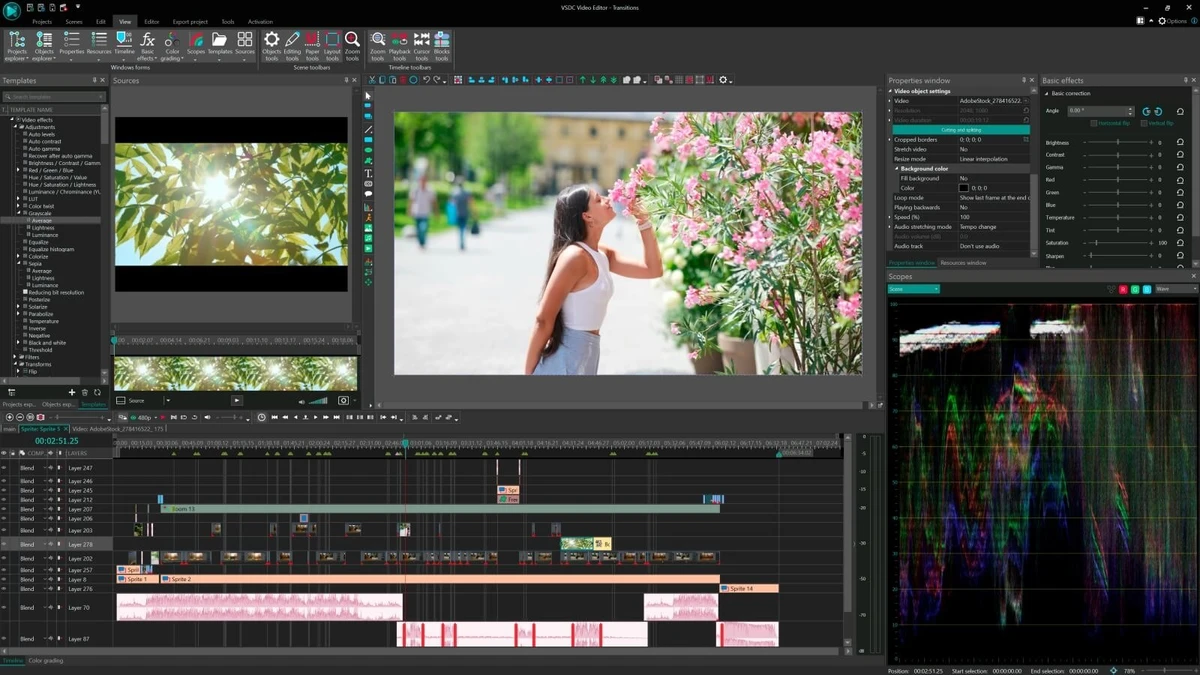
VSDC Free Video Editor is a Windows-based video editing application designed for both simple and complex video production tasks. It supports non-linear editing, allowing users to freely position and manipulate objects on the timeline for greater creative control. The software is built to handle a wide range of multimedia formats and includes a variety of visual and audio effects, making it suitable for content creators, educators, marketers, and hobbyists who want to produce professional-looking videos without requiring advanced technical skills.

Features of VSDC Free Video Editor

  • Non-linear video editing timeline
  • Ability to place objects anywhere on the timeline
  • Supports variable size and dynamic object positioning
  • Wide range of visual and audio effects
  • Effects grouped into categories (color correction, filters, transitions, special FX, transformations)
  • Subpixel accuracy for smooth animation and precise positioning
  • Preconfigured export profiles for multiple devices (smartphones, tablets, consoles, media players)
  • Supports most audio, video, image formats, and codecs
  • Built-in tools for voice-over, masking, and chroma key (standard features)
  • Self-contained editing environment with no need for external conversion tools
  • Export presets for devices such as iPhone, iPad, Android, PSP, Xbox, PlayStation, and more

User Experience

During my experience with VSDC Free Video Editor, the software stood out for its flexibility and depth of editing capabilities. The non-linear editing system allows users to freely arrange elements on the timeline, which provides more creative control compared to simpler, linear editors.

Despite its advanced feature set, the interface remains relatively accessible once users become familiar with the layout. The grouping of visual effects into categories makes it easier to locate and apply the desired adjustments without overwhelming the editing process. The support for a wide variety of file formats is another strong advantage. Users can import and edit different types of media without needing external conversion tools, which simplifies workflow and reduces preparation time.

Export profiles are especially useful for users who want to optimize videos for specific devices or platforms. Whether targeting mobile devices, gaming consoles, or media players, the preset configurations help streamline the export process. Overall, VSDC balances advanced functionality with usability, making it suitable for both beginners and more experienced video editors.

Who Should Use VSDC Free Video Editor?

  • Content creators and YouTubers
  • Students and educators producing video presentations
  • Beginners learning video editing
  • Users needing device-specific video exports
  • Hobbyists working with multimedia projects
  • Users looking for a free alternative to advanced video editors

Conclusion

VSDC Free Video Editor delivers a powerful set of tools for creating and editing videos with professional-level effects and flexibility. Its non-linear editing approach and wide format support make it a strong choice for users who want more control over their video projects.

Pros & Cons

Pros

  • Non-linear video editing system
  • Wide support for audio, video, and image formats
  • Strong collection of visual and audio effects
  • Device-specific export profiles included
  • Subpixel accuracy for smooth animations
  • No need for external conversion tools
  • Flexible object-based timeline editing

Cons

  • Interface may feel complex for beginners
  • Some advanced features require Pro version
  • Learning curve for non-linear editing concepts

Frequently Asked Questions

What is VSDC Free Video Editor used for?

VSDC Free Video Editor is used to create and edit videos with effects, transitions, and multi-format support.

Does VSDC support non-linear editing?

Yes. It uses a non-linear editing system that allows flexible placement of objects on the timeline.

Can I use effects in VSDC Free Video Editor?

Yes. It includes a wide range of visual and audio effects such as color correction, transitions, filters, and special FX.

Does it support different video formats?

Yes. It supports most audio, video, image formats, and codecs without requiring additional conversion tools.

Is VSDC Free Video Editor really free?

Yes. The free version includes core editing features, while the Pro version adds advanced tools and enhancements.

Can I export videos for different devices?

Yes. It includes preset profiles for smartphones, tablets, gaming consoles, and media players.

Is VSDC suitable for beginners?

Yes, but beginners may need some time to learn the non-linear editing workflow.

Recommended apps [Freeware]:
  • Easy System Utility 1.1.65 Easy System Utility logo clean junk files, repair tools, passwords and system optimization.
  • Far Manager 3.0 Build 6699 Far Manager logo Manage files efficiently with Far Manager's fast text-based interface, plugins, and archive support
  • LAV Filters 0.82 LAV Filters logo a free DirectShow codec package that enables broad audio and video format support on Windows
  • Prevent Restore 2026 v122 Prevent Restore logo securely wipes deleted files, blocks data recovery, and protects sensitive information on Windows
  • Donemax Video Downloader 3.0 Donemax Video Downloader logo download videos and audio from 1,200+ websites for offline viewing and playback
  • Norton 360 Remover 26.6.11050.2580 Norton 360 Remover logo a utility that completely uninstalls Norton 360 security software, removing leftover files and settings
Recommended apps [Shareware]:
  • Quick Heal AntiVirus Pro 26.1.0.2 Quick Heal AntiVirus Pro logo real-time malware protection, ransomware defense, and email security
  • UPDF 2.5.5 UPDF logo AI-powered PDF editor for Windows that simplifies editing, annotating, converting, and managing PDFs
  • Duplicate Photos Fixer Pro 1.3.1086.1158 Duplicate Photos Fixer Pro logo finds and removes duplicate and similar photos to organize your library and save space
  • My Music Collection 3.4.16.178 My Music Collection logo organize CDs, vinyl, and MP3s with cataloging, tracking, and export features on Windows
  • IntraWEB 16.2.2 IntraWEB logo web development framework for creating interactive web applications using a Windows application-style approach
  • REAPER 7.76 REAPER logo a powerful digital audio workstation for multitrack recording, MIDI editing, mixing, and professional audio production