Jutoh logo

Jutoh 3.31.7

  • User Rating:
    ★★★★★
    ★★★★★
    0.0 0Votes
  • Requirements:
    Windows
  • Version: 3.31.7
  • Latest updated: 4 days ago
  • License: Free Trial  
  • Publisher: Anthemion
  • Size: 70.8 MB
× app stores

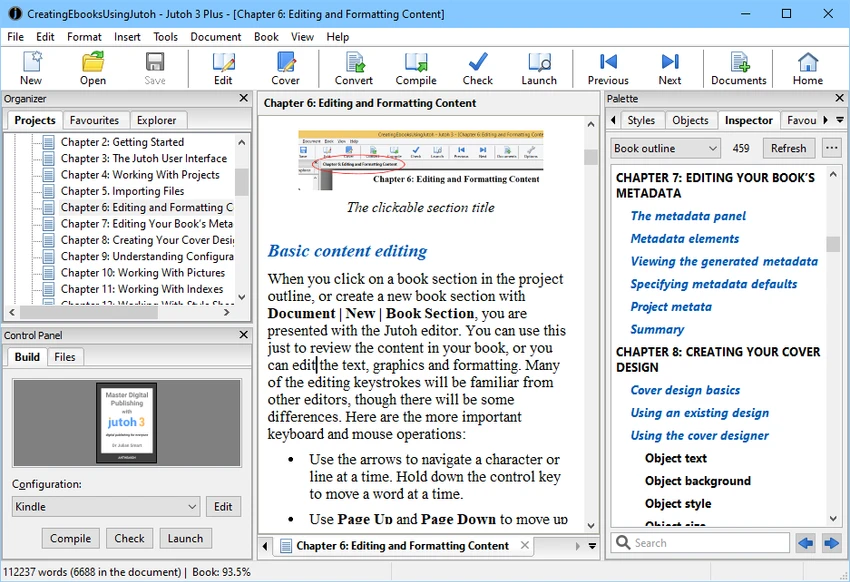
Jutoh is an ebook creation and publishing application designed for authors, publishers, and content creators who want to produce ebooks in multiple popular formats. It allows users to build ebook projects from existing documents or start from scratch using its built-in text editor. With support for multiple ebook configurations, cover design tools, and integrated validation utilities, Jutoh streamlines the ebook publishing process while remaining easy to use.

Features of Jutoh

  • Create ebooks from existing text, HTML, or OpenDocument files
  • New Project Wizard for quick project creation
  • Built-in styled text editor for writing and editing books
  • Built-in cover editor with customizable cover templates
  • Export ebooks in multiple popular formats, including EPUB and Mobipocket
  • Create multiple ebook variations from a single project using configurations
  • Easily customize covers, title pages, and formatting for different ebook editions
  • Integrated EPUB validation using EpubCheck and EpubPreflight
  • Store notes, images, text snippets, and web references alongside book projects
  • Cross-platform support for Windows, macOS, Linux, and other Unix-based systems
  • Single license usable across multiple supported operating systems

User Experience

After using Jutoh, I found that it focuses on making ebook creation efficient without introducing unnecessary complexity. The New Project Wizard allows existing documents to be imported quickly, reducing the time required to start a publishing project. The built-in styled text editor provides a comfortable environment for writing and editing content directly within the application. For users who already have manuscripts prepared in text, HTML, or OpenDocument formats, importing content is straightforward and preserves an organized workflow.

One feature that stands out is the ability to manage multiple ebook editions from a single project. Instead of maintaining separate files for different stores or publishing requirements, Jutoh allows different configurations for covers, formatting, and title pages, making it much easier to generate multiple versions of the same book.

The integrated cover editor is also convenient, allowing users to choose from templates or design their own covers without relying on external software. Another valuable addition is the built-in ebook validation tools. Since Jutoh includes EpubCheck and EpubPreflight integration, authors can verify their EPUB files before publication, helping identify formatting or compatibility issues early in the publishing process. Overall, the software offers a smooth workflow for writing, editing, organizing, validating, and exporting ebooks from a single application.

Who Should Use Jutoh?

  • Independent authors
  • Ebook publishers
  • Writers creating EPUB and Mobipocket books
  • Content creators publishing to multiple ebook stores
  • Users looking for a dedicated ebook authoring application

Conclusion

Jutoh provides a practical and efficient solution for creating, editing, validating, and publishing ebooks. Its combination of project management, built-in editing tools, cover design features, and support for multiple ebook configurations makes it a capable choice for authors who regularly publish digital books.

Pros & Cons

Pros

  • Easy-to-use ebook creation workflow
  • Imports text, HTML, and OpenDocument files quickly
  • Built-in styled text editor
  • Integrated cover editor with templates
  • Supports multiple ebook formats, including EPUB and Mobipocket
  • Create multiple ebook versions from one project
  • Built-in EPUB validation tools
  • Cross-platform compatibility
  • Fast performance thanks to its native C++ implementation

Cons

  • Primarily designed for ebook publishing rather than general document editing

Frequently Asked Questions

What is Jutoh used for?

Jutoh is used to create, edit, and publish ebooks in popular formats such as EPUB and Mobipocket.

Can I import existing documents into Jutoh?

Yes. Jutoh can import content from text, HTML, and OpenDocument files, allowing you to start ebook projects from existing documents.

Does Jutoh include a built-in text editor?

Yes. The software includes a styled text editor for writing and editing ebook content directly within the application.

Can I create different versions of the same ebook?

Yes. Jutoh supports multiple configurations, allowing you to create different covers, formatting, and title pages from a single project.

Does Jutoh check EPUB files for errors?

Yes. The software integrates EpubCheck and EpubPreflight, enabling users to validate EPUB files before publishing.

Which operating systems are supported?

Jutoh is available for Windows, macOS, Linux, and other Unix-based systems. The provided Windows system requirements specify support for Windows 10 and Windows 11.

Recommended apps [Freeware]:
  • Simple IP Config 2.9.7 Simple IP Config logo a lightweight, portable tool for quickly changing Windows IP, DNS, and network settings
  • FBackup 9.9.1044 FBackup logo a free Windows backup tool offering automatic backups, cloud support, encryption, and easy file recovery options
  • Glow 26.9 Glow logo advanced Windows system analysis tool offering deep hardware insights, diagnostics, benchmarks, and system optimization utilities
  • O&O ShutUp10++ 3.1.1104 O&O ShutUp10++ logo control Windows privacy, telemetry, updates, and system settings with a simple portable interface
  • WinBin2Iso 6.77 WinBin2Iso logo a free, portable utility that quickly converts BIN CD and DVD image files to ISO format on Windows.
  • Ventoy 1.1.16 + LiveCD Ventoy logo create bootable USB drives and boot directly from ISO files without extraction or reformatting
Recommended apps [Shareware]:
  • Wondershare Filmora 15.3.20.18660 Wondershare Filmora logo a powerful, user-friendly video editor with effects, transitions, and 4K support.
  • Text Edit Plus 16.5 Text Edit Plus logo a lightweight text editor with text analysis, word frequency statistics, and document editing tools
  • Okdo Pdf to All Converter Professional 6.0 Okdo Pdf to All Converter Professional logo Convert PDF files to Word, Excel, PowerPoint, images, HTML, text, and more with batch processing support
  • Lyric Video Studio 1.5.49 Lyric Video Studio logo a Windows app for creating lyric videos with AI tools, subtitles, motion tracking, and 4K video editing
  • OkMap Desktop 19.6.4 OkMap Desktop logo a GPS mapping software for route planning, waypoint creation, and offline/online map management
  • NTFS Permissions Auditor 26.6.27 NTFS Permissions Auditor logo analyze Windows folder permissions, audit NTFS access rights, and export detailed security reports