Automatic Email Processor logo

Automatic Email Processor 4.0.24

  • User Rating:
    ★★★★★
    ★★★★★
    0.0 0Votes
  • Requirements:
    Windows
  • Version: 4.0.24
  • Latest updated: 2 days ago
  • License: Freeware  
  • Publisher: Gillmeister
  • Size: 85 MB
×

Automatic Email Processor is a powerful Outlook automation tool designed to simplify email management tasks through customizable rules and automated workflows. The software can automatically save, archive, print, filter, and process incoming emails and their attachments, helping users reduce manual work and improve email organization. Built for businesses and professionals who handle large volumes of email, Automatic Email Processor supports dynamic folder creation, advanced filtering, automated attachment handling, and email archiving across multiple Outlook accounts and folders.

Features of Automatic Email Processor

  • Automatically save incoming emails in multiple formats including PDF, RTF, HTML, and MSG
  • Archive email attachments automatically
  • Automatically print emails and supported attachments
  • Monitor an unlimited number of Outlook folders
  • Create unlimited processing rules for different email accounts
  • Filter emails by subject, sender, recipient, attachment name, and other criteria
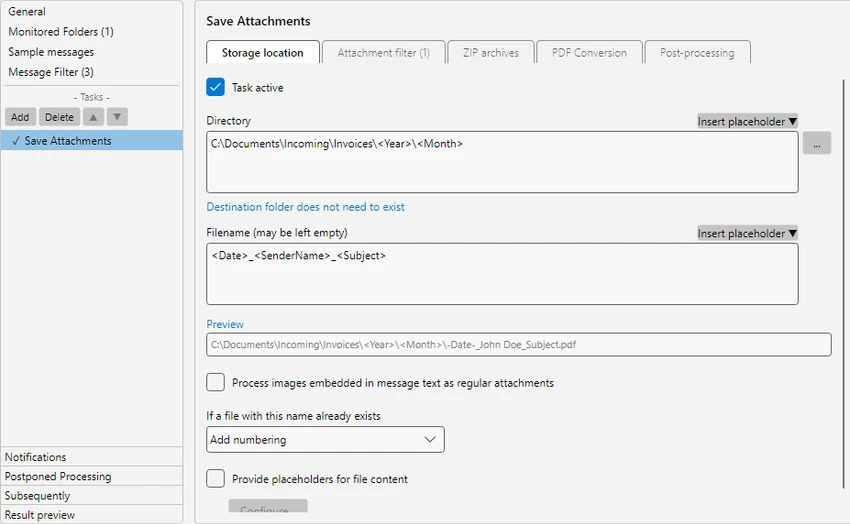
  • Build dynamic storage paths using email properties
  • Reprocess existing emails within Outlook folders
  • Archive emails from specific folders and date ranges
  • Receive email notifications about processing status
  • Move emails to other Outlook folders automatically
  • Mark processed emails as read
  • Launch external programs with custom parameters after processing
  • Support separate workflows for different email accounts

User Experience

After using Automatic Email Processor, it becomes clear that the software is built for efficiency. Rather than manually saving attachments, archiving messages, or sorting emails into folders, users can create rules that handle these tasks automatically. The rule-based system offers considerable flexibility. Different email accounts, senders, or document types can follow separate workflows, making the software suitable for complex business environments. Dynamic folder creation is particularly useful for organizations that need structured email archives based on sender information, dates, projects, or other email properties.

Automatic attachment processing is another major advantage. Instead of opening emails individually, attachments can be stored and organized automatically according to predefined rules. This can save significant time for departments that receive invoices, reports, contracts, or customer documents via email.

System Requirements

  • Operating System: Windows 11, Windows 10, or Windows Server
  • Architecture: 64-bit
  • Email Platform: Microsoft Outlook

Conclusion

Automatic Email Processor is a robust Outlook automation solution that significantly reduces the effort involved in email archiving, attachment management, and document processing. Its flexible rule system allows businesses to create highly customized workflows while maintaining organized and searchable email archives.

Pros & Cons

Pros

    • Comprehensive Outlook email automation
    • Automatic email and attachment archiving
    • Supports PDF, RTF, HTML, and MSG output formats
    • Powerful filtering and rule creation options
    • Dynamic folder and file naming capabilities
    • Automatic printing of emails and attachments
    • Unlimited Outlook folder monitoring
    • Ability to process historical emails
    • Supports custom post-processing actions

Cons

    • Requires Microsoft Outlook environment
    • Initial rule configuration may take time for complex workflows

Frequently Asked Questions

What is Automatic Email Processor used for?

Automatic Email Processor automates Outlook email management tasks such as saving, archiving, printing, filtering, and processing emails and attachments.

Can Automatic Email Processor save emails as PDF files?

Yes. The software can automatically save emails in PDF format as well as RTF, HTML, and MSG formats.

Does Automatic Email Processor archive attachments automatically?

Yes. Attachments can be automatically extracted, stored, and organized based on custom processing rules.

Can the software automatically print emails?

Yes. Automatic Email Processor can automatically print emails and supported attachment types according to predefined criteria.

Does Automatic Email Processor work with multiple Outlook folders?

Yes. It can monitor and process an unlimited number of Outlook folders simultaneously.

Can existing Outlook emails be processed?

Yes. The software can reprocess previously received emails from Outlook folders using configured rules and filters.

Recommended apps [Freeware]:
  • StaxRip 2.52.4 StaxRip logo powerful Windows GUI for video/audio encoding using FFmpeg, x265, AviSynth+, VapourSynth, and more.
  • UltraSearch 4.9.2.1208 UltraSearch logo locates files and folders on local NTFS drives in seconds without building an index. Fast, precise, and lightweight.
  • Visual Studio Code 1.124.2 Visual Studio Code logo Free and powerful code editor from Microsoft with extensions, debugging, Git support, and multi-language development
  • Dr.Web Live Disk 9.0.1 Dr.Web Live Disk logo free bootable antivirus rescue disk that removes malware and helps recover infected systems
  • Easy System Utility 1.1.63 Easy System Utility logo clean junk files, repair tools, passwords and system optimization.
  • Exportizer 10.3.4.822 Exportizer logo view, edit, and export databases to Excel, CSV, SQL, and more with advanced conversion tools.
Recommended apps [Shareware]:
  • Audio Transcoder 2.12.24 Audio Transcoder logo all-in-one audio converter and CD ripper supporting MP3, FLAC, AAC, WMA, and more
  • iBackup Viewer 4.3.14.2 iBackup Viewer logo extract contacts, messages, photos, and app data from iPhone backups
  • DSLR Remote Pro 3.31.5 DSLR Remote Pro logo Windows software for Canon DSLR control, photo booth creation, live view, HDR capture via USB connection
  • Screenpresso 2.2.13 Screenpresso logo a versatile screen capture and video recording tool with editing and annotation features.
  • VMware InstallBuilder Enterprise 26.5.1 VMware InstallBuilder Enterprise logo It helps developers quickly create professional installers, RPM packages, and software bundles for multiple platforms.
  • DBConvert Studio 4.3.1 DBConvert Studio logo simplifies database migration and synchronization across multiple database platforms.