PDQ Deploy logo

PDQ Deploy 20.0.20.0

  • User Rating:
    ★★★★★
    ★★★★★
    0.0 ★ 0Votes
  • Requirements:
    Windows
  • Version: 20.0.20.0
  • Latest updated: 3 weeks ago
  • License: Free Trial  
  • Publisher: PDQ.com Corporation
  • Size: 103 MB
× app stores

PDQ Deploy is a Windows software deployment solution built for IT administrators who need an efficient way to install applications, deploy updates, and automate maintenance across multiple computers. Instead of manually visiting each machine, I found that PDQ Deploy centralizes deployment tasks from a single console, making routine software management significantly more manageable.

The software supports silent deployment of both .exe and .msi installers, allowing administrators to install, uninstall, execute scripts, reboot systems, copy files, and perform other deployment tasks remotely. When paired with PDQ Inventory, it can automatically deploy scheduled updates—even when target computers come online after being offline—helping ensure systems remain up to date with minimal manual intervention.

Another standout aspect is its maintained library of more than 175 ready-to-deploy applications, reducing the time spent packaging common software updates. Combined with deployment scheduling, email notifications, and shared administration capabilities, PDQ Deploy is designed to streamline Windows software management for IT teams.

Features of PDQ Deploy

  • Deploy almost any Windows application or patch using .exe and .msi installers.
  • Silently install or uninstall software across multiple Windows PCs simultaneously.
  • Execute deployment tasks including:
    • Running scripts
    • Copying files
    • Rebooting systems
    • Sending messages
    • Sleeping devices
  • Schedule deployments to automate routine software updates.
  • Integrates with PDQ Inventory to deploy updates when offline computers reconnect.
  • Execute .vbs, .reg, .bat, and .ps1 scripts from existing files or create them directly.
  • Access a maintained library of over 175 ready-to-deploy applications.
  • Receive email notifications when deployments or scheduled tasks complete.
  • Support multi-admin environments through a shared database.
  • Initiate deployments from either the graphical console or the Command Line Interface (CLI).

Interface and Usability

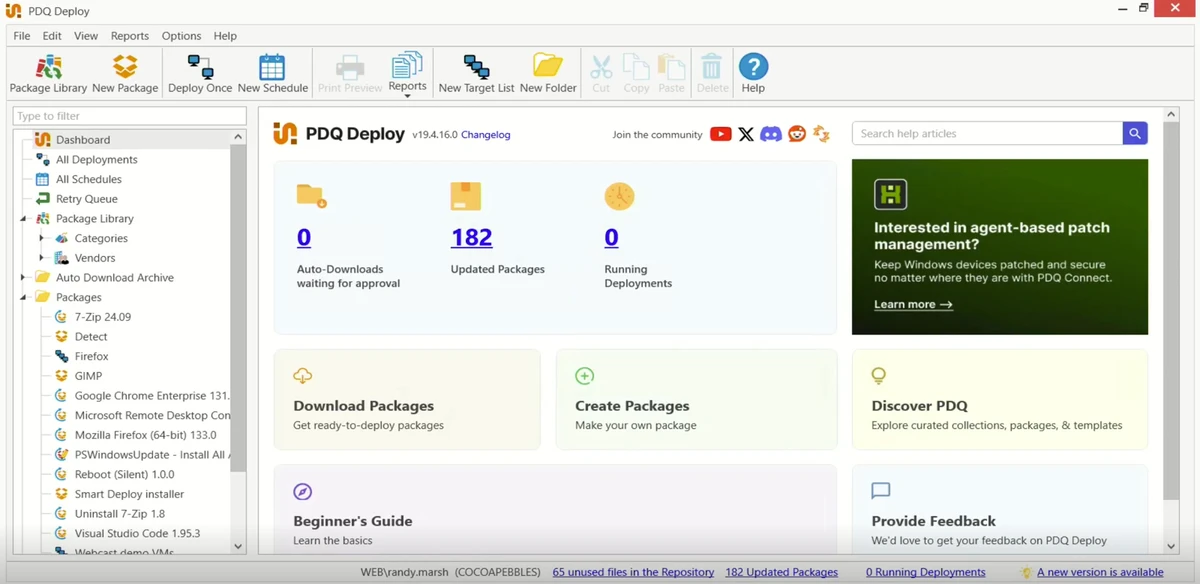
From an IT administrator's perspective, PDQ Deploy focuses on productivity rather than visual complexity. The management console keeps deployment tasks centralized, making it straightforward to organize software packages, schedules, and deployment history. The workflow is logical: create or select a deployment package, choose target computers, configure deployment options, and execute or schedule the task. Administrators who regularly work with PowerShell or Windows scripting will also appreciate the built-in ability to deploy common script formats without relying on separate tools.

For larger teams, the shared database helps multiple administrators work from the same deployment environment, reducing duplicated effort and keeping deployment configurations synchronized.

Who Should Use PDQ Deploy?

  • IT administrators managing multiple Windows computers
  • System administrators responsible for software deployment
  • Managed service providers (MSPs)
  • Corporate IT departments
  • Organizations looking to automate Windows application updates
  • Teams that regularly deploy PowerShell or Windows scripts

Conclusion

PDQ Deploy is a practical solution for Windows software deployment and patch management. During evaluation, its strongest advantages were centralized deployment, scheduling automation, scripting support, and the maintained application library that reduces repetitive packaging work.

Pros & Cons

✓

Pros

  • Supports silent deployment of EXE and MSI installers
  • Deploys software to multiple Windows computers simultaneously
  • Automates deployment scheduling
  • Executes multiple Windows script types
  • Includes a library of over 175 ready-to-deploy applications
  • Email notifications for deployment status
  • Shared database supports multiple administrators
  • Integrates with PDQ Inventory for automated patch deployment
✕

Cons

  • Windows-only platform
  • Some automation capabilities rely on integration with PDQ Inventory

Frequently Asked Questions

What is PDQ Deploy used for?

PDQ Deploy is a Windows software deployment tool that helps IT administrators remotely install, update, uninstall, and manage applications across multiple Windows computers. It is commonly used to automate software distribution and routine system maintenance.

Can PDQ Deploy deploy both EXE and MSI installers?

Yes. PDQ Deploy supports the silent deployment of both .exe and .msi installers. This allows administrators to install or remove applications on multiple computers without requiring user interaction.

Does PDQ Deploy support script deployment?

Yes. PDQ Deploy can execute several common Windows script formats, including PowerShell (.ps1), Batch (.bat), VBScript (.vbs), and Registry (.reg) files. Scripts can be deployed from existing files or created directly within deployment tasks.

Can PDQ Deploy automate software updates?

Yes. The software allows administrators to schedule deployments so updates can run automatically. When integrated with PDQ Inventory, deployments can also be triggered for computers that reconnect after being offline, helping keep systems up to date.

Does PDQ Deploy include ready-to-use application packages?

Yes. PDQ Deploy provides a library of more than 175 pre-configured applications that are maintained and updated by PDQ. This helps reduce the time needed to package and deploy many popular Windows applications.

What are the system requirements for PDQ Deploy?

According to the available information, PDQ Deploy requires Windows 10 or Windows Server 2016, or any later supported version of Windows, to install and run.

Recommended apps [Freeware]:
  • AOMEI Backupper 8.4.0 AOMEI Backupper logo easy-to-use Windows backup software for system imaging, disk cloning, and file restoration
  • Edge Remover 2.7 Edge Remover logo a lightweight Windows tool designed to uninstall Microsoft Edge Chromium and UWP versions
  • Cloudflare WARP 2026.6.850.0 Cloudflare WARP logo Browse faster and more securely with Cloudflare WARP, featuring encrypted connections, WireGuard technology, and Zero Trust support
  • ImTranslator 20.1 ImTranslator logo Translate text, web pages, and phrases in over 90 languages with multiple translation providers, dictionary support, and text-to-speech.
  • VeraCrypt 1.26.29 VeraCrypt logo Protect sensitive data with advanced disk and partition encryption, customizable algorithms, and strong password-based security.
  • Black Menu for Google 31.6.2 Black Menu for Google logo Access popular Google services quickly from your browser with a customizable menu extension for search, Gmail, Maps, Drive, and more.
Recommended apps [Shareware]:
  • Your Uninstaller! 7.5.3.1287 Your Uninstaller! logo powerful Windows uninstaller tool with deep scan, leftover removal, and system cleanup utilities for Windows PC
  • VovSoft PDF to Text Converter 1.5 VovSoft PDF to Text Converter logo convert PDF files to editable TXT documents offline with batch processing
  • MathType 7.11.1.462 MathType logo a powerful equation editor for creating mathematical formulas in Word, LaTeX, and more
  • MobaXterm 26.4 MobaXterm logo Manage SSH, RDP, VNC, X11, FTP, and Unix tools in one powerful Windows application
  • String-O-Matic 36.0 String-O-Matic logo advanced search and replace across multiple files, supporting regex, Unicode, and bulk file renaming for Windows users
  • Easy Duplicate Finder 8.1.0.1 Easy Duplicate Finder logo Find and remove duplicate files quickly with advanced scanning, file management tools, and safe deletion options.