


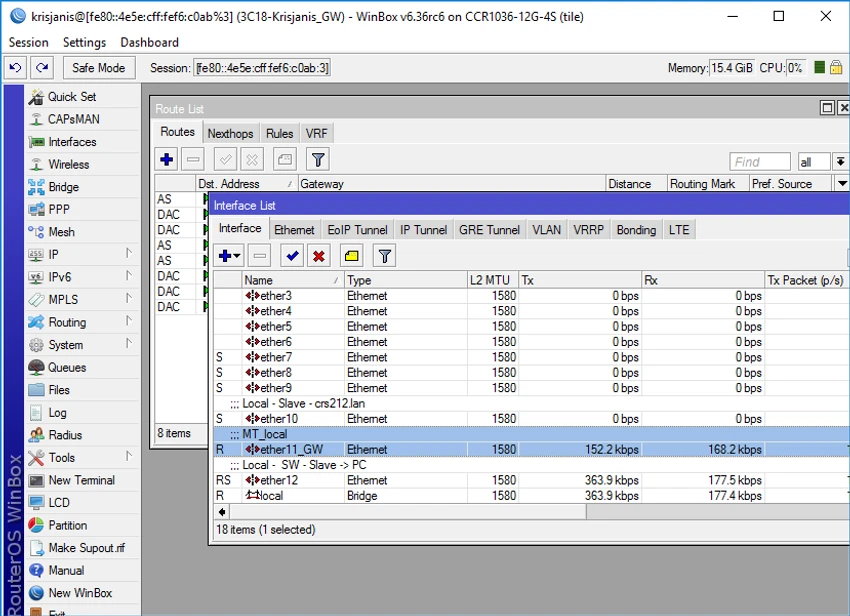

MikroTik Winbox is the official desktop application for configuring and managing MikroTik routers and devices running RouterOS. Designed to simplify network administration, it provides a graphical interface that makes it easier to access, configure, and monitor router settings without relying solely on command-line operations.
The software is an essential utility for anyone working with MikroTik hardware, offering quick access to RouterOS features through an organized interface. Whether configuring interfaces, managing routing settings, monitoring system performance, or maintaining network services, Winbox centralizes these tasks in a single application.
Keeping RouterOS up to date is also straightforward. Users can check for updates through the QuickSet interface or by navigating to System > Packages within Winbox or WebFig. This ensures devices receive the latest features, performance improvements, and security updates. Additionally, Winbox can be downloaded directly from a MikroTik router by accessing its local management address through a web browser.
Thanks to its responsive performance and comprehensive management capabilities, MikroTik Winbox remains one of the most widely used tools for administering MikroTik networking equipment in both home and professional environments.
Key Features of MikroTik Winbox
- Official graphical management tool for MikroTik RouterOS devices
- Configure and manage MikroTik routers through an intuitive interface
- Access a wide range of RouterOS settings and features
- Monitor and manage installed RouterOS packages
- Check for RouterOS software updates
- Upgrade RouterOS directly through the application
- Download Winbox directly from a MikroTik router
- Fast and responsive interface for network administration
Interface and Usability
After using MikroTik Winbox, I found the interface to be practical and focused on efficient router management. Navigation is straightforward, with settings grouped into logical categories that make it easy to locate configuration options without switching between multiple management tools.
The software responds quickly when connecting to RouterOS devices, and common administrative tasks such as checking installed packages or updating RouterOS are easily accessible from the System menu. While the large number of configuration options may seem overwhelming for first-time users, the graphical interface is considerably easier to work with than performing every task through a command line.
Who Should Use MikroTik Winbox?
- Network administrators managing MikroTik devices
- IT professionals configuring RouterOS networks
- Businesses using MikroTik routers
- Home users with MikroTik networking equipment
- Anyone who prefers a graphical interface over command-line configuration
Conclusion
MikroTik Winbox is a reliable and efficient management application for RouterOS devices. Its graphical interface simplifies network administration while still providing access to the extensive configuration options available in MikroTik routers. From routine maintenance and software updates to advanced network configuration, Winbox brings essential management tools together in a single application.


